Channels
Multi-channel deployment is supported by Druid and offers a wide range of digital channels in multiple languages so you can reach your customers wherever they like to be, in their natural digital way. With Druid conversational platform you will deliver the experience your customers and employees expect.
The Druid AI Platform enables authors and business users with no programming skills to create AI Agents which can be easily exposed in the preferred channel.
This topic provides you with an overview of the different channels integration across Druid deployments.
AI Channels
| Channel | Cloud | Hybrid | On premise |
|---|---|---|---|
| MS Copilot | Y | Y | Y |
Engagement & Support
| Channel | Cloud | Hybrid | On premise |
|---|---|---|---|
| Cuedesk | Y | Y | N |
| Druid Generic Chat | Y | Y | Y |
| Infobip | Y | Y | N |
| Sprinklr | Y | Y | N |
| Y | Y | N | |
| Workplace by Meta | Y | Y | Y |
Voice & Telephony
| Channel | Cloud | Hybrid | On premise |
|---|---|---|---|
| AudioCodes by VoiceAI Connect | Y | Y | Y |
| RCS by Vonage | Y | Y | N |
| RingCentral | Y | Y | Y |
| SMS by Twilio | Y | Y | N |
| SMS by Vonage | Y | Y | N |
| SMS by Sakari | Y | Y | N |
| Voice by Vonage | Y | Y | N |
| Voice to Text by Druid | Y | Y | Y |
Social Media & Chat
| Channel | Cloud | Hybrid | On premise |
|---|---|---|---|
| Facebook Messenger | Y** | Y** | Y** |
| GoogleChat | Y | Y | Y |
| Y | Y | Y | |
| Line | Y | Y | N |
| Y | Y | N | |
| MS Teams | Y | Y | N |
| Telegram | Y | Y | Y |
| Viber | Y | Y | Y* |
| Webex | Y | Y | Y |
| Y | Y | Y* | |
| WhatsApp by Meta | Y | Y | Y* |
| WhatsApp by Vonage | Y | Y | Y* |
*Only available if specific Druid services have open connection to the Internet.
**In Druid hybrid and cloud deployments Facebook channel uses the Microsoft Bot Framework, while in on premise deployments it uses direct Druid Facebook integration.
Web & Email
| Channel | Cloud | Hybrid | On premise |
|---|---|---|---|
| Direct line (WebChat) | Y | Y | Y |
| deprecated | deprecated | deprecated | |
| Outlook | Y | Y | N |
Other channels
| Channel | Cloud | Hybrid | On premise |
|---|---|---|---|
| Mobile Apps | Y | Y | Y |
Deactivate active channels
Once you activate a channel, you can deactivate it at any time, by following these steps:
- Log in the Druid Portal and from the main menu, select your AI Agent. The AI Agent configuration page appears by default on the Details tab.
- Click the Channels tab, then search for the channel you want to deactivate.
- Click on the Enabled toggle on the channel card to deactivate the channel.
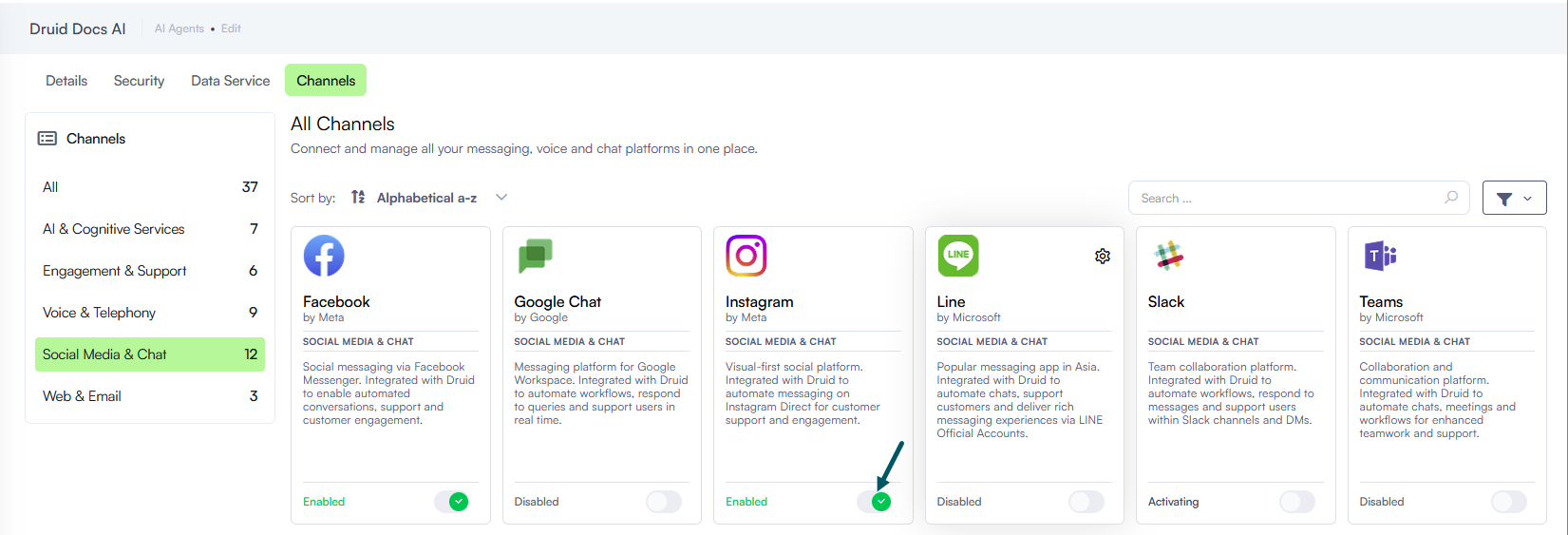
It might take up to a minute until the channel becomes inactive.
You can always re-activate an inactive channel by clicking the toggle again.