Transfer Calls
Druid SIP supports two methods for transferring active calls from the AI Agent to an external contact center or target IP address:
- Direct Routing to SIP Server / Telephony System (Bridge Transfer). Druid SIP routes the call directly to an external SIP server or telephony system using an outbound SIP INVITE, remaining in the call path as a bridge.
- Send Transfer Request to Voice Gateway (Blind Transfer). Druid SIP sends a SIP REFER request to the upstream Voice Gateway, instructing it to redirect the caller to the target SIP server and release Druid SIP from the call. This method supports passing custom User-to-User Information (UUI) headers.
Direct Routing to SIP Server / Telephony System (Bridge Transfer)
Use a Bridge Transfer when you need Druid SIP to establish a direct connection between the caller and an external SIP server or telephony system.
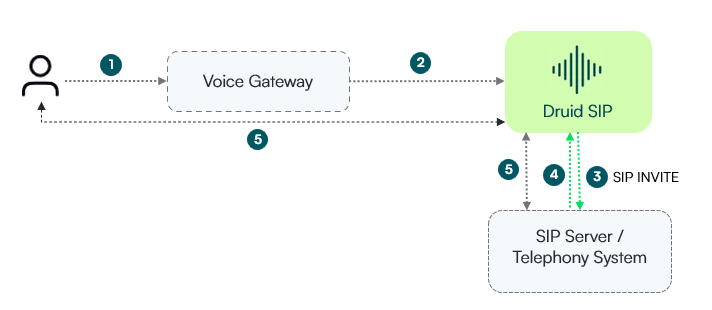
How it works
- Call connection. The caller initiates a call through the Voice Gateway to Druid SIP.
- AI Agent interaction. Druid SIP processes the call and handles conversational steps.
- Outbound transfer. When a transfer step triggers, Druid SIP sends an outbound SIP INVITE directly to the specified SIP Server / Telephony System.
- SIP session establishment.The targeted SIP Server / Telephony System responds, establishing a SIP session with Druid SIP.
- Bridged audio path. Druid SIP bridges the audio path so the caller communicates directly with the target telephony system.
- Automated controls paused. Because the caller is connected to the target system, Druid SIP automatically suppresses bot-level controls (such as text-to-speech cancellation, barge-in, no-input filler, and keypad/DTMF collection buffers).
isInput flag (true for caller, false for destination).Prerequisites
In a bridge call transfer, you must store specific properties in a Druid entity (such as [[VoiceParams]] or another entity). The target entity must contain the following specific property fields:
| Field Name | Type | Required | Description |
|---|---|---|---|
| targetUri | String | Yes | The destination SIP URI or IP address of the SIP Server or Telephony System (e.g., sip:10.0.0.1:5060). |
| targetProxy | String | No | Outbound SIP proxy or host used to route the call. |
| targetProtocol | String | No | Transport protocol for the outbound connection (UDP, TCP, or TLS). |
| targetUser | String | No | Username for SIP authentication on the outbound call, if required. |
| targetPass | String | No | Password for SIP authentication on the outbound call, if required. |
| targetMediaOption | String | No | Audio encryption level (negotiated, required, or none). Default is negotiated. |
| transferTimeoutSeconds | Integer | No | Time in seconds to wait for the target system to answer before timing out. |
Transfer call configuration
- Set the required field values on your entity (e.g., [[VoiceParams]]) in a step preceding via Code Extension or during the call transfer step via Set variables.
- On the desired flow, add a Backchannel event step.
- Set the Backchannel Step name to transfer.
- In the Input mapping field, specify the entity containing your transfer target parameters.
Blind Transfer via SIP REFER
Use a blind transfer when you want Druid SIP to send a transfer request to the upstream Voice Gateway and hand off the call. This approach allows passing custom context or metadata (such as customer IDs, intent, or session tokens) to the target telephony system using User-to-User Information (UUI) headers in compliance with IETF RFC 7433.
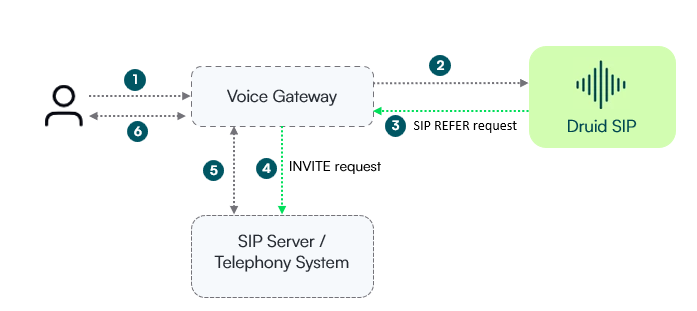
How It Works
- Call connection. The caller initiates a call through the Voice Gateway to Druid SIP.
- AI Agent interaction. Druid SIP processes the call and handles conversational steps.
- Call transfer. When a transfer step triggers, Druid SIP issues a SIP REFER request back to the Voice Gateway. The
Refer-Toheader contains the hex-encoded UUI metadata. - Gateway hand-off. The Voice Gateway takes over the transfer and sends an outbound SIP INVITE request (containing the UUI payload) directly to the target SIP Server / Telephony System.
- Session confirmation. The SIP Server / Telephony System accepts the call and establishes a session back to the Voice Gateway.
- Direct call connection. Audio is bridged between the caller and the SIP Server / Telephony System via the Voice Gateway, releasing Druid SIP from the active call path.
Prerequisites
To include UUI parameters in a call transfer, you must store them in a Druid entity (such as [[VoiceParams]] or another entity). The target entity must contain the following specific property fields you want to send:
| Field Name | Type | Required | Header Format | Description |
|---|---|---|---|---|
| uuiHeader | String | Yes | Body Payload (encoding=hex) | The core UUI data payload. Druid automatically converts it into Hex-encoded ASCII bytes. |
| uuiPurpose | String | No | purpose=<uuiPurpose value> | Identifies the UUI package (application rules and semantics) governing the payload. |
| uuiContent | String | No | content=<uuiContent value> |
Specifies the specific content format or layout of the UUI data within the package. |
Transfer call configuration
- Set the required field values on your entity (e.g., [[VoiceParams]]) in a step preceding via Code Extension or during the call transfer step via Set variables.
- On the desired flow, add a Backchannel event step.
- Set the Backchannel Step name to transfer.
- In the Input mapping field, enter the name of the entity containing your UUI parameters (e.g., [[VoiceParams]]).
- Save the step.
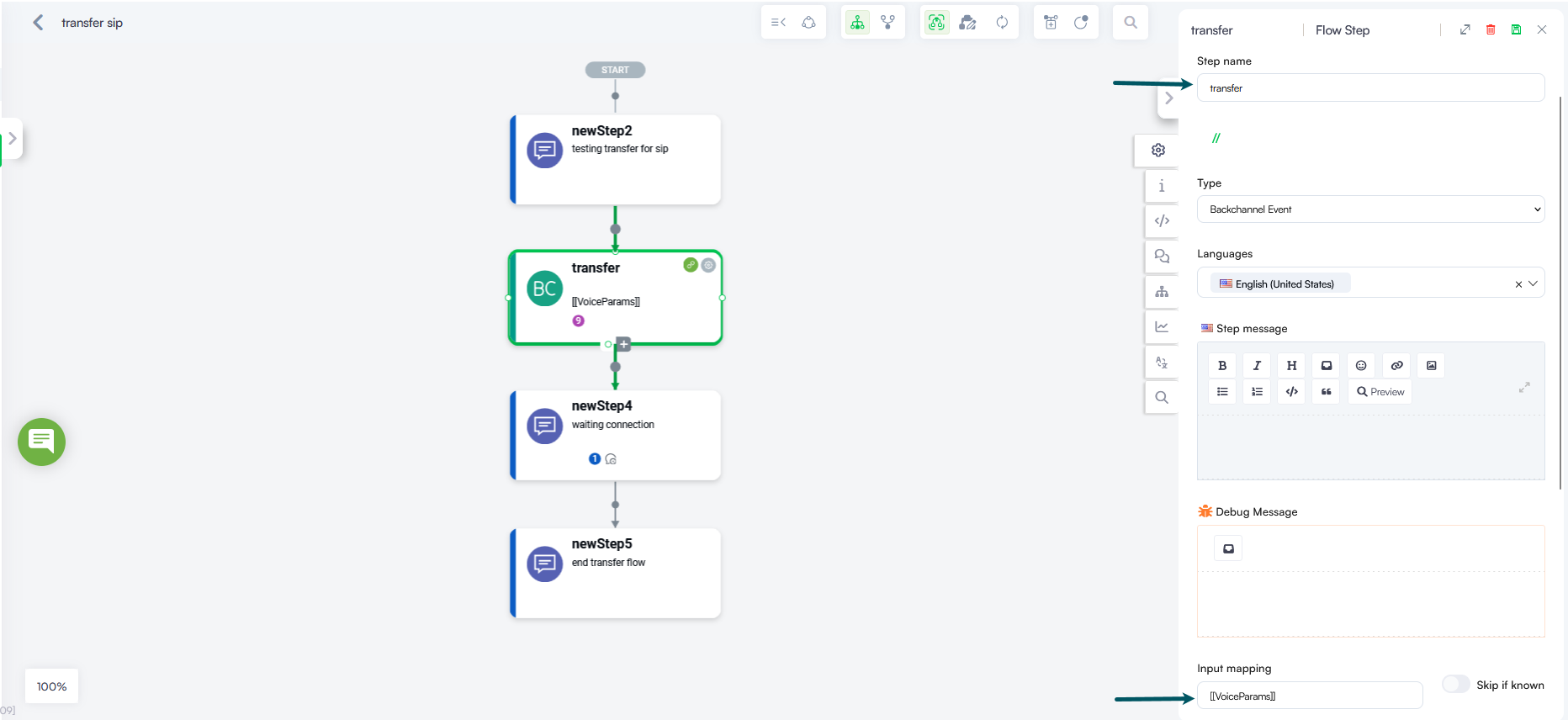
When the transfer triggers, Druid SIP automatically reads the mapped entity, encodes uuiHeader into Hex, appends uuiPurpose and uuiContent if present, and attaches the resulting UUI string to the Refer-To header of the SIP REFER request.
Generated SIP REFER Request
Druid SIP encodes the uuiHeader to its ASCII Hex equivalent and escapes the parameters inside the Refer-To header.
REFER sip:+15550100@192.168.1.50:5060 SIP/2.0
Via: SIP/2.0/UDP 192.168.1.50:5060;branch=z9hG4bK-7392-1-0
Max-Forwards: 70
From: "DRUID Voice" <sip:+15550100@sip.example.com>;tag=12345678
To: <sip:+15550199@sip.example.com>
Call-ID: 987654321@192.168.1.50
CSeq: 2 REFER
Refer-To: <sip:+15550199@sip.example.com?User-to-User=53616d706c6520555549205061796c6f6164%3Bencoding%3Dhex%3Bpurpose%3Dfoo%3Bcontent%3Disdn-uui>
Contact: <sip:+15550100@192.168.1.50:5060>
Downstream SIP INVITE Header
The receiving telephony server parses the parameters from the Refer-To URI and constructs the final User-to-User header in the outbound INVITE request sent to the target telephony system:
Example
INVITE sip:+15550199@sip.example.com;user=phone SIP/2.0
Via: SIP/2.0/UDP 192.168.1.50:5060;branch=z9hG4bK-7392-1-0
Max-Forwards: 70
From: "John Doe" <sip:+15550100@sip.example.com>;tag=12345678
To: <sip:+15550199@sip.example.com>
Call-ID: 987654321@192.168.1.50
CSeq: 1 INVITE
Contact: <sip:+15550100@192.168.1.50:5060>
User-to-User: 53616d706c6520555549205061796c6f6164;encoding=hex;purpose=foo;content=isdn-uui
Content-Type: application/sdp
Content-Length: 142