Internal Actions
Internal actions are built-in functions provided by Druid that you can use to extend the capabilities of your AI Agent flows. They support various operations, such as managing conversations, processing data, interacting with the Knowledge Base, and controlling Live Chat functionality.
You can configure Internal Actions in an Action step as either Pre-Actions or Post-Actions, just like connector actions.
This topic provides a reference to the internal actions available in the Druid Portal, including their functionality, supported parameters, and configuration examples.
Parameter syntax guidelines
When configuring internal actions, the syntax for specifying parameter values, variables, and entity fields depends on whether the action uses a JSON schema:
- Actions with a JSON schema. Enclose string values, variables, and entity fields in double quotation marks (") to ensure valid JSON syntax. Syntax: "string" / "List<string>" / "[[Entity]].EntityField" / "@Variable".
- Actions without a JSON schema. Specify values, variables, and entity fields without enclosing them in quotation marks. Syntax: string / List<string> / [[Entity]].EntityField / @Variable.
 AddUserRoles
This action assigns specific roles to the currently authenticated user in your AI Agent flow. You can provide roles in various formats, offering flexibility for different use cases:
- String or List of Strings: Directly list the role names you want to assign (e.g., ["admin", "editor"]).
- Dynamic Roles from Set Variables: Define roles dynamically using the Set Variables section and the Code Extension feature. This allows you to assign roles based on conditions or external data.
- Other String Type Expressions: Any expression that evaluates to a string containing a valid role name can be used.
Parameters
This internal action accepts as parameter the role names you want to assign. The format depends on the chosen input method:
- String: A single role name (e.g., "Helpdesk Agent").
- List of Strings: An array containing multiple role names (e.g., ["Employee","Manager"]).
- Dynamic roles specified in [[Role]].Name set in the Set Variables section. You can use any entity list that stores roles, an entity that references the [[Role]] system entity.


Example: Imagine you have a field named [[ChatUser]].AddRoles, which is an entity list referencing the system entity [[Role]]. You can dynamically assign roles based on user data using the Set Variables section.

BlockForLiveChat
This internal action prevents a user from being placed in the waiting queue. You should use this action in the Live Chat agent disconnected special flow. Use this action to manage user access effectively.
Syntax
{
    "BlockIntervalMinutes": <integer>,
    "BlockReason": "<string>",
    "SaveToChatActivityData": <boolean>
}
Parameters
| Parameter | Description | Default value |
|---|---|---|
| BlockIntervalMinutes | Specifies the duration, in minutes, for which the user will be blocked from Live Chat. | 1440 minutes (24 hours) |
| BlockReason | Provides a reason for blocking the user. This information is beneficial for Team Leaders but is not shared with the blocked user. | null |
| SaveToChatActivityData | Indicates whether to save the blocking action to the chat activity data. | false |
Example: This example would block the user for 60 minutes, log the reason "Abusive behavior," and record the block event in the chat activity data.
{
  "BlockIntervalMinutes": 60,
  "BlockReason": "Abusive behavior",
  "SaveToChatActivityData": true
}
For additional information on how to block or unblock chat users, see Block Chat Users.
CancelHelpdeskAgentBreakRequest
This internal action allows authors to provide helpdesk agents with the ability to cancel their break requests, enhancing agent flexibility and improve overall chat support efficiency.
The action is used in the CancelHelpdeskAgentBreakRequest flow, part of the Live Chat Advanced solution template available for download from the Solution Library.

If the agent has requested a break while having ongoing conversations and decides to cancel the break, the agent can do so by clicking the Cancel button.
CancelHelpdeskAgentLogOutRequest
This internal action allows authors to provide helpdesk agents with the ability to log out of Live Chat.
The action is utilized in the CancelHelpdeskAgentLogOutRequest flow, part of the Live Chat Advanced solution template available for download from the Solution Library.

If an agent clicks to log out while having ongoing conversations or when engaged in a conversation and automatic allocation is active, a log out request is initiated and the agent will be logged out after all live sessions have ended.
ChangeConversation
This internal action switches the current conversation to a new one by changing the ConversationId. Depending on the parameter value, the context can be retained (either partially or fully) or dropped entirely.
Example: If the internal action is implemented in the Cancel Conversation Flow and triggered from the Welcome flow, the new conversation will continuously revert to the same point, creating an endless loop.
When this internal action is canceled due to the aforementioned infinite loop scenario, it will be logged in the conversation history as follows: "[ChangeConversation invocation was canceled because it was triggered from a welcome flow, and that would generate infinite loops.]"
Parameters
The action supports an integer for context retention that can have one of the following values:
- 0: No context is saved, including authentication status. In this case, [[ChatUser]].IsAuthenticated becomes false.
- 1: No context is saved, except for the authentication status. [[ChatUser]].IsAuthenticated retains its previous value.
- 2: All context is kept, meaning the new conversation will have the previous context.
ChangeHelpdeskClientWaitingQueue
This internal action changes the queue that the helpdesk client is awaiting on to the one of the current agent.
The action is intended for internal use in integrations with Mediatel.
CloseActivity
This internal action closes an open activity. By default, an activity (indicated by [[ChatUser]].ActivityId) automatically closes after 1 hour of inactivity. Use this action to close an open activity before the 1-hour threshold.
No parameters are required.
ConnectAsHelpdeskAgent
The ConnectAsHelpdeskAgent internal action connects a user with the Helpdesk Agent role to the live chat agent queue, providing a list of helpdesk clients currently waiting. This action ensures proper routing and client assignment in a live chat environment.
This action applies to single Live Chat / route-to-human.
This action is crucial for effective agent-to-client assignment in live chat sessions.
Parameters
No parameters are required.
The internal action returns the list of clients waiting for helpdesk support in [[HelpdeskClientList]].
ConnectToHelpdeskAgent
This internal action places the user in the waiting queue for an agent and provides status updates regarding agent availability and working hours. This action is particularly useful for handling requests outside of standard working hours.
Scope: This action applies to Live Chat / route-to-human.
Key Details
- Queue placement: Adds the user to the agent waiting list.
- Working hours status: Sets [[HelpdeskClient]].IsOutsideWorkingHours to true if the request is outside working hours.
- Working hours information:
- Populates [[HelpdeskClient]].WorkingHoursBeginAt and [[HelpdeskClient]].WorkingHoursEndAt with the daily working hours.
- If agents are outside their schedule, the AI Agent can share working hours with the user for clarity.
Behavior with Multiple Time Slots
When multiple working slots exist in a day, the next available slot will be provided to the user.
If the day’s working hours are continuous, the full range will be shown.
Example: If working hours are 8:00–12:00 and 13:00–18:00, and a user attempts to connect at 19:00, the AI Agent will notify them of the day’s full working hours range (08:00 to 18:00), excluding the lunch break.
JSON Structure
{
    "QueueCode":"string"/[[<Entity>]].<QueueCodefield>/@queue_code,
    "PriorityLevel":"@priority",
    "AutomaticAllocation": true,
    "SendConversationTranscript": true,
    "ContactCenterParameters":{},
    "ForBotResponseValidation": false,
    "ResponseEntity":"[[Entity]].AgentResponse",
    "InfoToValidate": {
        "UserQuestion":"<[[Entity]].UserQuestion/@UserQuestion>",
        "BotResponse":"<[[Entity]].BotResponse/@BotResponse >",
        "MaxWaitTimeForAgentResponse": 30
    }
}
Parameters
| Parameter | Scope | Description | Default value |
|---|---|---|---|
| QueueCode | Live Chat |
|
|
| PriorityLevel | Live Chat | Places the client in the specified queue based on the client's priority stored in a local variable or entity field. | |
| AutomaticAllocation | Live Chat |
|
false |
| SendConversationTranscript | Live Chat | If set to "true", gets the conversation transcript and sends it to external contact centers. | false |
| ContactCenterParameters | Live Chat | Sends specific parameters to external contact centers. Review the specific help section to see the available contact center parameters that can be sent. | |
| ForBotResponseValidation |
LLM responses validation For more information on how to ensure your LLM-powered AI Agents provide accurate and reliable information, see Reviewing and Validating LLM Responses. |
Enables LLM response validation. | false |
| ResponseEntity | The entity that stores the agent-validated response. | ||
| UserQuestion | The entity that stores the user’s question. | ||
| BotResponse | The entity that stores the LLM response. | ||
| MaxWaitTimeForAgentResponse |
Sets the maximum time (in seconds) for a human agent to review the LLM response. NOTE: The job for MaxWaitTimeForAgentResponse runs every 15 seconds.
|
30 seconds |
ConnectToHelpdeskClient
This internal action connects the agent with the specified user.
This action automatically leverages existing contexts from the [[HelpdeskClient]] and [[ChatUser]] entities to initiate a live chat session.
ConnectToHelpdeskClientMultiChat
This internal action connects the agent to a specified user in a multichat setup.
This action automatically leverages existing contexts from the [[HelpdeskClient]] and [[ChatUser]] entities to initiate a live chat session.
No parameters are required.
On web channels (direct line) only!
You can also use this internal action to send a backchannel event — such as triggering a blink or opening a pop-up — along with the message "ConnectedToHelpdeskAgent", notifying the client application that the agent has connected successfully.
| Parameter | Description |
|---|---|
| EventName |
The name of the backchannel event, recognized by the client application. This parameter is mandatory. |
| PayloadEntity |
If specified, it sends the serialized Druid entity as part of the backchannel communication, similar to the backchannel flow step’s input mapping. This parameter is optional. Accepts values like "string", [[Entity]], or [[Entity]].EntityField, which resolve to an entity. |
Example: Defining a backchannel event with an optional payload entity:
EventNameis set to OpenChatPopup, triggering a pop-up in the client application.PayloadEntityis ChatSessionData, sending additional serialized entity data.
ConnectToPastConversation
The ConnectToPastConversation action allows agents to reconnect with users in past conversations across all supported channels, including WhatsApp, Facebook, Telegram, Viber, Google Chat, Instagram, Slack, and Twilio SMS, provided the following conditions are met:
- The user is not currently engaged in an active conversation with the AI Agent.
- The time since the last user interaction with the AI Agent is within the allowed limit for the specific channel. For instance, agents can reconnect to past live chat conversations within a 24-hour window from the last interaction, depending on channel restrictions.
For more information, see Multichat for Helpdesk Agents.
DeleteFacebookData
Anonymizes all personally identifiable information (PII) associated with the Facebook user who initiated a Facebook Data Deletion Callback request.
Using the unique Facebook user ID provided in the callback request, the action anonymizes personal data stored by Druid, including:
-
user names
-
Facebook profile information
-
conversation messages
-
chat logs
-
raw integration payloads
-
NLU engine responses
-
other metadata that may contain personal information.
The action affects only the Facebook user identified in the callback request. It executes as part of the Facebook Data Deletion Flow when Facebook notifies Druid that a user has requested data deletion or deleted their Facebook account.
The action does not perform scheduled or bulk deletion of Facebook users.
Parameters
This internal action does not require any parameters.
DetectLanguage
Determines the language of the intent provided in parameters block and returns the result in @DetectedLanguage.
DisconnectFromHelpdeskAgentsPool
This internal action disconnects the user from the agents queue. It applies to single Live Chat / route-to-human.
No parameters are required.
EndHelpdeskAgentBreak
This internal action ends a break for the current help desk agent.
No parameters are required.
The action is utilized in the EndHelpdeskAgentBreak flow, part of the Live Chat Advanced solution template available for download from the Solution Library.

While in break, a pop-up displays on screen with a break timer (showing the time consumed in break). If the agent clicks the I’m back button, the break ends and the agent becomes available again.
EndLiveConversation
This internal action ends an active live conversation and logs the chat activity in the system for accurate record-keeping.
No parameters are required.
ExtractEntities
This internal action identifies and extracts text related to non-deterministic entities, such as Boolean, Date, DateTime, Decimal, Email, Integer, Location, Organization, Percentage, and Person. This action utilizes the same ML service function as intent recognition, but unlike intent recognition, the extracted text does not depend on a specific training phrase pattern.
Use this action to detect and retrieve sensitive data from user input, such as personally identifiable information (PII) like addresses, emails, or names. Extracting these entities allows you to safeguard user privacy by either removing or anonymizing sensitive information from [[Intent]].Text before any further processing. This is especially important before transmitting data to external systems like ChatGPT or other external services.
FilterEntityList
This internal action allows you to filter an entity list based on specified conditions. You can apply multiple conditions to narrow down the list as needed, using accepted operators such as Equality, Inequality, LessThan, LessThanOrEqual, GreaterThan, and GreaterThanOrEqual.
Parameters
To filter the list, provide a JSON structure that specifies the entity list name and the conditions to apply. Each condition includes:
- Expression: The entity field to evaluate, given as "string/[[Entity]].Field".
- Operator: The operator to apply (e.g., GreaterThanOrEqual).
- ValueExpression: The value to compare against the entity field.
{
    "EntityListName": "EntityList",
    "Conditions": [
        {
            "Expression": "[[Entity]].Field",
            "Operator": "OperatorType",
            "ValueExpression": "value"
        },
        {
            "Expression": "[[Entity]].Field",
            "Operator": "OperatorType",
            "ValueExpression": "value"
        }
    ]
}
Example: Filter the EmployeeList to include only employees aged between 18 and 99
Example
{
    "EntityListName": "EmployeeList",
    "Conditions": [
        {
            "Expression": "[[Employee]].Age",
            "Operator": "GreaterThanOrEqual",
            "ValueExpression": "18"
        },
        {
            "Expression": "[[Employee]].Age",
            "Operator": "LessThanOrEqual",
            "ValueExpression": "99"
        }
    ]
}
This internal action generates a new 4-digit random authentication code and stores it in [[ChatUser]].AuthenticationCode.
No parameters are required.
Use this action for multi-factor authentication, allowing you to send a code as a second factor for chat user authentication.
GetAlertsInfo
This internal action loads the [[AlertInfo]] system entity, which is used in the "Alerts" presentation flow. This action retrieves and prepares alert information for display within the flow, ensuring the latest alerts are available for users.
GetConversationTranscript
This internal action saves the conversation transcript in [[ConversationInfo]].TranscriptJSON if [[ConversationInfo]].ExportType is 'json' or in [[ConversationInfo]].TranscriptTxt in all other cases. If no parameter is set, the conversation from current ActivityId will be saved as text, in [[ConversationInfo]].TranscriptTxt.
This action allows authors to save and send conversation transcripts to external systems through DRUID connectors (e.g., email, CRM). For setup information, refer to Sending the conversation transcript to external systems.
Parameters
JSON Structure
{
    "ActivityId":"[[ChatUser]]. ActivityId",
    "ConversationId":"[[ConversationInfo]].ConversationId",
    "StartDate":"YYYY-MM-DD",
    "EndDate":"YYYY-MM-DDThh:mm:ssTZD",
    "TimeoutMilliseconds":3000
    "ExportType":"Json",
    "IncludeAssistedConversation":false,
    "IncludeErrorMessages":false,
    "IncludeSystemMessages":false
}You can filter a conversation transcript by the following parameters:
| Parameter | Description |
|---|---|
| ActivityId | Get history for the specified ActivityId. You can also specify an ActivityId from a context entity other than [[ChatUser]], where you previously saved it. |
| ConversationId | Brings the entire history for the specified ConversationId. |
| StartDate / EndDate |
Brings the history within a specific period. You can use them with one of the parameters above. NOTE: Both Date (yyyy-mm-dd) and Date and Time (YYYY-MM-DDThh:mm:ssTZD) formats are accepted.
|
| TimeoutMilliseconds |
Brings the conversation history for the current ActivityId. It is particularly useful in case of infrastructure issues (e.g., when the Conversation History Database is full or there are network speed limitations, etc.). The default value is 3000ms. To get the conversation history from the Conversation History DB if infrastructure issues occur, we recommend increasing the parameter value. NOTE: You can increase the value to a maximum of 30 sec (30000 ms).
|
| ExportType |
Set the parameter to "Text" or "JSON" to choose the output format:
Copy
Conversation Transcript Example
Copy
Conversation Transcript - JSON Output Example |
| IncludeAssistedConversation |
Set this to true to merge and intercalate messages from both the main (client-side) conversation and the assistant conversation (between the agent and the assistant AI Agent) in the conversation transcript in chronological order. Messages from the assistant AI Agent are prefixed with "<-- (assist)" in the transcript text version. Copy
Conversation Transcript - Text Output Example
Copy
Conversation Transcript - JSON Output Example |
| IncludeErrorMessages |
Specifies whether error messages are included in the conversation transcript output. Setting this parameter value to true loads all messages originating from the exception flow. Default value: false. Info: This parameter is available starting with Druid 10.1.
|
| IncludeSystemMessages |
Specifies whether system messages are included in the conversation transcript output. Setting this parameter value to true delivers all system messages from the conversation, providing useful context for the Conversation Diagnostics Agent performing transcript analysis. Default value: false. Info: This parameter is available starting with Druid 10.1.
|
GetIntentMatching
This internal action retrieves the intent specified by [[Intent]].Text. It captures the intent communicated by the user in a conversation flow by matching the input text against existing intents and system commands, matching the AI Agent runtime experience.
When triggered, GetIntentMatching processes input text in two sequential stages:
-
Exact match check. The internal action first checks if the input text matches an exact intent utterance or user command (including commands starting with !).
-
ML prediction fallback. If no exact match is found during the initial check, it initiates a prediction request to Machine Learning (ML) services to evaluate and match the intent.
Parameters
JSON Structure
{
    "Model": "string",
    "LanguageCode": "string",
    "KBDataSourceId":"string",
    "KBDataSourceName":"string",
    "BotId":"string",
    "CorrelationId":"string",
    "IsChildIntent":"string",
    "ParentFlowId":"string",
    "UrlMetadataFilter":"string",
    "KBIncludeExcludedNodes":"string",
    "ScoreCalculator":"string"
}
| Parameter | Description |
|---|---|
| Model |
Specifies the prediction model. Options:
|
| LanguageCode |
Sets the prediction language. Use a hardcoded value (e.g., "en-US") or the user’s language ([[ChatUser]].Language). |
| KBDataSourceId |
Copy
Example |
| KBDataSourceName | The name of the KB data source to search against. Allows solution authors to target a specific data source by name rather than hardcoding IDs, ensuring consistency across environments where data source IDs may differ. |
| BotId |
Identifier for the specific AI Agent executing the prediction. |
| CorrelationId | Identifier to track interactions across multiple predictions. |
| IsChildIntent | Used when predicting sub-intents within a parent intent. |
| ParentFlowId | Specifies the parent flow’s ID, particularly for parent-child flow setups. |
| UrlMetadataFilter |
Filters KB articles based on specific terms or URL structures. Available in DRUID 7.5 and higher. Examples To search articles under a URL containing "useful-information":
Copy
To search articles from a specific file path:
Copy
To search articles under a parent URL containing a specific file name:
Copy
To search all articles under a parent URL containing a specific sub-folder and its subsequent pages:
Copy
|
| KBIncludeExcludedNodes | Includes excluded nodes in KB predictions when set. |
| ScoreCalculator |
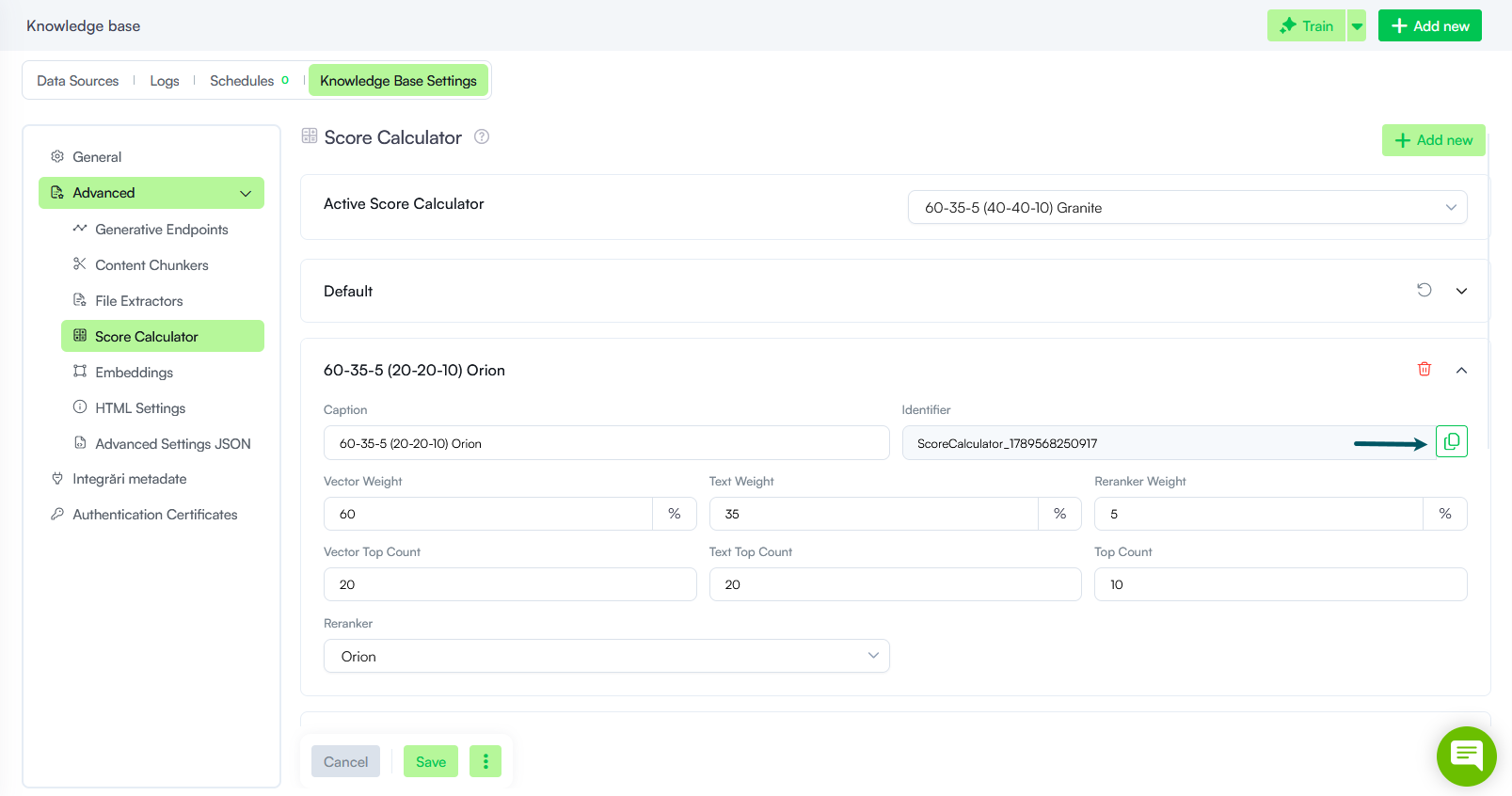
Specifies the score calculator strategy to use when predicting matches in the Knowledge Base at conversation time. In Knowledge Base Settings > Advanced > Score Calculator, copy the value from the Identifier field of the preferred score calculator strategy and provide it as a string in the internal action. If left empty (null), the default KB score calculator strategy is used.
Info: This parameter is available starting with Druid 10.1.
|

Unlike integrations that return an explicit response payload, this internal action does not return a response payload. It populates specific fields of the [[Intent]] system entity, depending on where the prediction is done:
-
Prediction via Intent / Conversational Flows. When prediction matches flows, the platform updates [[Intent]].OtherFlows and [[Intent]].Match, both referencing the [[MatchingFlow]] system entity. For more information about the properties stored in [[MatchingFlow]], see [[MatchingFlow]].
-
Prediction via the KB. When prediction is done against the Knowledge Base, the evaluation results populate [[Intent]].KBQnAItems, which references the [[KBQnA]] system entity. For more information about the properties stored in [[KBQnA]], see [[KBQnA]].
GetMegaBotIntentMatching
This internal action retrieves the intent specified by [[Intent]].Text considering the Druid Conductor feature. Use it to capture the exact intent communicated to the user in the chat and manually execute a prediction against the NLU/KB models of Druid Conductor and orchestrated AI Agents.
The sequence in which the system searches for a match depends on which flow triggers the internal action::
- Triggered from a Druid Conductor flow
- Conductor Models. The system first checks the NLU/KB models of the Druid Conductor.
- Orchestrated AI Agent Models. If no match is found, it then queries the models of all orchestrated AI Agents.
- Triggered from an orchestrated AI Agent flow: The prediction follows this sequence:
- Current AI Agent. The system first checks the NLU/KB models of the orchestrated AI Agent where the flow is currently running.
- Parent Druid Conductor. It then checks the NLU/KB models of the connected Druid Conductor.
- Peer AI Agent. Finally, it checks the models of all other orchestrated AI Agents managed by that same Druid Conductor.
Parameters
This internal action encompasses the same parameters as the internal action GetIntentMatching.
GetOnlineHelpdeskAgents
This internal action retrieves the list of currently available Helpdesk Agents and stores it in [[HelpdeskAgentList]]. It provides helpdesk managers with precise insights into agent availability by filtering for active status.
To ensure data accuracy, an agent is only included in this list if they meet all of the following conditions:
- Session Status. The agent is currently logged in and has not initiated a logout request.
- Connectivity. The agent is strictly online with an active socket connection (excluding broken sessions).
- Availability. The agent is currently outside of a break period and has not requested a break.
This list allows managers to monitor real-time capacity and manage specific queues based on agents who are truly ready to receive incoming tasks.
Parameters
By default, the action retrieves all online agents. To filter the results to agents from a specific queue, provide the queue code in one of the following formats: [[key]].queueCode or @.queueCode.
GetUnweightedSentiment
This internal action analyzes the unweighted sentiment of the specified intent and stores the sentiment score in the @UnweightedSentiment variable as a string decimal (e.g., "-0.3"). This allows for easy interpretation and further processing of the sentiment analysis results.
Parameters
| Parameter | Description |
|---|---|
| Intent |
Specify the intent for which the sentiment analysis will be conducted. |
GetWaitingHelpDeskClients
This internal action retrieves the list of clients currently waiting in the helpdesk queue and stores it in [[HelpdeskClientList]], providing a clear view of all clients waiting to be picked up by a helpdesk agent. This action is particularly useful when used within the ConnectToHelpdeskClientMultichat flow.
Parameters
By default, the action retrieves all clients in the waiting queue. To check the list of clients waiting in a specific queue, provide the queue code in one of the following formats: [[key]].queueCode or @.queueCode.
IsInRole
The IsInRole action checks whether the current user has any of the specified roles associated with their account. It returns the result as a string, either "true" or "false". This action allows you to control the flows based on user roles, enabling personalized experiences and permissions management.
Parameters
You can specify one or more roles to check against:
- Single role: ["User"]
- Multiple roles: ["Employee", "Manager"]
Usage
You can use the result of this action to set up conditions to perform subsequent steps by using one of the following expressions:
KBCheckUserPermissions
This internal action evaluates whether a specific user has the necessary access rights to view or interact with SharePoint content indexed in the Knowledge Base.
Behavior and Logic
The action utilizes a tiered verification system to ensure content security:
- Primary method: The action first attempts to verify permissions using the SharePoint REST API. This method requires the app registration to be granted the Sites.FullControl.All SharePoint permission.
- Fallback method: If the Sites.FullControl.All permission is missing, the action automatically falls back to the Microsoft Graph API.

Parameters
Syntax
{
  "KBQnAItems": "[[Intent]].KBQnAItems",
  "UserIdentifier": "[[ChatUser]].DomainUserName"
}
| Parameter | Description |
|---|---|
| KBQnAItems | The collection of Knowledge Base results returned by the intent. |
| UserIdentifier | The unique identifier for the user (typically the Domain User Name) used to verify access against the data source. |
The internal action returns the result in the field [[Intent]].KBQnAItems[i].HasReadAccess. You can use this boolean value to determine whether to share the information with the KB agent or to remove specific KB records from the agent context if the user lacks access. For more information on how to filter KB responses based on user permissions, see User Permission-based Content Filtering.
KBCreateDataSource
This internal action lets you create knowledge base (KB) data sources directly within your conversational flows. Use it to create KB data sources from files or SharePoint site libraries, enabling access to relevant information in your conversations.
Parameters
{
  "Name":"[[Entity]].Field",
  "Type":"string",
  "Language":"en-US",
  "SourceFile":"[[Entity]].FileProperty",
  "SharepointTenantId":"string",
  "SharepointClientId":“string",
  "SharepointClientSecret":"string",
  "Uri":"string”,
  "MinThreshold": "string",
  "TargetThreshold": "string",
  “StoreType”:”string”,
  “Host”:”string”,
  “UserName”:”string”,
  “Password”:”string”,
  “DisableCertificat”:”string”,
  “Port”:”string”,
  “CrawlIntegrationId”:”string”,
  “ExtractintegrationId”:”string”,
  “Icon”:”string”,
  “SourceType”:”string”
}
| Parameter | Data source type | Description |
|---|---|---|
| Name | File repository, SharePoint online, Shared drive | The new name of the data source (hardcoded, stored in a variable or entity field). This parameter is mandatory. |
| Type | File repository, SharePoint online, Shared drive |
The data source type. Use any of the following string values:
|
| Language | File repository, SharePoint online, Shared drive | The language of the data you upload. It must be one of the AI Agent languages. |
| SourceFile | File Repository | The entity field of type File that stores the data source file (Excel or PDF). |
| SharepointTenantId | SharePoint online | The Tenant Id you received from your MS Azure administrator. |
| SharepointClientId | SharePoint online | The Client Id you received from your MS Azure administrator. |
| SharepointClientSecret | SharePoint online | The Client Secret you received from your MS Azure administrator. |
| Uri | SharePoint online, Shared drive |
Provide the Uri based on the data source type and storage type, as follows:
|
| MinThreshold | File repository, SharePoint online, Shared drive | The minimum acceptable score for content extraction. |
| TargetThreshold | File repository,SharePoint online, Shared drive | The desired score threshold for content extraction. This threshold determines the level of confidence required for the extracted content to be considered relevant and accurate. |
| StoreType | Shared drive | The storage type: Local File, Local Share, FTP or SFTP. |
| Host | Shared drive (FTP/SFTP) |
The host name of the SFTP server. |
| UserName | Shared drive, SharePoint 2019 | The FTP/SFTP login ID for Shared drive data sources or the username for SharePoint on premises. |
| Password | Shared drive, SharePoint 2019 | The SFTP login password or the password for SharePoint on premises. |
| DisableCertificat | SharePoint online | Set to "true" to authenticate using a SharePoint client secret instead of a DRUID-generated certificate. |
| Port | Shared drive (FTP/SFTP) | The host name of the FTP/SFTP server. |
| SourceType | SharePoint | For SharePoint data sources, provide the data source type: Sharepoint online or Sharepoint 2019. |
The action returns the following data source information that you can use to match articles within that specific data source:
- [[KBOperation]].CreatedDataSource.Id
- [[KBOperation]].CreatedDataSource.Name
- [[KBOperation]].CreatedDataSource.CreatedOn
For more information, see KB Management at Conversation Time.
KBDeleteDataSource
This internal action allows you to delete a specific KB data source directly within your conversational flows.
Parameters
| Parameter | Description |
|---|---|
| DataSourceId | The Id of the data source (hardcoded, stored in a variable or entity field). This field is mandatory. |
KBEditDataSource
This internal action allows you to edit a specific KB data source directly within your conversational flows.
Parameters
JSON Structure
{
  "DataSourceId":"[[Entity]].Field",
  "SourceFile":"[[Entity]].FileProperty",
  "Name":"string",
  "Uri":"string",
  "SharepointTenantId":"string",
  "SharepointClientId":"string",
  "SharepointClientSecret":"string",
  "MinThreshold":"string",
  "TargetThreshold":"string",
  "StoreType":"string",
  "Host":"string",
  "UserName":"string",
  "Password":"string",
  "DisableCertificatValidation":"string",
  "Port""string"
}
| Parameter | Data source type | Description |
|---|---|---|
| DataSourceId | all | The Id of the data source (hardcoded, stored in a variable or entity field). This field is mandatory. |
| Name | all | The new name of the data source if want to update the name. |
| SourceFile | File Repository | The new data source file you want to upload, which is hardcoded or stored in a variable or entity field of type 'File'. |
| SharepointTenantId | SharePoint online | The new Tenant Id you received from your MS Azure administrator. |
| SharepointClientId | SharePoint online | The new Client Id you received from your MS Azure administrator. |
| SharepointClientSecret | SharePoint online | The new Client Secret you received from your MS Azure administrator. |
| Uri | SharePoint online, Shared drive |
The Uri based on the data source type and storage type, as follows:
|
| MinThreshold | File repository, SharePoint online, Shared drive | The minimum acceptable score for content extraction. |
| TargetThreshold | File repository,SharePoint online, Shared drive | The desired score threshold for content extraction. This threshold determines the level of confidence required for the extracted content to be considered relevant and accurate. |
| StoreType | Shared drive | The storage type: Local File, Local Share, FTP or SFTP. |
| Host | Shared drive (FTP/SFTP) |
The host name of the SFTP server. |
| UserName | Shared drive, SharePoint 2019 | The FTP/SFTP login ID for Shared drive data sources or the username for SharePoint on premises. |
| Password | Shared drive, SharePoint 2019 | The FTP/SFTP login password or the password for SharePoint on premises. |
| DisableCertificatValidation | SharePoint online | Set to "true" to authenticate using a SharePoint client secret instead of a DRUID-generated certificate. |
| Port | Shared drive (FTP/SFTP) | The host name of the FTP/SFTP server. |
Each data source type has unique settings you can adjust to keep your knowledge base (KB) data accurate and up-to-date. Here’s what you can edit for each data source type:
- For a data source of type File (Excel or PDF), you can:
- Edit the name
- Upload a new source file
- Update extraction thresholds
- For a data source of type SharePoint, you can:
- Edit SharePoint credentials (Tenant ID, Client ID, and Client Secret)
- Update extraction thresholds
- For a data source of type Shared Drive (FTP/SFTP), you can:
- Edit the host and port
- Update FTP/SFTP login credentials (ID and password)
- Update extraction thresholds
KBExtractDocumentContent
This internal action extracts the content of a document directly within your conversational flows and returns it as a collection of strings. It accepts a document from a [[File]] entity field and provides output in the following format:
- For unstructured documents: content is returned in [[KBOperation]].ExtractedDocument[i].Content.
- For structured documents: content is divided into [[KBOperation]].ExtractedDocument[i].Question and [[KBOperation]].ExtractedDocument[i].Answer.
Parameters
{
  "SourceFile":"[[Entity]].FileProperty",
  "DocumentType":"structured" //optional, default value = unstructured
}
| Parameter | Description |
|---|---|
| SourceFile |
The entity field of type [[File]] that stores the document to be processed. NOTE:
If the document exceeds 5 MB or the extracted content surpasses 1 MB, the internal action returns an error and does not proceed with the extraction. |
| DocumentType | Indicates if the document is structured or not. Default value is "unstructured". This parameter is optional. |
When extracting data from .eml, .msg and .oft files, the response JSON includes dedicated fields for email metadata, making the extracted data easier to process and use in business applications:
- To - The recipient email address(es).
- From - The sender email address.
- Subject - The email subject line.
- Date - The email timestamp (ISO 8601 format).
The full email content, including all metadata and the complete message body, is also saved in both the answer and content fields within the paragraphs array.
{
  "to": "recipient@example.com",
  "from": "sender@example.com",
  "subject": "Email subject line",
  "date": "2024-01-15T10:30:00Z",
  "paragraphs": [
    {
      "question": "string",
      "answer": "Complete email body content including To: recipient@example.com, From: sender@example.com, Subject: Email subject line, Date: 2024-01-15T10:30:00Z, and the full message body text",
      "content": "Complete email body content including To: recipient@example.com, From: sender@example.com, Subject: Email subject line, Date: 2024-01-15T10:30:00Z, and the full message body text"
    }
  ],
  "error": "string"
}
This structured response allows you to easily access specific email fields for filtering, sorting, or display purposes, while maintaining the complete email content for comprehensive processing.
KBExtractUrlContent
This internal action crawls a specified website directly within your conversational flows and extracts unstructured content as paragraphs. The extracted content is returned as a collection of strings in [[KBOperation]].ExtractedDocument[i].Question and [[KBOperation]].ExtractedDocument[i].Answer.
Parameters
| Parameter | Description |
|---|---|
| Url |
The URL of the website starting with 'https://'. E.g. https://druidai.com. |
| CrawlHttpRequests | Set to 'true' if the website is static HTML site; otherwise, set to 'false'. |
KBTrain
This KB-specific internal action trains the knowledge base directly from within your conversational flows after adding or updating a specific data source.
| Parameter | Description |
|---|---|
| DataSourceId | The Id of the data source that was added/updated (hardcoded, stored in a variable or entity field). This field is mandatory. |
LlmStreamer
This internal action delivers LLM responses token by token, reducing perceived latency and improving conversations. It streams tokens in real time from your configured LLM resource (Endpoint Type and Model Name) and makes them available for immediate playback.
LookupEntity
This internal action allows you to:
- Filter an indexed entity and return all similar records into an entity list.
- Perform extended Named Entity Recognition (NER) on entity candidates identified by the Flow Engine.
Parameters
JSON Structure
{
"Index": "entity_index",
"Value": "@variable | [[Intent]].Entities[0].Text",
"MinScoreThreshold": integer,
"MaxLimitForOutput": 25
}
| Parameter | Description |
|---|---|
| Index | The name of the entity index to search within. This defines the scope for finding similar records or candidates. |
| Value | The target value to match within the index. This can be a specific entity (e.g., @Location) or a dynamic reference, such as an entity extracted by the Flow Engine ([[Intent]].Entities[0].Text). |
| MinScoreThreshold | The minimum similarity score (in percentage) required to consider a match valid. Records with a score below this threshold will be excluded from the results. |
| MaxLimitForOutput |
The desired limit for the number of entities returned by the machine learning model (ML). By default, the value is set to 10. This parameter provides control over the number of entities the model outputs, allowing you to adjust the result size based on your needs. NOTE: This parameter is available in DRUID 8.13 and higher.
|
Basic Lookup Example
In this example, the action populates [[LocationList]] with records similar to @Location, using a similarity score threshold of 30%.
{
  "Index":"Location",
  "Value":"@Location",
  "MinScoreThreshold":30,
  "MaxLimitForOutput":20
}
Extended Lookup Example
This example applies extended NER to entity candidates found by the Flow Engine in the CourseTopic index, with a minimum similarity score threshold of 40%.
{
  "Index":"CourseTopic",
  "Value":"[[Intent]].Entities[0].Text",
  "MinScoreThreshold":40,
  "MaxLimitForOutput":20
}
Marks all previous alert messages as read, clearing any unread status for past alerts.
No parameters are required.
RemoveUserRoles
This action removes the specified roles from the current user.
Parameters
This internal action accepts as parameter the role names you want to remove. The format depends on the chosen input method:
- String: A single role name (e.g., "Helpdesk Agent").
- List of Strings: An array containing multiple role names (e.g., ["Employee","Manager"]).
- Dynamic roles specified in [[Role]].Name set in the Set Variables section. You can use any entity list that stores roles, an entity that references the [[Role]] system entity.
Example: Imagine you have a field named [[ChatUser]].RemoveFromRoles, which is an entity list referencing the system entity [[Role]]. You can dynamically assign roles based on user data using the Set Variables section.
RequestHelpdeskAgentBreak
This internal action requests a break for the current helpdesk agent once all active conversations are completed. No parameters are required.
RequestHelpdeskAgentLogOut
This internal action requests a logout for the current helpdesk agent once all active conversations have concluded. No parameters are required.
SaveAuthenticatedUser
This internal action sets [[ChatUser]].IsAuthenticated to true, indicating that the user is authenticated and can access flows that require authentication. No parameters are required.
SaveIdentifiedUser
This internal action to match an existing profile or provision a new user as an authenticated user in the Druid Portal. This action is designed for the Authentication Flow.
The action uses [[ChatUser]].MasterId and [[ChatUser]].DomainUserName to search the DRUID Users database for a matching user profile. If it finds a match, it replaces the current anonymous user profile with the identified user’s profile. If it doesn’t find a match, it provisions a new user profile.
The table below lists the [[ChatUser]] attributes expected as input by the SaveIdentifiedUser action. In the Set Variables section of the step where you call the internal action, provide the [[ChatUser]] attributes listed in the table below.
| [[ChatUser]] Fields | Description | Mandatory |
|---|---|---|
| MasterId | Holds the business unique key for the user. It is the Badge for an HR AI Agent, the Client Id or VAT No or CNP for a Customer Support AI Agent. | Yes |
| DomainUserName | Used in AI Agents for employees, like the HR AI Agent or the Help Desk AI Agent. It is used in Active Directory integrated AI Agents (intranet web page) or MS teams AI Agents. | Only if you integrate with AD or other user management systems. |
|
The Email should be unique across users on your tenant. |
Yes | |
| FirstName | The user's first name. | Yes |
| LastName | The user's last name. | Yes |
| RestoreExistingConversation |
When set to true, if the user has a previous authenticated conversation, the system loads the last conversation ID instead of generating a new one. In scenarios where multiple users access the AI Agent from the same browser or a shared office computer, setting this parameter to true ensures that the specific user session context is maintained accurately upon login. |
No |
The system applies the following criteria for matching the user profile:
- Searches for MasterId. If found, it verifies the DomainUserName. If they match, it links the profile.
- If MasterId exists but DomainUserName does not match, it updates DomainUserName and other profile details (FirstName, LastName, Email, DomainUserName).
- If MasterId is not found, it creates a new user profile.
Parameters
JSON Structure
{
    "UpdateProfile": true,
    "MatchBy": "Email/MasterId",
    "RestoreExistingConversation": true
}|
Parameter |
Description |
|---|---|
| UpdateProfile | Defaults to true. When true, the action updates the profile if found in the database. |
| MatchBy |
The [[ChatUser]] attribute used to identify the user in the database ("Email" or "MasterId"). If UpdateProfile is true and required ChatUser fields are empty, the action returns the error "Cannot update or provision user with MasterId/Email.. null." Use MatchBy independently of UpdateProfile to only identify or provision by the specified attribute. |
Example: Identify the user by Email and update/provision the user profile
In this example, the following [[ChatUser]] fields are mandatory: FirstName, LastName and MasterId.
{
    "UpdateProfile": true,
    "MatchBy": "Email",
    "RestoreExistingConversation": true
}Example: Identify the user by MasterId and update/provision user profile
In this example, the following [[ChatUser]] fields are mandatory: FirstName, LastName and Email.
{
    "UpdateProfile": true,
    "MatchBy": "MasterId",
    "RestoreExistingConversation": true
}Error codes
The following error codes may occur in [[SystemError]].Code:
| Error | Description |
|---|---|
| Cannot update or provision user with MasterId/Email.. null. | Occurs if UpdateProfile is set to "true" and required [[ChatUser]] fields are empty. |
| MasterIdExists |
Occurs when attempting to update the user’s MasterId, but it is already assigned to another user.
|
| EmailExists | Occurs when attempting to update the user’s email, but it is already assigned to another user. |
SaveNotAuthenticatedUser
This internal action sets [[ChatUser]].IsAuthenticated to false, marking the user as unauthenticated. The user will no longer have access to flows that require authentication. No parameters are required.
SignInHelpDeskAgent
This internal action signs in the current user as a helpdesk agent, enabling them to join live chat sessions and take over customer inquiries from the available agent pool. No parameters are required.
The action applies to Multi-chat (route-to-human).
StartHelpdeskAgentBreak
This internal action starts a break for the current help desk agent. No parameters are required.
This action applies to Multi-chat (route-to-human).
SwitchIntent
This internal action searches for an intent that matches the user's request and immediately switches to it if a match is found. Introduced for Agent Mandate, this action streamlines the authoring experience by eliminating the need to use actions like GetIntentMatching or GetMegaBotIntentMatching and subsequently configuring conditional logic to trigger specific flows based on the matched intent.
Parameters
JSON Structure
{
  "Model": "string",
  "LanguageCode": "string",
  "KBDataSourceId": "string",
  "KBDataSourceName": "string",
  "BotId": "string",
  "CorrelationId": "string",
  "IsChildIntent": "string",
  "ParentFlowId": "string",
  "UrlMetadataFilter": "string",
  "KBIncludeExcludedNodes": "string",
  "ScoreCalculator": "string"
}
| Parameter | Description |
|---|---|
| Model |
Specifies the prediction model. Options:
|
| LanguageCode |
Sets the prediction language. Use a hardcoded value (e.g., "en-US") or the user’s language ([[ChatUser]].Language). |
| KBDataSourceId |
|
| KBDataSourceName | The name of the KB data source to search against. Allows solution authors to target a specific data source by name rather than hardcoding IDs, ensuring consistency across environments where data source IDs may differ. |
| BotId |
Identifier for the specific AI Agent executing the prediction. |
| CorrelationId | Identifier to track interactions across multiple predictions. |
| IsChildIntent | Used when predicting sub-intents within a parent intent. |
| ParentFlowId | Specifies the parent flow’s ID, particularly for parent-child flow setups. |
| UrlMetadataFilter |
Filters KB articles based on specific terms or URL structures. Examples To search articles under a URL containing "useful-information":
Copy
To search articles from a specific file path:
Copy
To search articles under a parent URL containing a specific file name:
Copy
To search all articles under a parent URL containing a specific sub-folder and its subsequent pages:
Copy
|
| KBIncludeExcludedNodes | Includes excluded nodes in KB predictions when set. |
| ScoreCalculator |
Specifies the score calculator strategy to use when predicting matches in the Knowledge Base at conversation time. In Knowledge Base Settings > Advanced > Score Calculator, copy the value from the Identifier field of the preferred score calculator strategy and provide it as a string in the internal action. If left empty (null), the default KB score calculator strategy is used.
|
TakeHelpdeskAgentOffline
This internal action takes the specified helpdesk agents offline based on the specified parameter.
The action applies to Multi-chat (route-to-human).
Parameters
| Parameter | Description |
|---|---|
| No parameter | Takes offline the agent found in the [[HelpdeskAgent]] entity. |
| Queue code | Takes offline agents in the specified queue. You can provide the queue code in one of these formats: [[Entity]].QueueCode, @queueCode, or "<queueCode>". |
| List of agents | Takes offline a specific list of agents. You can provide the list in one of the following formats: [[HelpdeskAgentList]], or [[<entity>]].<ListOfAgents>. |
TakeHelpdeskClientOffTheQueue
This internal action takes the current user off the helpdesk waiting queue. No parameters are required.
The action applies to Live chat / route-to-human.
TransferHelpdeskCall
This internal action transfers the client to another queue or helpdesk agent. Use either the code of a live chat queue, or the AgentId of an agent, to transfer the call to a specific agent (e.g., [[HelpdeskAgent]].AgentId).
Parameters
JSON Structure
{
    "QueueCode":"string"/[[<Entity>]].<QueueCodefield>/@queue_code,
    "PriorityLevel":"@priority",
    "AutomaticAllocation": boolean,
    "DisplayConnectButton": boolean,
    "SendConversationTranscript": boolean,
    "ContactCenterParameters":{}
}
| Parameter | Scope | Description | Default value |
|---|---|---|---|
| QueueCode | Live Chat |
|
|
| PriorityLevel | Live Chat |
You can allow chat users to set the priority of their live chat conversation. Store the selected priority in a local variable or entity field, then use it to place the user in the appropriate queue. This priority can also be applied when transferring the user to a different queue. |
|
| AutomaticAllocation | Live Chat |
|
false |
| DisplayConnectButton | Live Chat |
When a client is transferred to another agent or queue, they are moved to the end of the new queue. When set to true, the Connect button will appear next to the transferred client, signaling their priority status due to prior waiting time in another queue. Agents can connect to connect to transferred clients regardless their position in the queue. |
false |
| SendConversationTranscript | Live Chat | If set to "true", gets the conversation transcript and sends it to external contact centers. | false |
| ContactCenterParameters | Live Chat | Send specific parameters to external contact centers. Review the specific help section to see the available contact center parameters that can be sent. |
Example: In this example:
- The call will be transferred to the queue "Support".
- The priority level for the call is defined by the variable @priority.
- The system automatically assigns the call to the next available agent.
{
    "queueCode":"Support",
    "PriorityLevel":"@priority",
    "AutomaticAllocation" : true
}This internal action performs machine translation using eTranslation. It translates literal text or text from a specified source DRUID entity field into a different language, which can be entirely unrelated to the current chat conversation language. The translated output is stored in a specified destination entity field.
Parameters
JSON Structure
{
                        "TranslationInput": "Text to translate or [[Source]].Field",
                        "TranslationOutput": "[[Destination]].Field for translated text",
                        "SourceLanguage": "en",
                        "DestinationLanguage": "de",
                        "Provider": "ETranslation"
                    }
| Parameter | Description |
|---|---|
| TranslationInput |
The text to translate. You can specify the text directly or reference a field from an existing entity using the format [[EntityName]].FieldName. |
| TranslationOutput | The destination entity field where the translated text will be stored, specified as [[EntityName]].FieldName. |
| SourceLanguage | The language code of the input text (for example, en for English). |
| DestinationLanguage | The language code of the translated text (for example, de for German). |
| Provider | The translation provider to use. Currently supports only eTranslation. |
- The translated text and related metadata (source and destination languages) are logged in the Conversation History.
- The selected source and destination languages are independent of the conversation language used by the chat user.
UpdateIntentMatching
The UpdateIntentMatching internal action refines intent matching outcomes by incorporating post-processing resolutions. The KB Response Flow primarily uses this action to enhance intent detection, particularly when a Large Language Model (LLM) provides the final answer and might have a different interpretation of the initial intent match.
This action ensures that the Evaluation Tool accurately logs LLM-generated responses, including those initially categorized as ‘Intent Not Found’.
By using UpdateIntentMatching, authors can override the Flow Engine's default scoring and precisely record whether a relevant intent was ultimately found.
Key Benefits
- Facilitates manual corrections and feedback loops to refine intent recognition.
- Reduces false negatives by correctly recording when a response is provided, even after an initial "intent not found".
- Optimizes the handling of GPT-generated responses, particularly in "Intent Not Found" scenarios.
- Facilitates Knowledge Base refinement. Logs the source of KB articles, aiding in the evaluation and improvement of KB content.
When and how to use UpdateIntentMatching
Implement this internal action to handle key scenarios where the initial intent matching needs correction. Add UpdateIntentMatching as a Post Internal Action. The parameters you set depend on the situation.
- Potentially relevant matches found but not used by LLM. When the KB Engine retrieves articles that the LLM considers irrelevant, use UpdateIntentMatching to log these KB articles in the Evaluation Tool. This allows for subsequent manual review and correction, and it records the source AI Agent (if the predict is done from a Druid Conductor) and article for better tracking. You can use the provided JSON structure, populating the KBQ* and KBBot* fields with information from the [[Intent]] context.
- False negative scenario. Implement this internal action within your ‘Intent not found’ flow that uses LLM. If the Flow Engine executes the ‘Intent not found’ flow (due to an initial lack of intent matches), but the LLM within that flow successfully generates an answer, the final output will be a positive match (an intent is found because the LLM addressed the user's intent). However, by default, the response is logged as 'not found' in the Evaluation Tool. To correct this false negative misclassification, use the UpdateIntentMatching internal action to log the triggered flow's information in the Evaluation Tool. This information is accessible via [[Intent]].Match. Additionally, set the MatchFound to true.
{
                            "MatchFound": false,
                            "FlowId": "00000000-0000-0000-0000-000000000000",
                            "FlowScore": 0,
                            "KBQ1Id": "[[Intent]].KBQ1.Id",
                            "KBQ1Name": "[[Intent]].KBQ1.Name",
                            "KBQ1Score": "[[Intent]].KBQ1.Score",
                            "KBBot1Id": "[[Intent]].KBQ1.BotId",
                            "KBBot1Name": "[[Intent]].KBQ1.BotName",
                            "KBQ2Id": "[[Intent]].KBQ2.Id",
                            "KBQ2Name": "[[Intent]].KBQ2.Name",
                            "KBQ2Score": "[[Intent]].KBQ2.Score",
                            "KBBot2Id": "[[Intent]].KBQ2.BotId",
                            "KBBot2Name": "[[Intent]].KBQ2.BotName",
                            "KBQ3Id": "[[Intent]].KBQ3.Id",
                            "KBQ3Name": "[[Intent]].KBQ3.Name",
                            "KBQ3Score": "[[Intent]].KBQ3.Score",
                            "KBBot3Id": "[[Intent]].KBQ3.BotId",
                            "KBBot3Name": "[[Intent]].KBQ3.BotName",
{
                                "MatchFound": true,
                                "FlowId": "[[Intent]].Match.Id",
                                "FlowName": "Match.Name",
                                "FlowScore": null,
                                "FlowBotId": "[[Intent]].Match.BotId"
                                }
By using UpdateIntentMatching, authors gain greater control over the Flow Engine's behavior, leading to a continuously improving conversational experience.
Related Topics