ServiceNow
This topic explains how to configure a DRUID REST app and integration tasks for ServiceNow integration. It covers authentication and supported API operations (GET, POST, PATCH).
Authentication with OAuth Credentials
To authenticate with ServiceNow, you'll need the following information:
- Base URL: The URL of your ServiceNow instance.
- Client ID: From your ServiceNow OAuth configuration.
- Client Secret: From your ServiceNow OAuth configuration.
- Username: A service account user.
- Password: Password for the service account.
- Grant Type: password
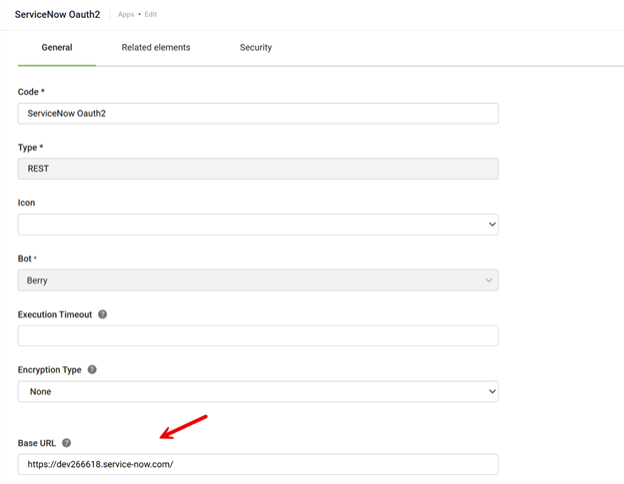
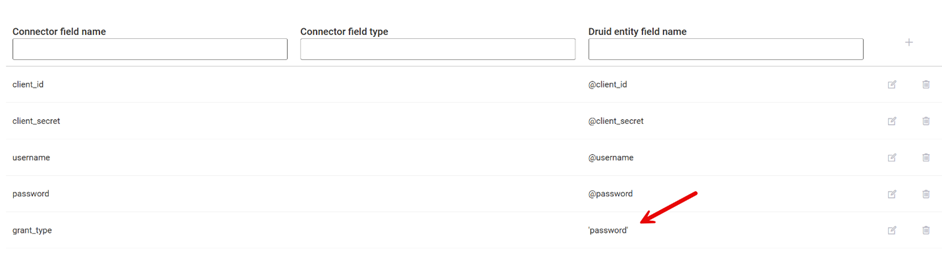
Generate OAuth Credentials
To obtain the Client ID and Client Secret:
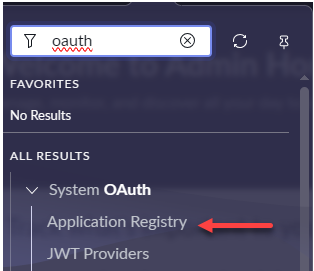
- In your ServiceNow instance, go to System OAuth > Application Registry.
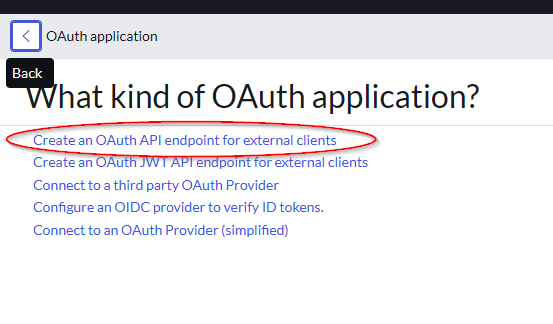
- Register a new OAuth application.
- Read
- Create
- Update
- Delete incidents
- Save the generated credentials.
Use a dedicated service account for DRUID integration. Assign it permissions to:
See ServiceNow documentation for detailed instructions.
The following sections provide the required endpoints and parameters for various ServiceNow REST API operations.
Create an Incident
Request body
{
  "caller_id": "",
  "category": "{{category}}",
  "short_description": "{{short_description}}",
  "opened_by": "6816f79cc0a8016401c5a33be04be441",
  "comments": "{{comments}}",
  "cause": "{{email}}",
  "active": "true"
}
Get Incident Information
API Resource URL
GET: {{BaseUrl}}/api/now/table/incident?sys_class_name={sys_class_name}&sysparam_view={sysparam_view}&sysparam_limit={sysparam_limit}&number={number}&sysparm_display_value=trueGet Incidents by User
API Resource URL
GET: {{BaseUrl}}/api/now/table/incident?sys_class_name={sys_class_name}&sysparam_view={sysparam_view}&sysparam_limit={sysparam_limit}&sysparm_display_value=trueUpdate an Incident
Request body
{
  "description": "test",
  "close_code": "Resolved by caller",
  "close_notes": "Closed"
}