Data Anonymization Agentic Solution
Data Anonymization Agentic Solution is a fully agentic business application built entirely on DRUID technology. Powered by DRUID LLM Becus 1.0, this solution anonymizes sensitive user information before sending any requests to external LLM providers. By ensuring that Personally Identifiable Information (PII) is replaced with placeholders, it gives you full control over data privacy and security.
This DRUID-native solution showcases our in-house capability to protect user data while still enabling advanced conversational experiences with other LLMs, without relying on third-party anonymization services.
Key Components
This solution includes:
- A CustomCode Orchestrator that detects and anonymizes PII.
- An example agent that demonstrates how anonymization is applied in practice.
- A feature switch (DataAnonymization) that controls whether anonymization is active.
- A first-welcome-flow which must be used as the initial welcome message, since it handles the provisioning step.
Business Workflow
- User Interaction – The assistant engages with users in a natural conversation.
- PII Detection & Anonymization – If enabled, Becus 1.0 identifies and replaces PII (such as names, emails, phone numbers, addresses, IDs) with placeholders in the main LLM context.
- Retry Mechanism – To ensure robustness, the integration includes a retry mechanism during PII anonymization and external LLM processing. At each iteration, the system verifies that the LLM returns consistent results — including identical arguments, agent names, and the presence of all required values. If any mismatch or missing data is detected, the request is retried automatically until a valid response is confirmed, minimizing errors and ensuring reliable data handling.
- Dictionary Storage – All mappings between placeholders and real values are stored in a central dictionary (PiiMappingsJSON).
- External Processing – The anonymized content (with placeholders such as [USER_NAME_1]) is then sent to GPT-4o mini or other providers, ensuring no sensitive user data leaves your tenant.
- De-anonymization – Before sending responses back to the user, placeholders are replaced with their original values by an auto-lookup process in the dictionary.
- Conversation History – Only anonymized content is stored in the GPT entity, while responses shown to users are fully restored.
Human Agent Workflow
- Agents can review conversations without exposure to sensitive PII.
- Each new agent should have an associated entity list (naming convention is Messages>AgentName>Agent) inside the GPT entity. This ensures modularity and proper context management across agents.
- When a user returns to continue a conversation, the assistant will still have access to the right context for that specific agent.
- Responses are de-anonymized before being sent to end-users.
Prerequisites
- Tenant Druid community (open new tenant here) or Druid subscription.
- You should have a AI Agent. For information on how to create an AI Agent, see Creating AI Agents.
- API resources enabled for DRUID WebView and DRUID Data Service.
- DRUID LLM API resources must be activated for DRUID Becus 1.0 and gpt-4o-mini. Contact your DRUID sales representative to enable these resources and generate an API token.
Configuring the Skill Template
Step 1. Install the solution from the Solutions Library
Go to the Solutions Library, search for solution "Data Anonymization Agentic Solution", and import it.
Wait until the import status shows as “Success”.
Step 2. Configure app connections
Go to Administration > Druid Services and check if you have the Druid Service Gateway resources provisioned for DRUID Becus 1.0 and gpt-4o-mini. If they are not provisioned, contact a Druid Admin to generate those resources.
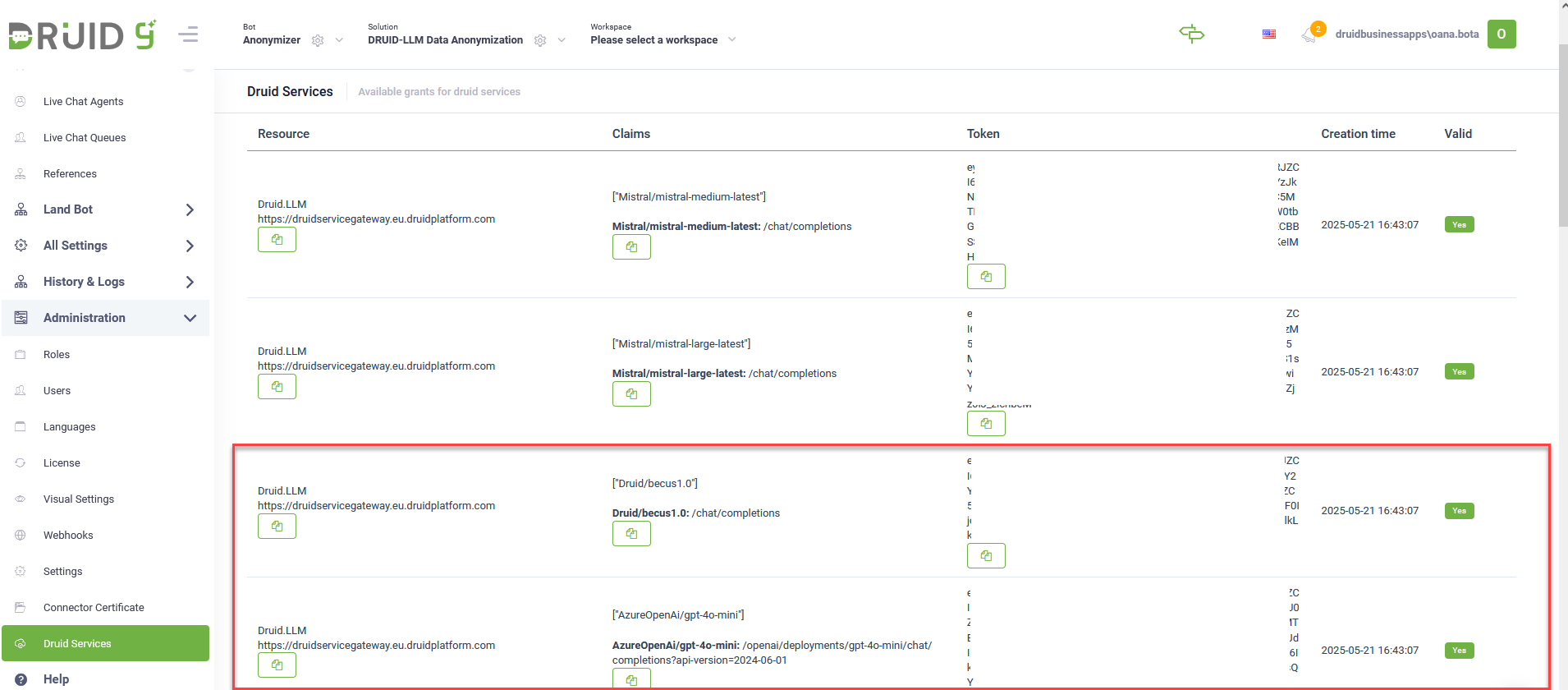
If Druid Service Gateway resources are provisioned, go to Solution Contents > Apps. The provided connections are already configured since they use the credentials already provisioned on the tenant.
| App | Description | Provisioning |
|---|---|---|
| Druid-SLM_Becus 1.0 | Used for anonymizing user data before external processing. | Provisioned by DRUID. |
| GPT-4o Mini | Used for processing anonymized user content. | Provisioned by DRUID. |
You can also change these connections and add your own LLM resources.
Click Publish to make the apps available.
Step 3. Set the AI Agent special flows
Go to the AI Agent details page and click on Dialogue management. Select the welcome-flow as the assistant’s welcome message.
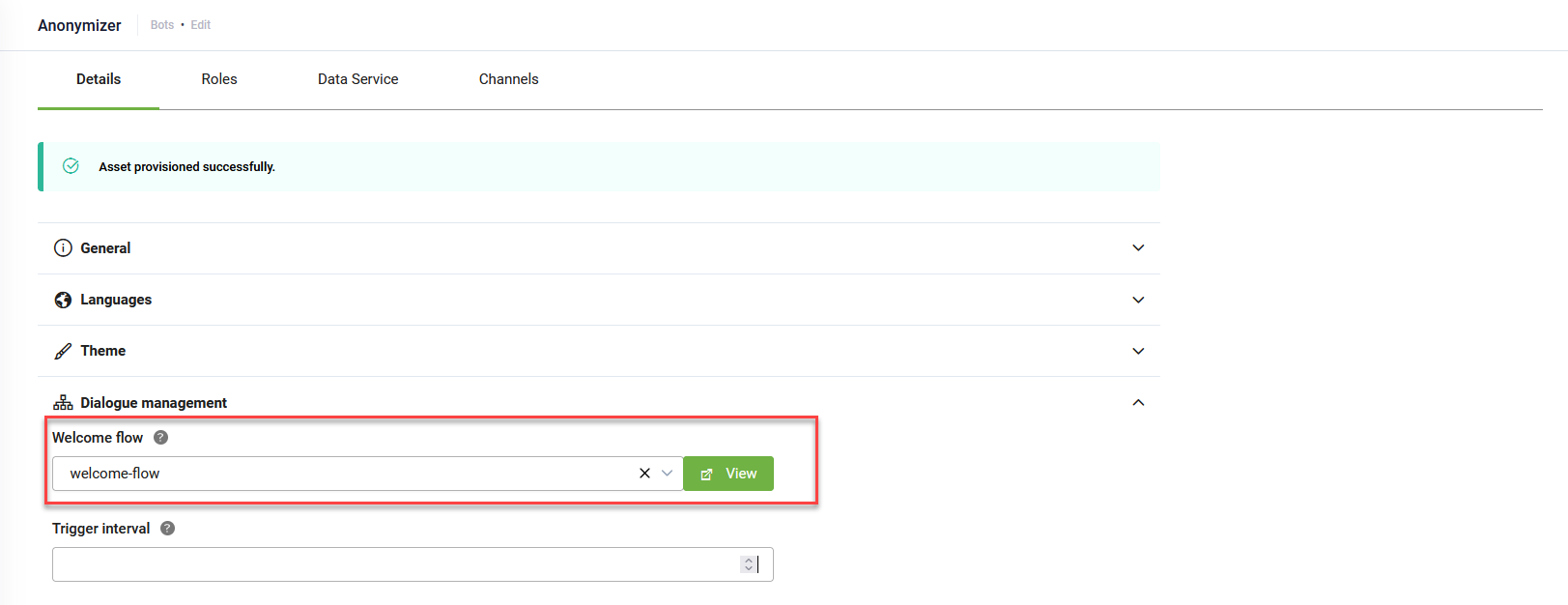
When a new chat starts, this flow will automatically trigger the provisioning workflow. This step ensures all demo data for anonymization are initialized.
Step 4. Enable the anonymization feature
The anonymization feature is disabled by default. To enable it, follow these steps:
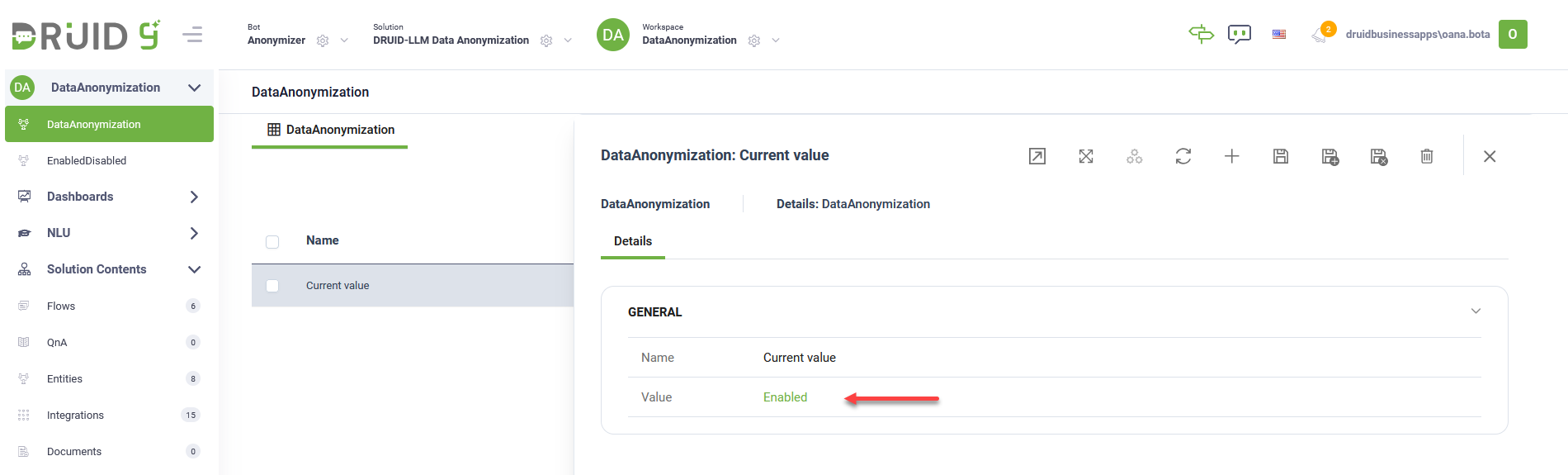
- From the Workspace menu, select DataAnonymization.
- In the Data Anonymization view, click on the Current Value record. The Current Value form opens.
- From the Value field, select Enabled.
- Click the Save & close icon at the top-right corner of the page top save and exit the form.
Step 5. Configure NLU Intents Classification with LLM
To ensure flows are recognized correctly, anonymization works through NLP powered by Becus.
To configure NLU intents classification with LLM, follow these steps:
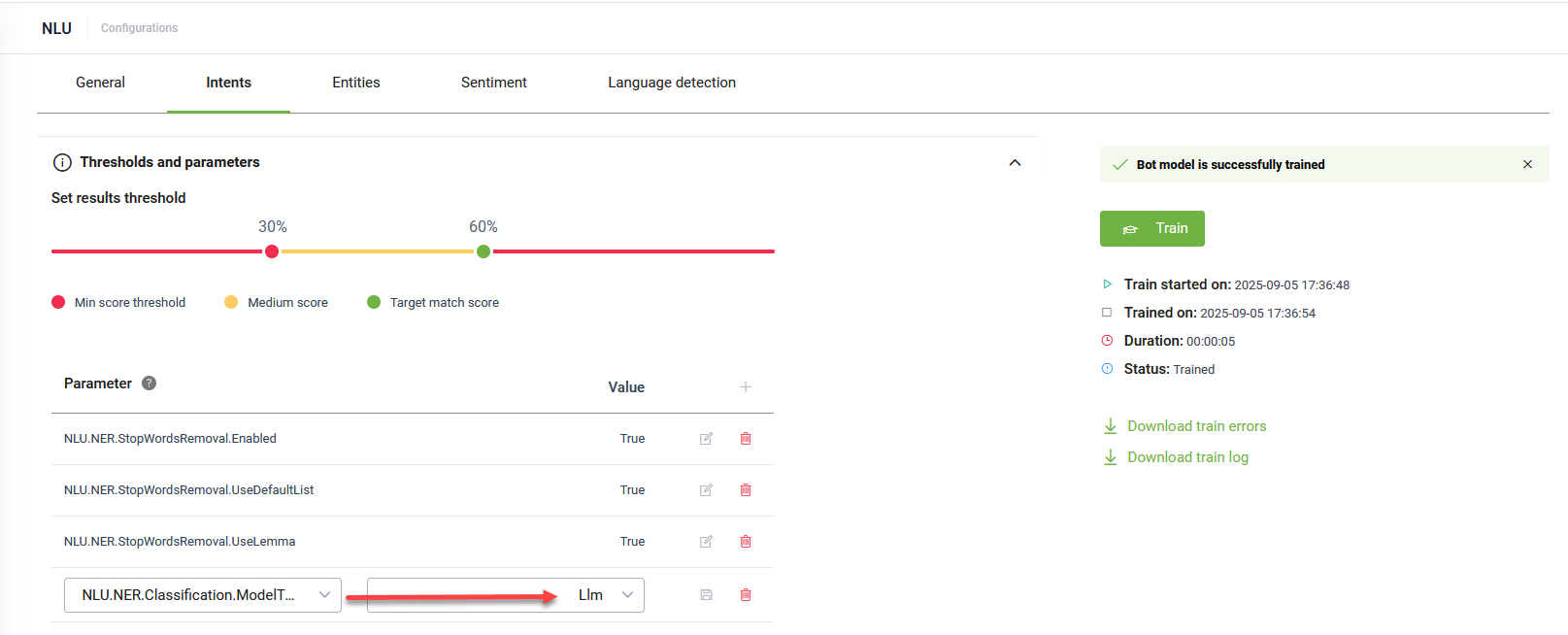
- Navigate to NLU > Configurations > Intents tab.
- Click on Thresholds and parameters.
- Add the NLU.NER.Classification.ModelType parameter and set it to LLM.
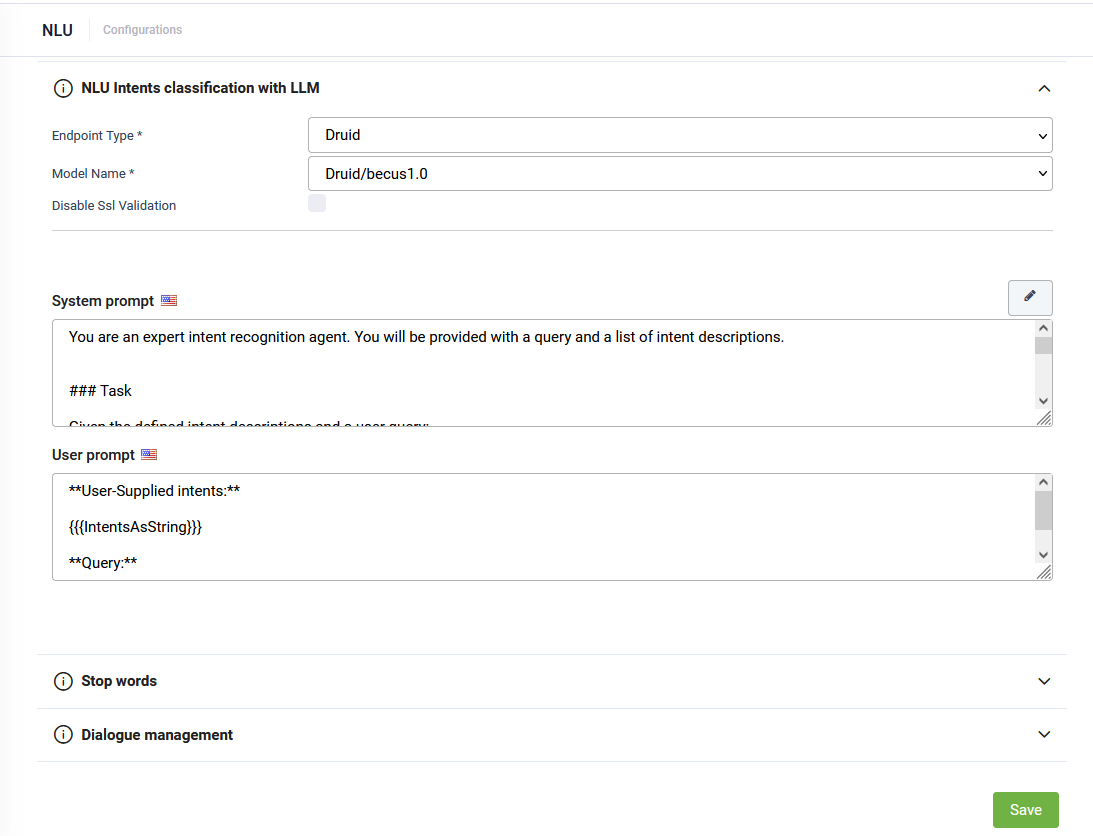
- Click the link that appears in the message below the NLP parameters. The NLU Intents Classification with LLM expands.
- From the Endpoint Type field, select Druid.
- From the Model Name field, select Druid/becus1.0.
- For both prompts, click the Set default button. The default DRUID prompts will be automatically filled in.
- Click Save at the bottom of the page to apply the NLU configuration.
- Train the AI Agent.
Each new agent should have a description and some training phrases.
Each agent should have its own set of phrases so that anonymization and intent detection are modular and precise.
This ensures the assistant routes user input correctly, even when anonymized.
Running the Solution
Start a conversation with the assistant. The demo Agent is instructed to collect information for selling concert tickets, therefore you can initiate a discussion by asking something similar to : "I would like to buy some concert tickets".
Any PII you share (like your name, email, or address) will be anonymized before being processed externally, then restored when the assistant responds to you.
To use the PII, some custom code is required to get the real value in the PiiMappingsJSON dictionary before executing the action.
This ensures privacy, compliance, and security while still delivering a seamless conversational experience.