Druid Connector Host
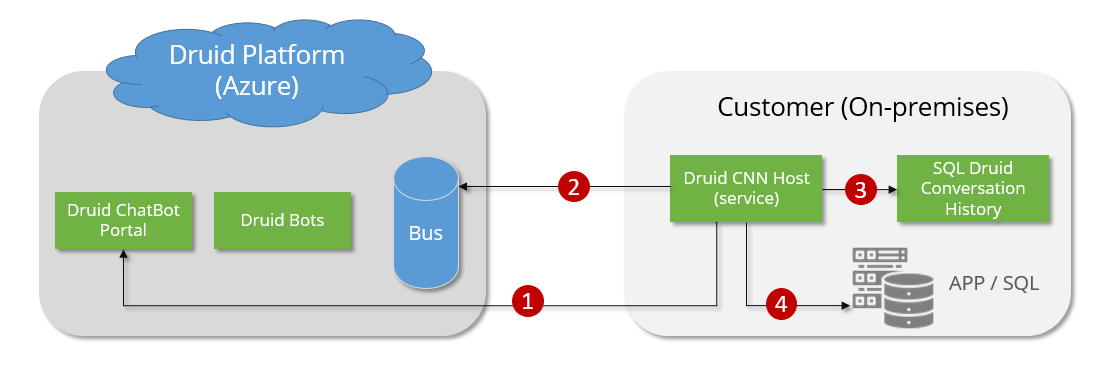
In hybrid deployments, the AI Agents running in the Druid Cloud are integrated with on premise apps. The AI Agents and on premise apps communicate via the Druid Connector Host installed on your local servers, usually hosted in your DMZ zone.
NOTE: For trial and sandbox environments, there is no need to install the Druid Connector Host; the Cloud Connector Service will be used by default. After the trial period ends, if you're integrating with third-party systems which cannot be accessed via the Internet or if you want to store the AI Agent conversation history in your own DB, you need to install the Druid Connector Host.
The Druid Connector performs the following types of connections:
- Get tenant settings from the Druid API.
- Query Bus for work orders sent by the AI Agents and post responses back to the queue.
- Save conversation history into the local Database.
- Call the integrated apps or databases.
You can also use the Druid Connector Host in a high availability scenario. For more information see Druid Connector High Availability.
Software footprint
The DRUID Connector Host application service includes the following components:
- Action Processor
- Connection History processor
- Nancy API Web Server (required by the UiPath integration) (http://<Druid_connector_host>:12345/services).
This section provides step-by-step procedures for setting up your own Druid Connector Host on Windows or Linux.