AI Agent Orchestration
Orchestrate multiple specialized AI Agents through a single, intelligent conversation layer — powered by context-aware routing, seamless handoffs, and unified user experience.
What is Druid Conductor?
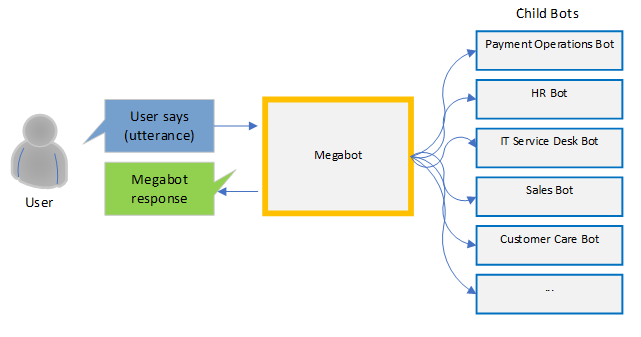
Druid Conductor is an orchestration AI Agent that acts as the primary interface in any conversation. It owns the conversation end-to-end — handling requests it can answer directly, and silently delegating to the right specialized AI Agent when needed. The user always talks to one AI Agent. The complexity is invisible.
Think of a healthcare company where Mary is the primary AI Agent that patients always talk to. When a patient needs to book an appointment, Mary delegates to the Appointment Scheduling agent. For a billing question, she routes to the Billing agent. For general support, she calls on the Support agent. The patient just talks to Mary — she handles the rest.
Orchestrated AI Agents work like specialized teams within your organization. Each one is an expert in its own domain. Druid Conductor knows when to handle something itself and when to call in a specialist — preserving full context across every handoff so the conversation always feels continuous.
Benefits of Multi-AI Agent orchestration
- Unified User Experience. Users interact with one AI Agent, that is, the Druid Conductor. It silently routes to the right specialist. No need for users to know which AI Agent handles payments, appointments, or HR. They just ask.
- Role-Based Content Segregation. Assign specific orchestrated AI Agents to specific user roles. An HR team member sees only HR agent capabilities; Finance sees only Finance. Druid Conductor enforces these boundaries automatically at routing time.
- Higher Performance. Specialized AI Agents are trained on narrower domains, producing higher accuracy within their scope. Together they outperform any single general-purpose AI Agent.
- Infinite Scalability. Need to add a new capability? Build a new specialized AI Agent and link it to your Druid Conductor. The existing setup is untouched — the orchestration layer adapts automatically.
- Better Authoring Governance. Druid Conductor authors control routing, dialogue management, live chat, and authentication in one place. Orchestrated AI Agents authors focus purely on their domain — clear separation of duties, no duplication.
- AI Agents That Collaborate, Not Just Operate. Your AI Agents don't work in silos. Each one can hand off tasks, trigger workflows in other AI Agents, or pass control back to Druid Conductor — enabling multi-step tasks that span domains, like booking an appointment that also verifies insurance eligibility.
How Druid Conductor works
Druid Conductor is the primary AI Agent the user always talks to — it knows when to call in a specialist and when to handle things itself.
Routing Intelligence
Druid Conductor uses its own NLU model in combination with the models of all orchestrated AI Agents to predict the best match for every user utterance. The Ranking and Resolver engine weighs these predictions and selects the specialized AI Agent. When multiple AI Agents score above the confidence threshold, Druid Conductor initiates a brief sub-dialog to confirm the user's intent before proceeding — avoiding misrouting without frustrating the user.
If no orchestrated AI Agent matches, Druid Conductor falls back to its own intents, acting as a catch-all that ensures no user message goes unanswered.
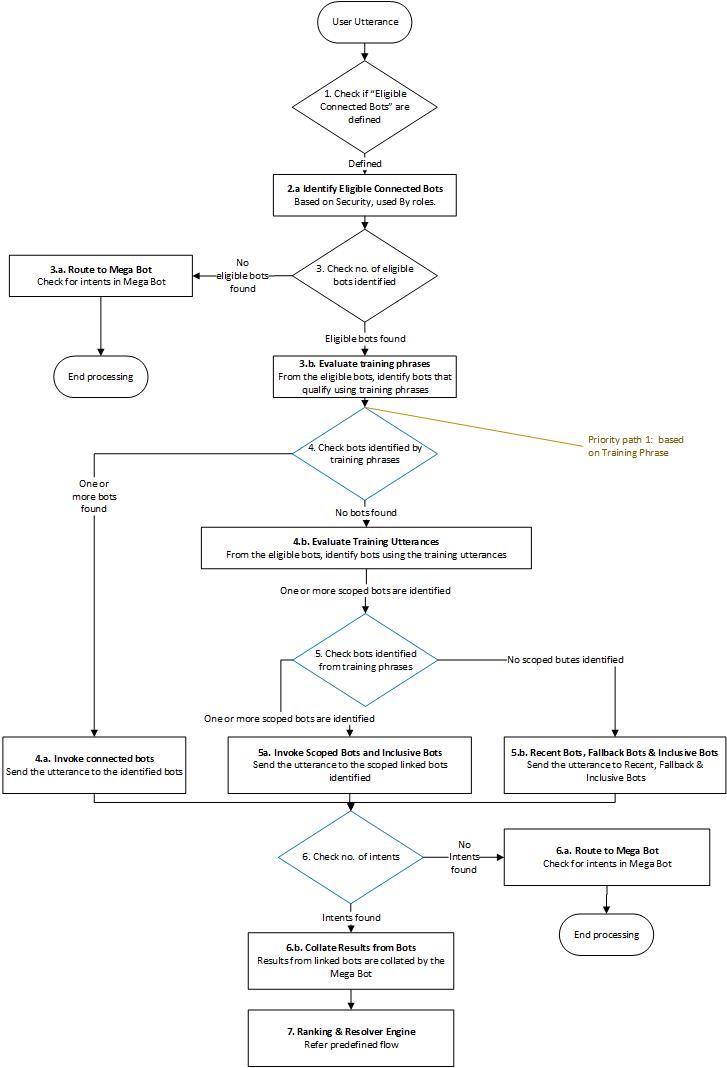
Users never know which AI Agent is handling their request. They just talk to Druid Conductor — Mary, in the healthcare example — and the right AI Agent is silently engaged behind the scenes.
Context Preservation Across Agent Handoffs
One of the most powerful aspects of Druid Conductor is its ability to maintain conversation context across agent transitions. It tracks which AI Agent last engaged the user, and when the next utterance arrives, it first predicts against that agent before broadening the search. This means a user can move naturally from booking an appointment to asking a billing question — without feeling transferred or having to repeat themselves.
AI Agents Org Chart
The AI Agents Org Chart gives you a visual view of your multi-AI Agent setup. Once an AI Agent has linked AI Agents, it appears at the top of the chart with the Conductor badge. All orchestrated AI Agents appear beneath it — like a team org chart, with Druid Conductor as the primary AI Agent and each specialist in their own domain.
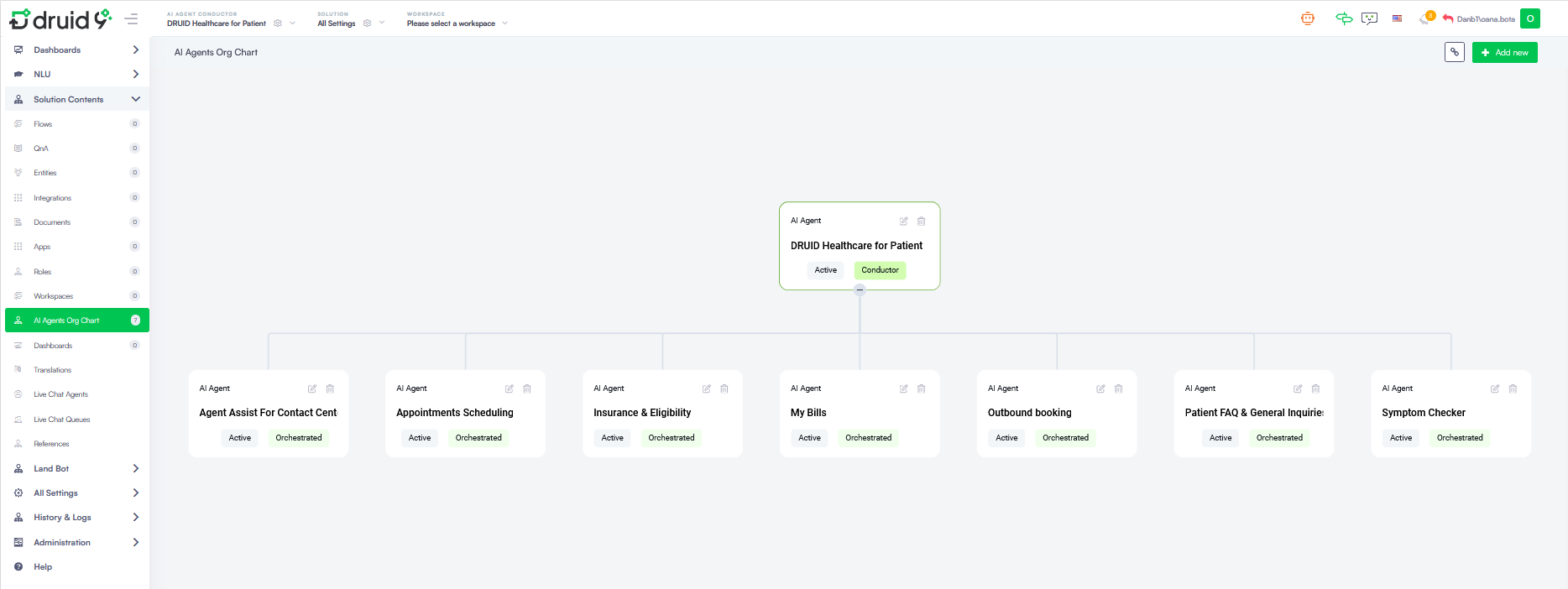
Each card in the Org Chart displays the AI Agent name, its status (Active/Inactive), and its role label:
| Label | Meaning |
|---|---|

|
This AI Agent is the orchestrator — the primary interface for the user and the routing hub for all other AI Agents. |

|
This AI Agent is managed by a Druid Conductor. It handles specialized domain tasks when invoked. |
Setting up Multi-AI Agent Orchestration
Configuring a Druid Conductor involves establishing a hierarchy between your primary conversational AI Agent and your specialized AI Agents.
Prerequisites
Before beginning the orchestration process, ensure that:
- You created and deployed the AI Agent that will serve as Druid Conductor. This AI Agent must be configured with the DRUID Starter solution (ensure the "Intent not recognized" flow is correctly set in Dialogue Management to allow intent delegation).
- You have created independent, domain-specific AI Agents to orchestrate (e.g., one for appointments, one for billing, one for FAQ). These AI Agents have been trained.
Linking AI Agents to Druid Conductor
Once you have individual AI Agents, you can link them within the AI Agent Org Chart to activate the orchestration layer:
- From the top navigation, select the AI Agent you want to designate as Druid Conductor, then select its solution from the Solution dropdown.
- From the Solution Contents menu, click AI Agents Org Chart. The canvas is empty by default until you add your first orchestrated AI Agent.
- Click Add new in the top-right corner. A modal opens.
- Select the desired AI Agent from the dropdown.
- Toggle Enable off if you want to orchestrate the AI Agent but temporarily exclude it from routing.
- Click Save & Close.
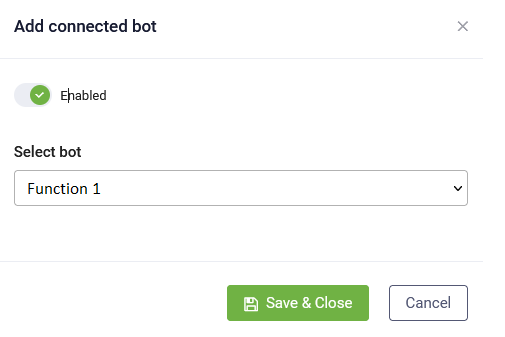
Add as many orchestrated AI Agents as you have use cases. Each one appears in the AI Agent Org Chart beneath Conductor.
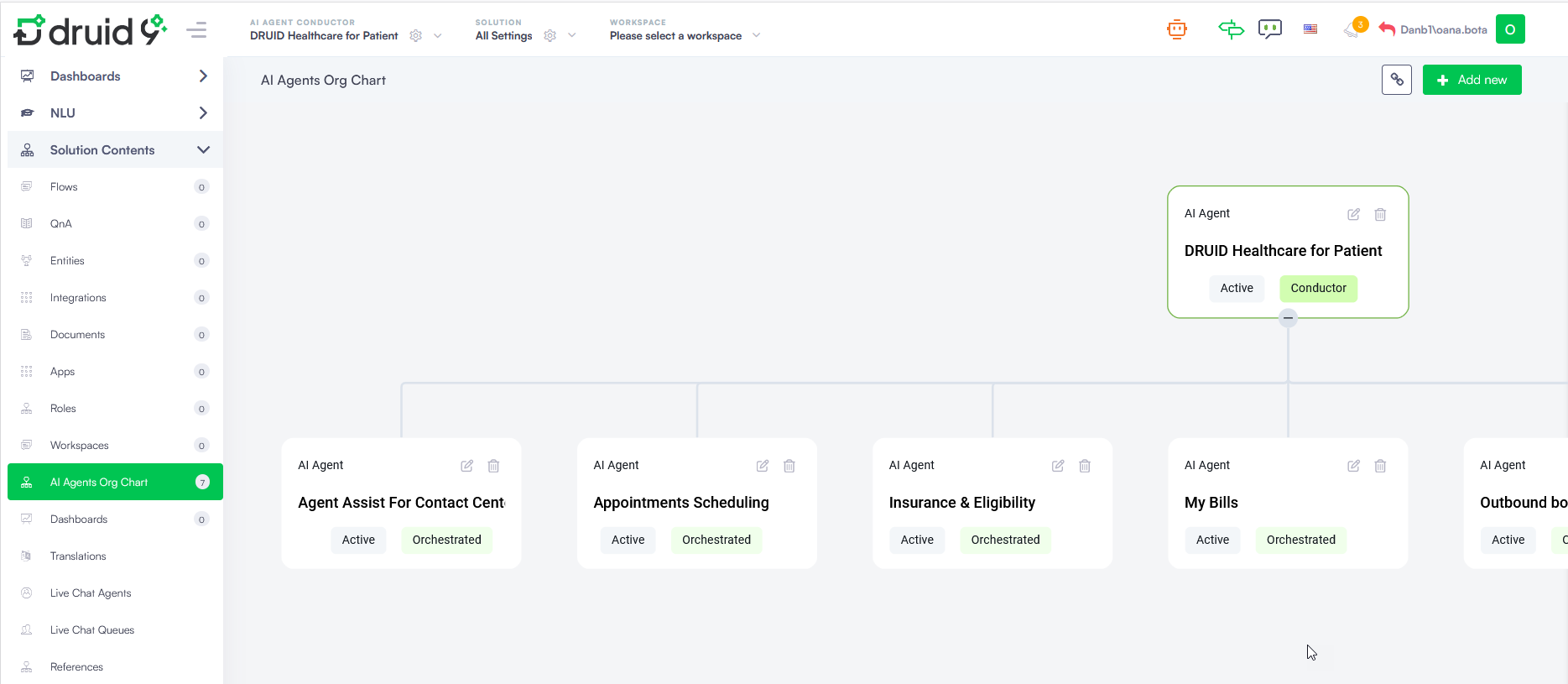
- A Druid Conductor cannot itself be orchestrated by another Druid Conductor.
- An AI Agent can be orchestrated by multiple Druid Conductors simultaneously.
Manually Controlling Druid Conductor Routing
By default, Druid Conductor automatically routes user utterances to the most suitable orchestrated AI Agent. In some scenarios, you may want to override this behavior and direct the conversation to a specific AI Agent manually.
You can do this by setting [[ChatUser]].PredictTargetBot in the conversation context during the Intent rephrase flow. This is the only point at which the routing prediction can be modified.
Routing to a specific AI Agent
Set [[ChatUser]].PredictTargetBot = "<AI Agent name>" to direct Druid Conductor to engage a particular AI Agent. This removes the need to rely on roles within the AI Agent or conversation to control routing.
To return to the default automated routing behavior, set [[ChatUser]].PredictTargetBot to null.
Restricting routing to a subset of orchestrated AI Agents
You can limit the routing prediction to a specific set of orchestrated AI Agents by setting [[ChatUser]].RestrictedTargetBots before the prediction is made.
For example, [[ChatUser]].RestrictedTargetBots = ["HR Bot", "Finance Bot"]
Druid Conductor will only consider the listed AI Agents when routing the next utterance. To lift the restriction and restore full routing across all orchestrated AI Agents, set [[ChatUser]].RestrictedTargetBots to null.
Trigger Cross-AI Agents flows
Druid Conductor supports triggering flows between orchestrated AI Agents (using Trigger flow steps), or from an orchestrated AI Agent back to Druid Conductor — enabling sophisticated, multi-step workflows that span domain boundaries.
For example, a healthcare scenario: the Appointments Scheduling agent can trigger a flow in the Insurance & Eligibility agent mid-conversation to verify coverage, then pass control back — all within a single seamless user interaction.
- Cross-AI Agents flow triggering only works within an active Druid Conductor-managed conversation.
- If an orchestrated AI Agent is removed from Druid Conductor, any flows referencing it will stop triggering.
- When an AI Agent is orchestrated by multiple Druid Conductors, the flow list shows all flows across all sibling AI Agents— grouped by AI Agent. Select carefully to avoid misrouting.
Conversation History
Druid Conductor's Conversation History lets you trace the full journey of any conversation — including which orchestrated AI Agent responded to each message. Messages handled by an orchestrated AI Agent display its name.
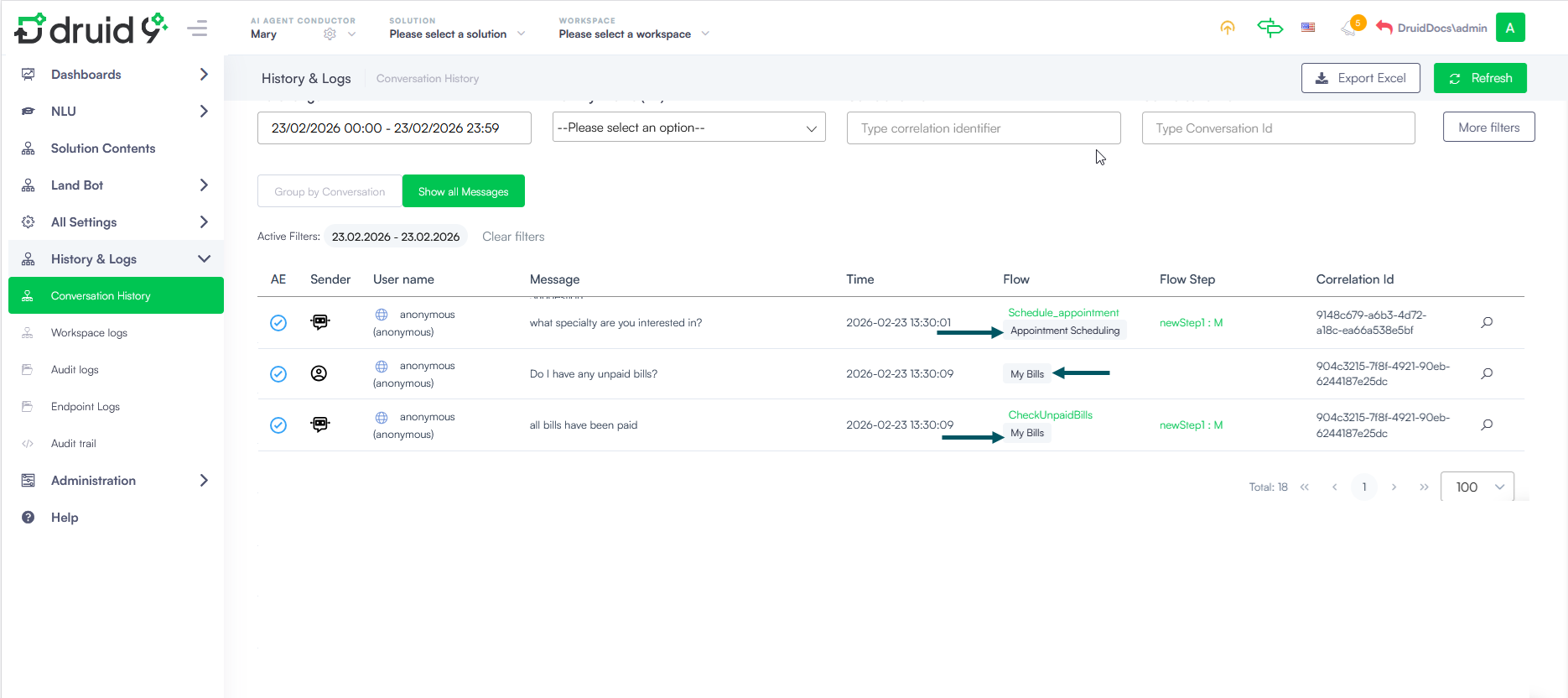
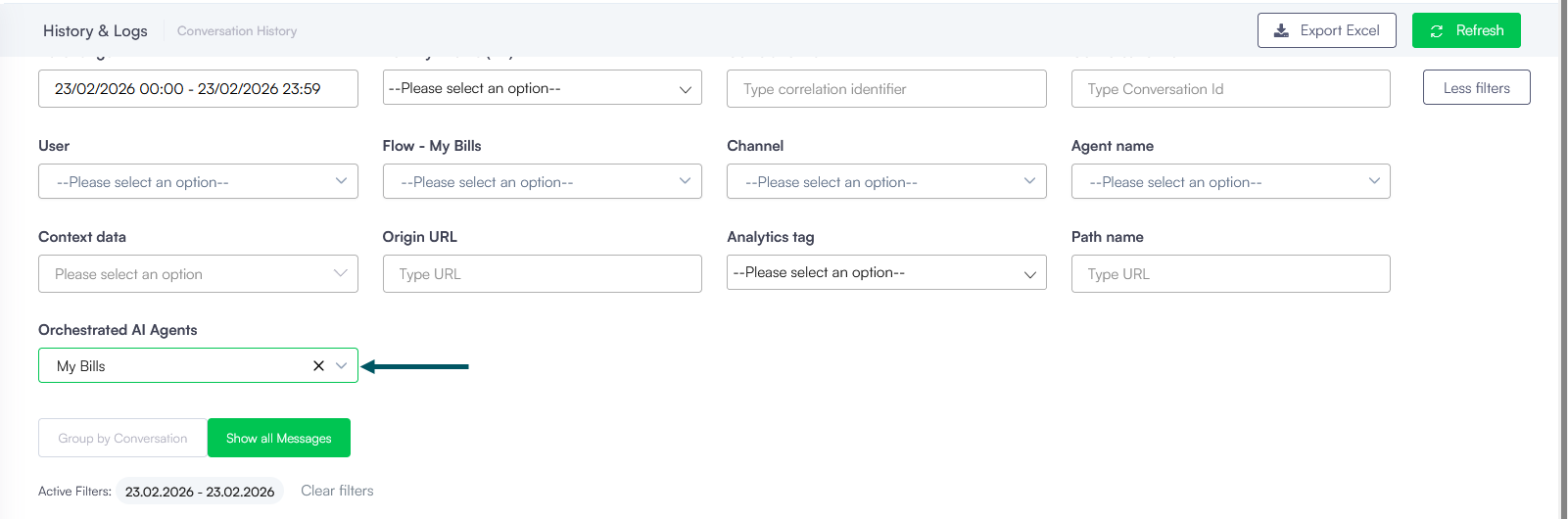
To filter conversation history by a specific orchestrated AI Agent, click More filters and select the desired AI Agent from the Orchestrated AI Agents dropdown.
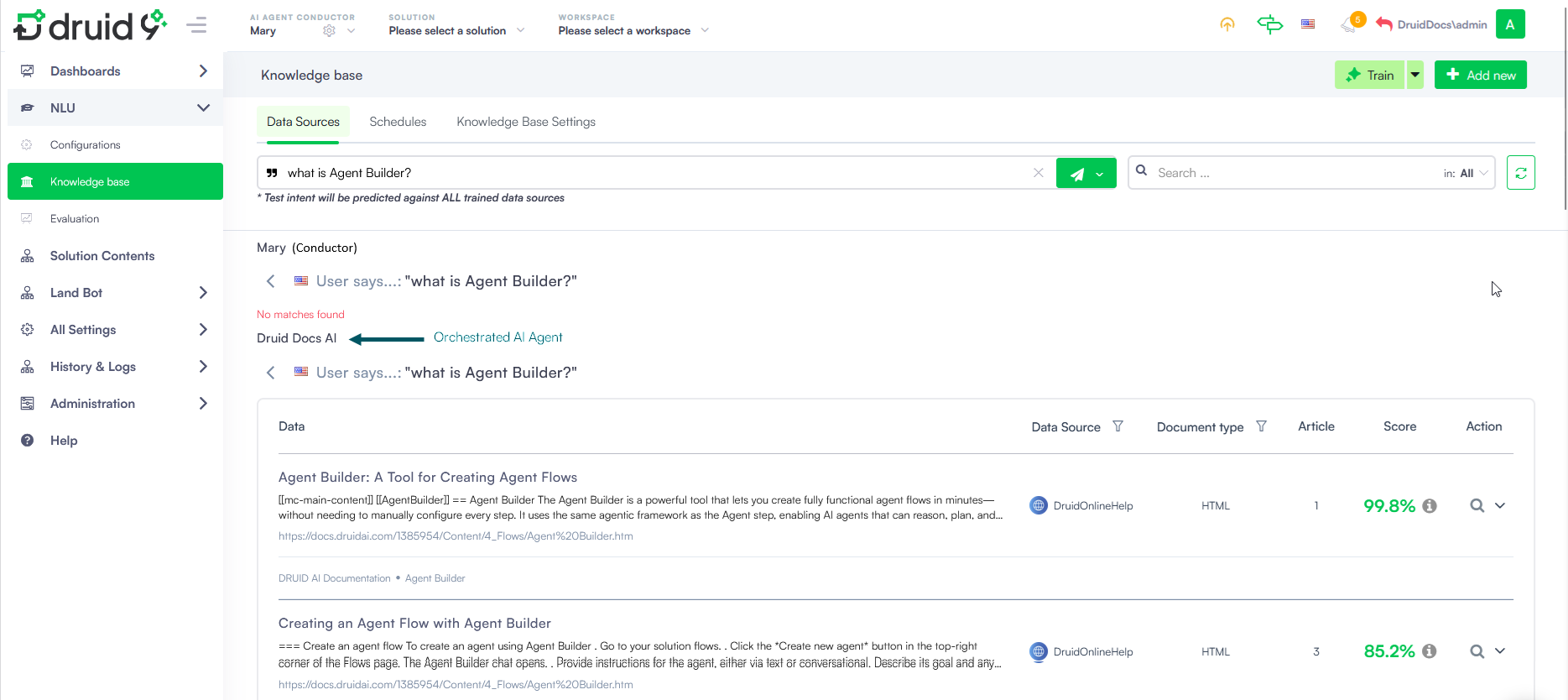
Knowledge Base — Multi-AI Agent Predict
In the Knowledge Base Predict panel (when operating within Druid Conductor), you can test questions against all knowledge indexes across every orchestrated AI Agent simultaneously — giving a unified view of what your entire AI Agent network knows.
Druid Conductor Evaluation
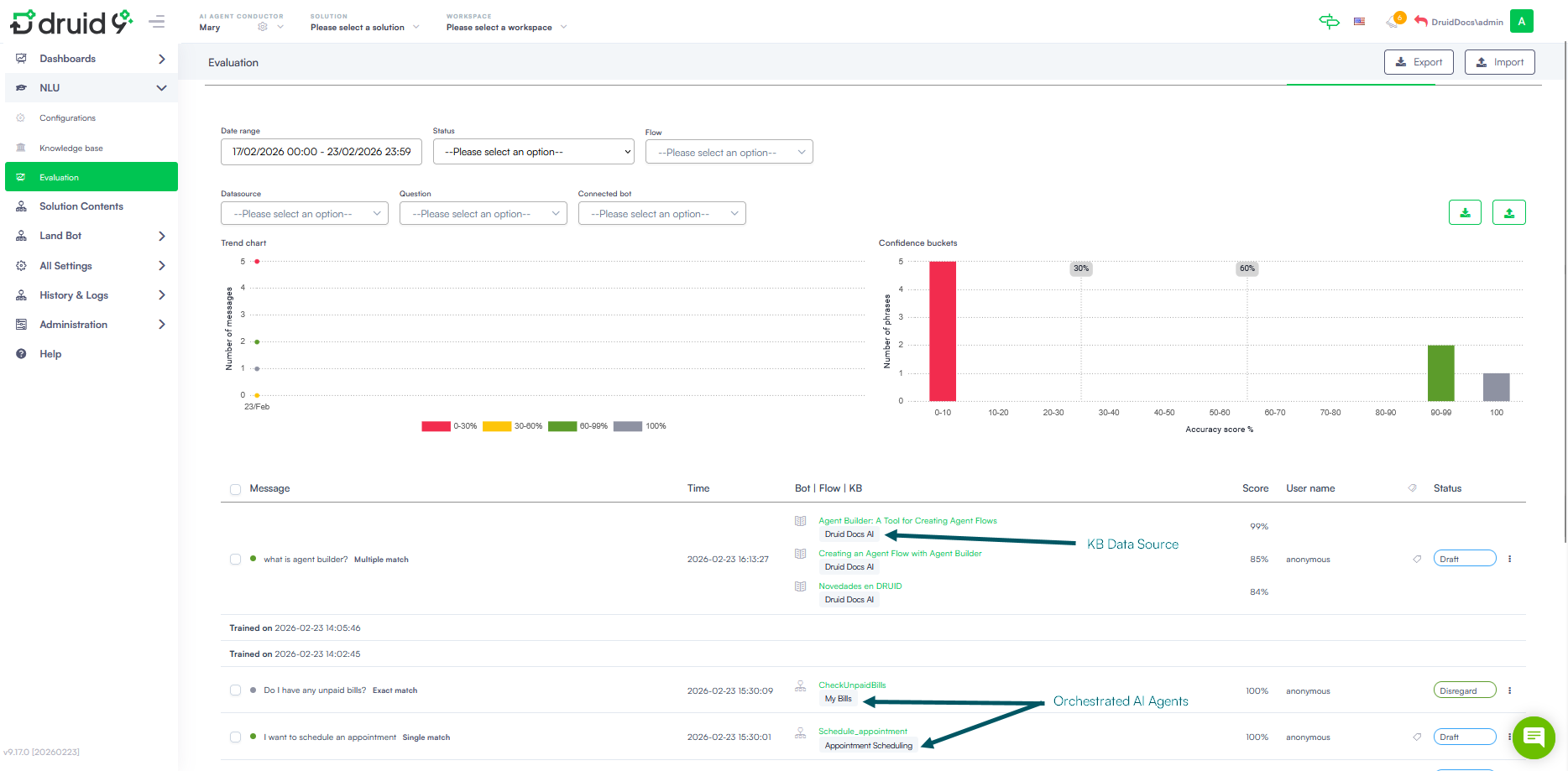
The Druid Conductor Evaluation provides a comprehensive picture of conversation quality across the entire multi-AI Agent network. For each message, the evaluation panel shows:
- Flow Triggered — identifies messages that initiated a flow directly from Conductor.
- Knowledge Base Response — highlights messages answered via a KB article (indicated by a book icon).
- Orchestrated AI Agent Interaction — shows the name of the AI Agent that handled each response, making it easy to audit routing decisions and track performance per agent.
View AI Agents orchestration on your tenant
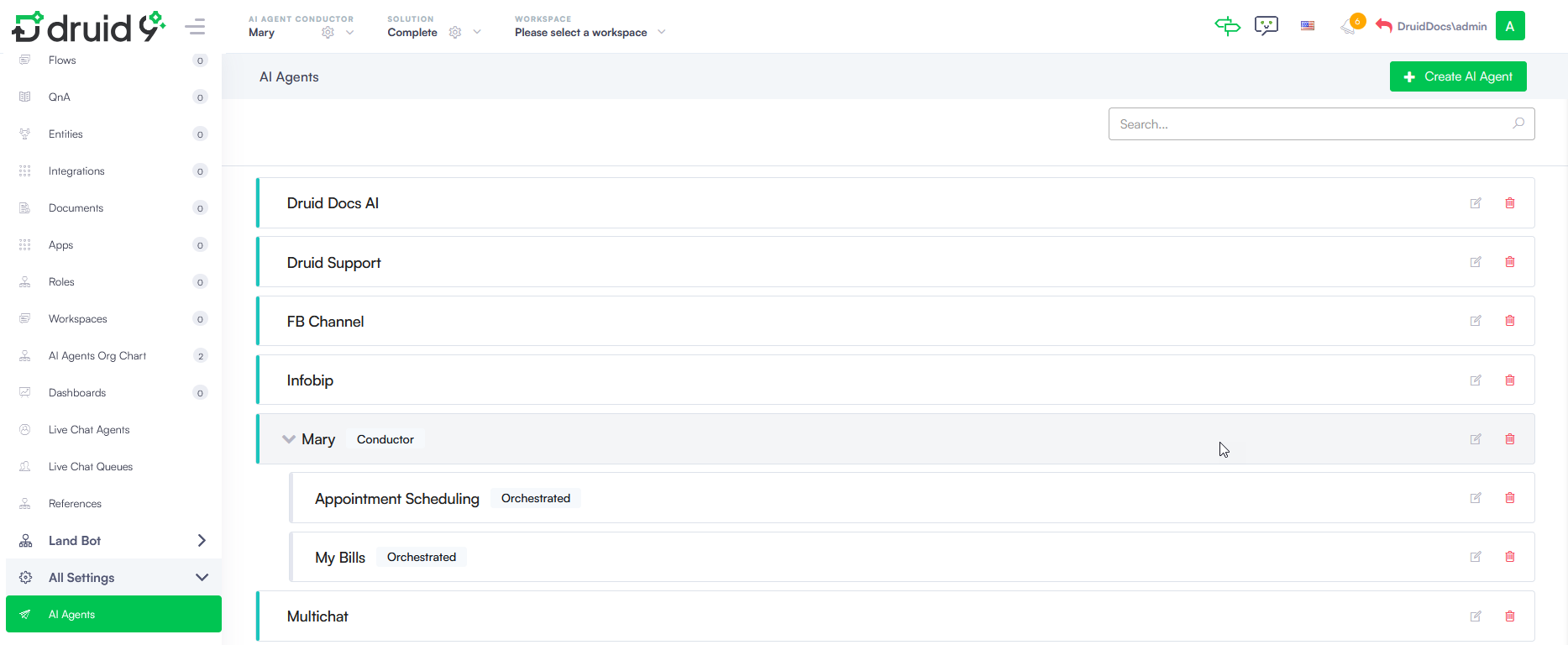
To view all AI Agents defined on your tenant — including Druid Conductors and their orchestrated AI Agents — go to All Settings > AI Agents. AI Agents without a label are standalone AI Agents.