Adding Description for Hero Card Buttons
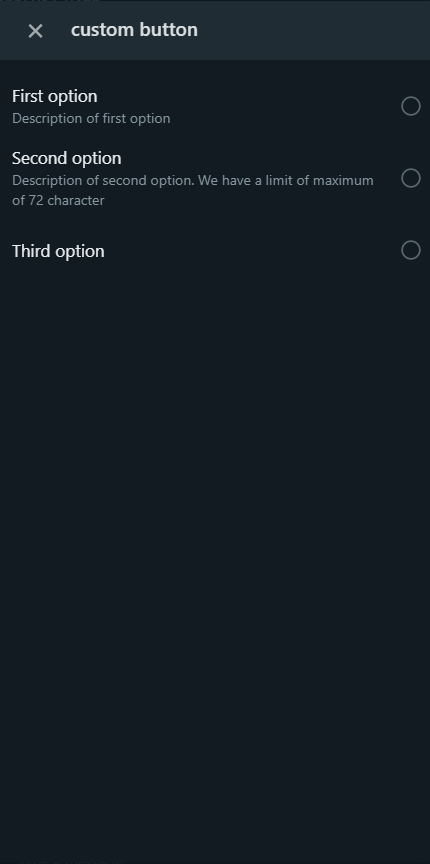
In DRUID 5.7 and higher you can add description for hero card buttons. To do that on the hero step, go to Metadata section, tap on Advanced Editing and in the JSON field, for each button in the "buttons" array add the channelData object and set the "description" property.
NOTE: When rendering the hero card in WhatsApp, the buttons description is truncated to 72 characters; therefore, make sure that your buttons description is maximum 72 characters long.
Copy
{
    "hero": {
        "attachmentLayout": "carousel",
        "pageSize": 10,
        "moreItemsValue": "More Items",
        "noMoreItemsValue": "No More Items",
        "channelData": {
            "whatsappOptionsButtonName": "custom button"
        },
        "cards": [
            {
                "images": [
                    {
                        "url": "https://icons.iconarchive.com/icons/designbolts/free-multimedia/128/Black-Floppy-icon.png"
                    }
                ],
                "title": "",
                "subtitle": "",
                "text": "",
                "buttons": [
                    {
                        "text": "Caption",
                        "title": "First option",
                        "type": "imBack",
                        "channelData": {
                            "description": "Description of first option"
                        },
                        "value": ""
                    },
                    {
                        "text": "Caption",
                        "title": "Second option",
                        "type": "imBack",
                        "channelData": {
                            "description": "Description of second option. We have a limit of maximum of 72 characters for the description for a row. This description will be truncated because it is longer"
                        },
                        "value": ""
                    },
                    {
                        "text": "Caption",
                        "title": "Third option",
                        "type": "imBack",
                        "value": ""
                    }
                ]
            }
        ]
    }
}
Hero cards rendering considerations
A hero step with multiple cards which have no title is rendered in WhatsApp with a blank space between the cards.
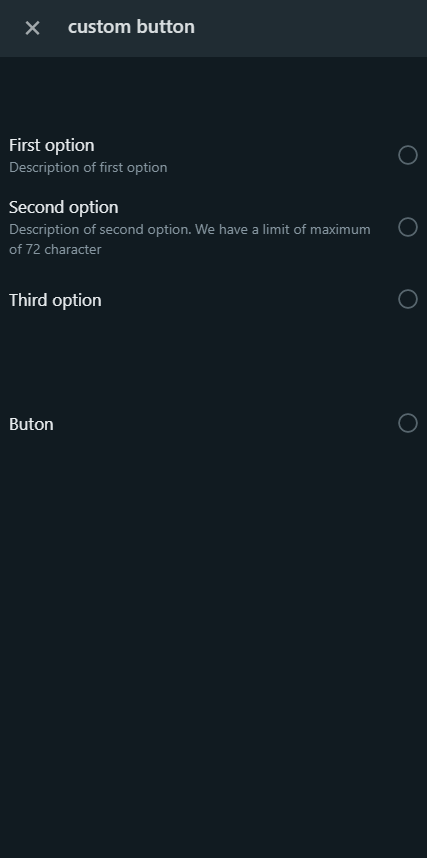
A hero step with a single card will show no blank space.