Druid Generic Chat
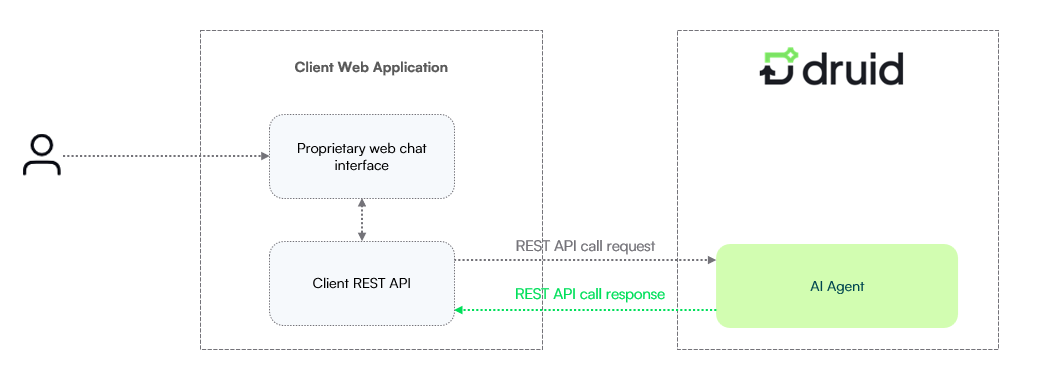
The Druid Generic Chat channel provides a REST API-based integration that connects your proprietary web chat interface directly to the Druid Conversational Engine.
The Custom Web Chat channel is the preferred choice for organizations that want to leverage the Druid Conversational Engine while retaining complete ownership of the web chat interface and overall user experience.
Unlike the standard Druid Web Chat channel, which includes a ready-to-use chat widget and user interface, the Druid Generic Chat channel does not provide any front-end components. Instead, it exposes a set of REST messaging endpoints that enable your application to exchange text messages with a Druid AI Agent while giving you complete control over the user experience.
Interaction Mechanisms
The Druid Generic Chat channel supports two distinct communication mechanisms to facilitate message exchanges between your custom front-end interface and the Conversational Engine. Depending on your system design and responsiveness criteria, you can implement either a synchronous approach or an asynchronous polling cycle to manage the user experience.
Synchronous Request-Response (Default)
In this mode, when a user sends a message through your proprietary chat UI, your backend client API forwards this input to Druid by calling the message delivery REST API (/messages). Your client API holds the HTTPS connection open with Druid while the Flow Engine processes the request. Once ready, all generated AI Agent replies are delivered back to your client API in the synchronous response payload, which then routes them back to the front-end interface.
Long Polling Mechanism (Asynchronous)
Long Polling offers an asynchronous alternative to the default synchronous request-response model. It is designed to significantly improve responsiveness and user experience, especially in scenarios involving multi-message replies or delayed AI Agent processing (for example, due to complex backend integrations, database lookups, or proactive messages).
In this mode, when your backend client API transmits a user message to Druid via the REST messaging API (POST *.druidplatform.com/api/generic-chat/{botId}/messages), it does not wait for a direct synchronous response from the Flow Engine. Druid acknowledges receipt immediately with a fast confirmation payload and closes that initial connection.
Immediately after submitting the message, your backend client API initiates a continuous polling mechanism by making repetitive POST requests to the dedicated Long Polling endpoint: POST *.druidplatform.com/api/generic-chat/{botId}/messages/getMessages.
Druid holds these connections open until a AI Agent message or event becomes available. As soon as a message is ready, Druid sends it back to the client REST API, closing that specific /getMessages request. Immediately after that, the client REST API will initiate a new request to fetch the next message from the AI Agent, and will continue to do so, until the chat session closes.
This asynchronous approach ensures that messages are delivered to the user as soon as they are generated by Druid, without waiting for an entire set of responses or for a slow integration to complete.
The /getMessages request will time out after a set period (typically 30 seconds) if no messages are available, at which point the client REST API must immediately re-initiate the getMessages call to continue polling.
The following sequence outlines how your backend client API handles communication between your custom front-end interface and Druid when using the long polling asynchronous model:
- Initiating the conversation:
- When the user opens the web chat, the web chat interface initiates the conversation with the client REST API.
- The client REST API initiates the conversation with Druid AI Agent, which authenticates the conversation.
- The Druid AI Agent responds with the Welcome Message.
- The Web chat sends the welcome message:
- The client REST API responds with the Welcome Message (received from Druid AI Agent).
- The web chat interface gives the Welcome message to the user.
- The web chat interface captures user input:
- The web chat interface captures the “User says”.
- The web chat interface sends the user's messages to the client REST API .
- The client REST API sends the user input to the AI Agent, calling the Druid API Create Activity (
POST *.druidplatform.com/api/generic-chat/{botId}/messages). - Backend client API polling for AI Agent responses:
- Immediately after sending the user's input, the backend client API begins polling for responses by making periodic POST requests to the Long Polling endpoint:
*.druidplatform.com/api/generic-chat/{botId}/messages/getMessages. - The Druid AI Agent sends available AI Agent responses to the backend client API via these
getMessagescalls, as soon as they are ready. EachgetMessagescall returns one message/event. - If the Druid AI Agent has more messages, the backend client API immediately makes another POST request to
getMessagesto retrieve the next one. This continues until no more messages are received. - User closes the call:
- The web chat UI announces the backend client API that the conversation is closed.
- The backend client API announces the Druid AI Agent that the conversation is closed (e.g., by sending a close_conversation message) to end the active long polling loop and free up system resources.
Channel Configuration
The Druid Generic Chat channel is active by default in Druid.
To configure the channel:
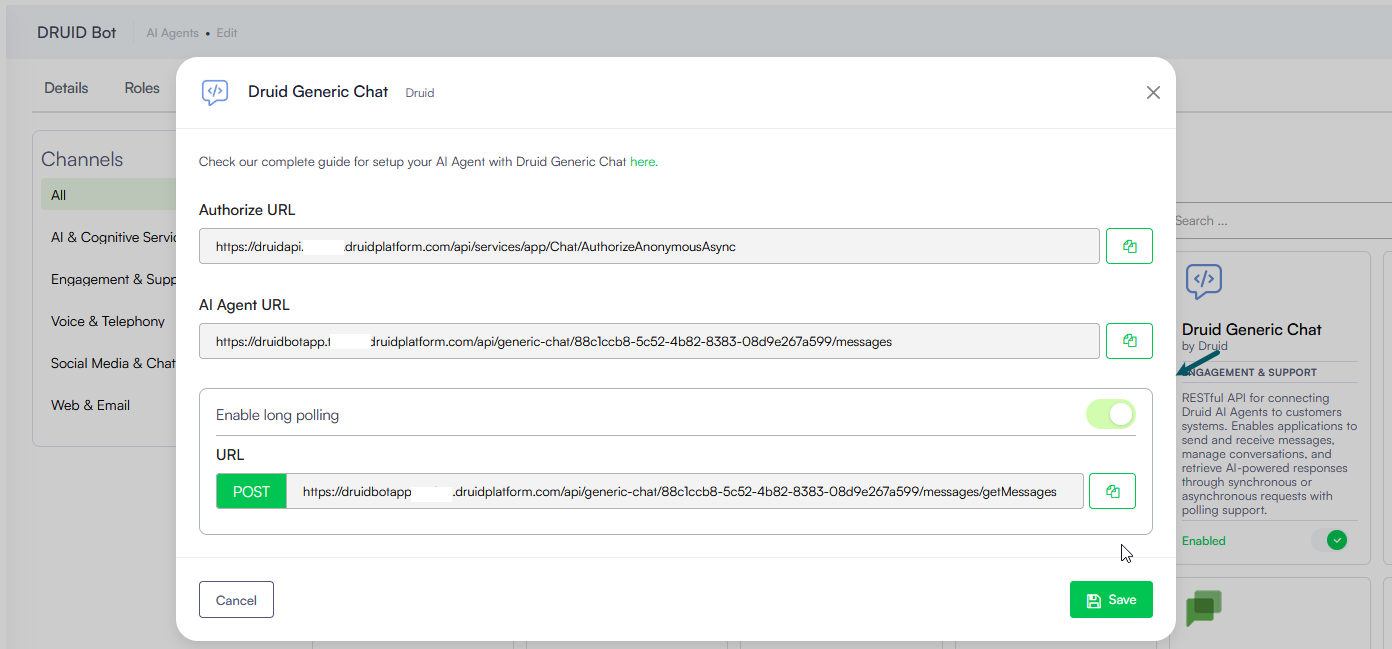
- In the Druid Portal, go to your AI Agent Settings, and click the Channels tab.
- Search for 'Druid Generic Chat' and click on the card.
- Copy the generated Authorize URL and AI Agent URL.
- If your system architecture requires asynchronous delivery, toggle the Enable long polling option and copy the corresponding long poll endpoint.
- Optionally, customize channel display settings as follows:
- Alias: Enter a clear, business-friendly display name (e.g., Interactive Messaging). This value is stored in[[ChatUser]].ChannelDisplayName, which appears in reporting tools like AI Agent Summary dashboard - Engagement KPIs and can also be referenced in flow business logic.
- Description: Enter a brief description. This is particularly helpful when using an alias, as it helps identify the channel's specific purpose within the Druid Portal.
- Channel Icon: Upload a custom icon to display on the channel card within the Druid Portal.
- Click Publish to activate the channel.
During session execution, Druid automatically populates the following system fields:
- [[ChatUser]].ChannelId = "generic-chat"
- [[ChatUser]].ChannelDisplayName - Stores the Alias which is used in AI Agent Summary Dashboard > Engagement KPIs > Channel chart.
- [[ChatUser]].UserId - Stores the unique client user identification string.
Druid API Reference
Use these specifications to connect your proprietary interface application layer to the Druid messaging engine.
Authorize
Establishes an anonymous session and provides the short-lived access token required for subsequent interactions.
Syntax
POST: *.druidplatform.com/api/services/app/Chat/AuthorizeAnonymousAsync
Request Body
Authorize API
{
   "botId": "<bot_id>",
   "queryString": "phone=<phone>",
   "channelId": "generic-chat"
}
Response
Response Example
{
   "botId": "3fa85f64-5717-4562-b3fc-2c963f66afa6",
   "userId": "string",
   "conversationId": "string",
   "token": "string"
}
The returned bearer authorization token remains valid for exactly 1 hour from generation time.
Send Messages (Create Activity)
Transmits the text written by the user to the Druid messaging layer.
Syntax
POST: *.druidplatform.com/api/generic-chat/{botId}/messages
Request Header
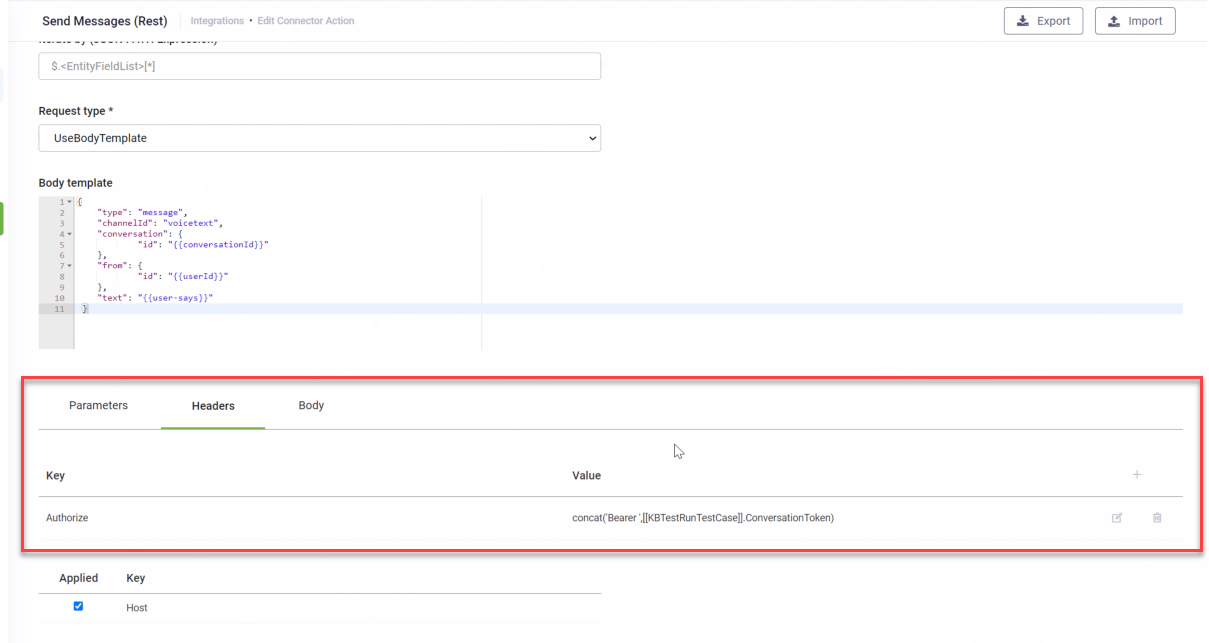
In the request header, map the Authorize key to the bearer token obtained from the Authorize API. Use the Druid-specific CONCAT function for the Authorize key value with the following syntax:
Here, [[Entity]].StringField represents the field that stores the token obtained from the Authorize API.
Request
{
      method: "POST",
      headers: {
        Authorization: `Bearer ${session.token}`,
        "Content-Type": "application/json",
      },
      body: JSON.stringify({
        type: "message",
        channelId: "generic-chat",
        conversation: {
          id: conversationId,
        },
        from: {
          id: userId,
        },
        text: message,
        attachments,   // sending files for file upload steps
        timeout: 50,
      }),
    }
The timeout parameter enables you to specify a duration in seconds for the system to wait for a response from the Flow Engine. If the Flow Engine doesn't respond within the configured timeout period, the system will log an error in the Conversation History.
Response
{
    "type": "message",
    "channelId": "generic-chat",
    "conversation": {
            "id": "<conversationId>"
    },
    "to": {
            "id": "<userId>"
    },
    "text": "<AI Agent response>",
}
Get Messages (Long Polling)
Retrieves messages asynchronously from the Druid AI Agent when the background long polling mechanism is enabled
Syntax
POST *.druidplatform.com/api/generic-chat/{botId}/messages/getMessages
Request Header
In the request header, map the Authorize key to the bearer token obtained from the Authorize API. Use the Druid-specific CONCAT function for the Authorize key value with the following syntax:
Here, [[Entity]].StringField represents the field that stores the token obtained from the Authorize API.
Request Body
{
  "conversationId": "your-conversation-id"
}
Parameters
| Parameter | Type | Description | Required |
|---|---|---|---|
| conversationId | String | The unique identifier for the ongoing conversation, obtained from the Authorize API response. | Yes |
Response
The response structure for getMessages is identical to the Responds with Message sections described for SendMessages API response, containing the AI Agent response or an event.
getMessages endpoint will return the next available message or event as soon as it's ready, or after a timeout period if no message is available. The client API should continuously poll this endpoint until the conversation is officially closed.Request body examples
 Trigger flow
{
"type":"message",
"channelId":"generic-chat",
"conversation":{"id":"HCDpcBeRvKnKtMiKlw3iaE-eu"},
"from":{"id":"anonymous"},
"text":"new_choice",
"attachments":[],
"timeout":50
}{
"type":"message",
"channelId":"generic-chat",
"conversation":{"id":"HCDpcBeRvKnKtMiKlw3iaE-eu"},
"from":{"id":"anonymous"},
"text":"Buton A",
"attachments":[],
"timeout":50
}
{
"type":"message",
"channelId":"generic-chat",
"conversation":{"id":"HCDpcBeRvKnKtMiKlw3iaE-eu"},
"from":{"id":"anonymous"},
"text":"",
"attachments":
[{"contentType":"application/vnd.openxmlformats-officedocument.wordprocessingml.document",
"name":"Adeverinta.docx",
"content":"[binary-code]"},
{"contentType":"text/plain",
"name":"DB_Connector.txt",
"content":"U2VydmVyOiBsb2NhbGhvc3QNCkRCOiAgICAgIExvY2FsQ29ubmVjdG9yLVZsYWR1dA0KVXNlcjogICAgbG9jYWx1c2VyLVZsYWR1dA0KUGFzczogICAgUGFyb2xhMSENCg0KDQpDOlxEcnVpZFxEcnVpZFNoYXJlZEZvbGRlclxGaWxlc1w="}],
"timeout":50
}
Response Payload
Responses are fetched using long polling (/getMessages).
The following provides supported flow steps and their supported features.
Simple (Message/Action)
Supports Markdown, special characters, and formatting. Step actions execute automatically.
[
  {
    type: 'message',
    timestamp: '2026-08-26T12:31:11.0987496+00:00',
    serviceUrl: 'https://directline.botframework.com/',
    channelId: { channel: 'generic-chat', subChannel: '' },
    from: { id: 'dev-vladutvasi-agenticflowbtw2r1-bot', properties: {} },
    conversation: { id: 'HCDpcBeRvKnKtMiKlw3iaE-eu', properties: {} },
    recipient: { id: 'anonymous', properties: {} },
    membersAdded: [],
    membersRemoved: [],
    reactionsAdded: [],
    reactionsRemoved: [],
    locale: 'en-US',
    text: 'Welcome to the trigger flow demo!',
    speak: 'Welcome to the trigger flow demo!',
    inputHint: 'expectingInput',
    attachments: [],
    entities: [],
    channelData: {
      flowStepName: 'Trigger flow',
      sourceMessageId: 'wPkOtjxO0OXRO5me5P4ag-b'
    },
    replyToId: '383a26c4-afd1-44d7-9569-c4bc2cfd106c',
    listenFor: [],
    textHighlights: [],
    properties: { extBotId: { valueKind: 0 } }
  },
  {
    type: 'message',
    timestamp: '2026-08-26T12:31:11.1003208+00:00',
    serviceUrl: 'https://directline.botframework.com/',
    channelId: { channel: 'generic-chat', subChannel: '' },
    from: { id: 'dev-vladutvasi-agenticflowbtw2r1-bot', properties: {} },
    conversation: { id: 'HCDpcBeRvKnKtMiKlw3iaE-eu', properties: {} },
    recipient: { id: 'anonymous', properties: {} },
    membersAdded: [],
    membersRemoved: [],
    reactionsAdded: [],
    reactionsRemoved: [],
    locale: 'en-US',
    text: 'this is an action step',
    speak: 'this is an action step',
    inputHint: 'expectingInput',
    attachments: [],
    entities: [],
    channelData: {
      flowStepName: 'newStep3',
      sourceMessageId: 'vEHj4uwgUUeQ3nvZl8Esfg-u'
    },
    replyToId: '383a26c4-afd1-44d7-9569-c4bc2cfd106c',
    listenFor: [],
    textHighlights: [],
    properties: { extBotId: { valueKind: 0 } }
  },
Interactive buttons returned under suggestedActions.
[
  {
    type: 'message',
    timestamp: '2026-08-26T12:39:18.468614+00:00',
    serviceUrl: 'https://directline.botframework.com/',
    channelId: { channel: 'generic-chat', subChannel: '' },
    from: { id: 'dev-vladutvasi-agenticflowbtw2r1-bot', properties: {} },
    conversation: { id: 'HCDpcBeRvKnKtMiKlw3iaE-eu', properties: {} },
    recipient: { id: 'anonymous', properties: {} },
    membersAdded: [],
    membersRemoved: [],
    reactionsAdded: [],
    reactionsRemoved: [],
    locale: 'en-US',
    text: 'English message',
    speak: 'English message',
    inputHint: 'expectingInput',
    suggestedActions: {
      to: [],
      actions: [
        {
          type: 'imBack',
          title: '1. Buton A',
          text: 'Buton A',
          value: 'Buton A',
          channelData: { ValueKind: 1 }
        },
        {
          type: 'imBack',
          title: '2. Buton B',
          text: 'Buton B',
          value: 'Buton B'
        }
      ]
    },
    attachments: [],
    entities: [],
    channelData: { flowStepName: 's1', sourceMessageId: '7I0qAzwR3U6rt8KIdCLRTg-v' },
    replyToId: '4e910757-0346-4792-9241-782a15e4d863',
    listenFor: [],
    textHighlights: [],
    properties: { extBotId: { valueKind: 0 } }
  }
]
Multi-card layout (carousel) with images and imBack buttons.
{
    type: 'message',
    timestamp: '2026-08-26T12:31:11.1016141+00:00',
    serviceUrl: 'https://directline.botframework.com/',
    channelId: { channel: 'generic-chat', subChannel: '' },
    from: { id: 'dev-vladutvasi-agenticflowbtw2r1-bot', properties: {} },
    conversation: { id: 'HCDpcBeRvKnKtMiKlw3iaE-eu', properties: {} },
    recipient: { id: 'anonymous', properties: {} },
    attachmentLayout: 'carousel',
    membersAdded: [],
    membersRemoved: [],
    reactionsAdded: [],
    reactionsRemoved: [],
    locale: 'en-US',
    text: 'Choose a product from below:',
    speak: 'Choose a product from below:',
    inputHint: 'expectingInput',
    attachments: [
      {
        contentType: 'application/vnd.microsoft.card.hero',
        content: {
          Title: 'Iphone',
          Subtitle: null,
          Text: 'These are the new iphone 16 models',
          Images: [
            {
              Url: 'https://9to5mac.com/wp-content/uploads/sites/6/2024/09/iphone-16-event-13.43.05@2x.jpg?quality=82&strip=all&w=1600',
              Alt: null,
              Tap: {
                Type: null,
                Title: null,
                Image: null,
                ImageAltText: null,
                Text: null,
                DisplayText: null,
                Value: null,
                ChannelData: null
              }
            }
          ],
          Buttons: [
            {
              Type: 'imBack',
              Title: 'Order',
              Image: null,
              ImageAltText: null,
              Text: null,
              DisplayText: null,
              Value: 'Prod1',
              ChannelData: null
            }
          ],
          Tap: null
        },
        properties: {}
      },
      {
        contentType: 'application/vnd.microsoft.card.hero',
        content: {
          Title: 'Samsung',
          Subtitle: null,
          Text: 'This is the new Samsung flip',
          Images: [
            {
              Url: 'someurl',
              Alt: null,
              Tap: {
                Type: null,
                Title: null,
                Image: null,
                ImageAltText: null,
                Text: null,
                DisplayText: null,
                Value: null,
                ChannelData: null
              }
            }
          ],
          Buttons: [
            {
              Type: 'imBack',
              Title: 'Order',
              Image: null,
              ImageAltText: null,
              Text: null,
              DisplayText: null,
              Value: 'Prod2',
              ChannelData: null
            }
          ],
          Tap: null
        },
        properties: {}
      },
      {
        contentType: 'application/vnd.microsoft.card.hero',
        content: {
          Title: 'Huawei',
          Subtitle: null,
          Text: 'This is the new Huawei.',
          Images: [
            {
              Url: 'https://consumer.huawei.com/dam/content/dam/huawei-cbg-site/common/mkt/plp-x/phones/compare/pura70-ultra-compare-green.png',
              Alt: null,
              Tap: {
                Type: null,
                Title: null,
                Image: null,
                ImageAltText: null,
                Text: null,
                DisplayText: null,
                Value: null,
                ChannelData: null
              }
            }
          ],
          Buttons: [
            {
              Type: 'imBack',
              Title: 'Order',
              Image: null,
              ImageAltText: null,
              Text: null,
              DisplayText: null,
              Value: 'Prod3',
              ChannelData: null
            }
          ],
          Tap: null
        },
        properties: {}
      }
    ],
    entities: [],
    channelData: {
      flowStepName: 'Hero Card',
      inactivateCardAfterUsage: false,
      sourceMessageId: 'GVipV9zLkWuPoLtkmbHg-x'
    },
    replyToId: '383a26c4-afd1-44d7-9569-c4bc2cfd106c',
    listenFor: [],
    textHighlights: [],
    properties: { extBotId: { valueKind: 0 } }
  }
Small thumbnail layout with description and buttons.
[
  {
    type: 'message',
    timestamp: '2026-08-26T12:46:25.1609812+00:00',
    serviceUrl: 'https://directline.botframework.com/',
    channelId: { channel: 'generic-chat', subChannel: '' },
    from: { id: 'dev-vladutvasi-agenticflowbtw2r1-bot', properties: {} },
    conversation: { id: 'HCDpcBeRvKnKtMiKlw3iaE-eu', properties: {} },
    recipient: { id: 'anonymous', properties: {} },
    attachmentLayout: 'carousel',
    membersAdded: [],
    membersRemoved: [],
    reactionsAdded: [],
    reactionsRemoved: [],
    locale: 'en-US',
    text: 'Thumbnail EN\n\nLanguage: en-US',
    speak: 'Thumbnail EN\n\nLanguage: en-US',
    inputHint: 'expectingInput',
    attachments: [
      {
        contentType: 'application/vnd.microsoft.card.thumbnail',
        content: {
          Title: 'Title',
          Subtitle: 'Subtitle',
          Text: 'Description<br>Description 2</br>',
          Images: [
            {
              Url: 'https://druiddemo18533.blob.core.windows.net/images1/Card1.png',
              Alt: null,
              Tap: {
                Type: null,
                Title: null,
                Image: null,
                ImageAltText: null,
                Text: null,
                DisplayText: null,
                Value: null,
                ChannelData: null
              }
            }
          ],
          Buttons: [
            {
              Type: 'imBack',
              Title: 'Button 1',
              Image: null,
              ImageAltText: null,
              Text: null,
              DisplayText: null,
              Value: '1st button VALUE',
              ChannelData: null
            },
            {
              Type: 'imBack',
              Title: 'Button 2',
              Image: null,
              ImageAltText: null,
              Text: 'Caption',
              DisplayText: null,
              Value: '2nd button VALUE',
              ChannelData: null
            }
          ],
          Tap: null
        },
        properties: {}
      },
      {
        contentType: 'application/vnd.microsoft.card.thumbnail',
        content: {
          Title: 'Title',
          Subtitle: 'Subtitle',
          Text: 'Description',
          Images: [
            {
              Url: 'https://druiddemo18533.blob.core.windows.net/images1/Card2.png',
              Alt: null,
              Tap: {
                Type: null,
                Title: null,
                Image: null,
                ImageAltText: null,
                Text: null,
                DisplayText: null,
                Value: null,
                ChannelData: null
              }
            }
          ],
          Buttons: [
            {
              Type: 'imBack',
              Title: 'Button 3',
              Image: null,
              ImageAltText: null,
              Text: null,
              DisplayText: null,
              Value: '3rd button VALUE',
              ChannelData: null
            },
            {
              Type: 'imBack',
              Title: 'Button 4',
              Image: null,
              ImageAltText: null,
              Text: 'Caption',
              DisplayText: null,
              Value: '4th button VALUE',
              ChannelData: null
            }
          ],
          Tap: null
        },
        properties: {}
      }
    ],
    entities: [],
    channelData: {
      flowStepName: 'newStep1',
      inactivateCardAfterUsage: false,
      sourceMessageId: '56Pg8MTLMEqvWkf9wSfUJA-t'
    },
    replyToId: '2cf348b2-b8e5-45be-a627-c89878643921',
    listenFor: [],
    textHighlights: [],
    properties: { extBotId: { valueKind: 0 } }
  }
]Renders schema forms via application/vnd.microsoft.card.adaptive.
When sending a response to an adaptive card step, the request payload must submit the form data inside the value JObject, while the text parameter remains set to null.
The request body must include the target card identifier (hiddenAdaptiveCardId), the validation identifier (validationId), and the key-value pairs representing the entity fields collected by the form.
Example
{
  "type": "message",
  "channelId": "generic-chat",
  "conversation": {
    "id": "<conversation_id>"
  },
  "from": {
    "id": "<user_id>"
  },
  "text": null,
  "value": {
    "hiddenAdaptiveCardId": "<AdaptiveCardId>",
    "validationId": "<validationId>",
    "<EntityField1>": "<value1>",
    "<EntityField2>": "<value2>"
  },
  "timeout": 50
}
The parameters inside the value object are received in the response message sent by Druid when the adaptive card is rendered:
-
hiddenAdaptiveCardId – The adaptive card identifier provided in the channelData object (or within the submit action data of the card attachment content).
-
validationId – The step validation identifier provided within the submit action data of the adaptive card attachment content.
-
EntityField – Key-value pairs matching the field identifiers defined in the adaptive card payload (for example, [[Employee]].LastNameEmployee), mapped to the user-submitted values.
Example response from Druid containing an adaptive card:
Response Example
[
  {
    "type": "message",
    "timestamp": "2026-09-28T10:31:04.459252+00:00",
    "serviceUrl": "https://directline.botframework.com/",
    "channelId": {
      "channel": "generic-chat",
      "subChannel": ""
    },
    "from": {
      "id": "dev-vladutvasi-bankingfaqbo7v5qr-bot",
      "properties": {}
    },
    "conversation": {
      "id": "LcALYzz9VcC4KtCgl6zM3s-eu",
      "properties": {}
    },
    "recipient": {
      "id": "anonymous",
      "properties": {}
    },
    "attachmentLayout": "list",
    "membersAdded": [],
    "membersRemoved": [],
    "reactionsAdded": [],
    "reactionsRemoved": [],
    "locale": "en-US",
    "text": "Please fill in the information below",
    "speak": "<speak version=\"1.0\" xmlns=\"http://www.w3.org/2001/10/synthesis\" xml:lang=\"en-US\"><voice name=\"en-US-Ava:DragonHDLatestNeural\">Please fill in the information below</voice></speak>",
    "inputHint": "expectingInput",
    "attachments": [
      {
        "contentType": "application/vnd.microsoft.card.adaptive",
        "content": {
          "type": "AdaptiveCard",
          "$schema": "http://adaptivecards.io/schemas/adaptive-card.json",
          "version": "1.3",
          "body": [
            {
              "type": "Input.Text",
              "id": "[[Employee]].LastNameEmployee",
              "label": "Last Name",
              "isRequired": true,
              "errorMessage": "This field is required!"
            },
            {
              "type": "Input.Text",
              "id": "[[Employee]].Email",
              "label": "Email",
              "placeholder": "This field is required",
              "isRequired": true,
              "errorMessage": "This field is required!"
            },
            {
              "type": "Input.Text",
              "id": "[[Employee]].Company",
              "label": "Company",
              "placeholder": "Company",
              "isRequired": true,
              "errorMessage": "This field is required!"
            },
            {
              "type": "Input.Text",
              "id": "[[Employee]].FunctionName",
              "label": "Function Name",
              "placeholder": "Function Name",
              "isRequired": true,
              "errorMessage": "This field is mandatory!"
            },
            {
              "type": "ActionSet",
              "actions": [
                {
                  "type": "Action.Submit",
                  "title": "Save",
                  "data": {
                    "hiddenAdaptiveCardId": "feddeb7a-9f90-4a6a-a063-c644cc0c0077",
                    "validationId": "09f68feadf"
                  }
                }
              ]
            }
          ]
        },
        "properties": {}
      }
    ],
    "entities": [],
    "channelData": {
      "flowStepName": "Capture data",
      "inactivateCardAfterUsage": false,
      "hiddenAdaptiveCardId": "feddeb7a-9f90-4a6a-a063-c644cc0c0077",
      "sourceMessageId": "eJkdBPxRpkmJ04PyCL0XA-p"
    },
    "replyToId": "37b9d6c9-967d-4c72-87a7-269353e064f5",
    "listenFor": [],
    "textHighlights": [],
    "properties": {
      "extBotId": {
        "valueKind": 0
      }
    }
  }
][
{
type: 'message',
timestamp: '2026-08-26T12:42:32.2107334+00:00',
serviceUrl: 'https://directline.botframework.com/',
channelId: { channel: 'generic-chat', subChannel: '' },
from: { id: 'dev-vladutvasi-agenticflowbtw2r1-bot', properties: {} },
conversation: { id: 'HCDpcBeRvKnKtMiKlw3iaE-eu', properties: {} },
recipient: { id: 'anonymous', properties: {} },
membersAdded: [],
membersRemoved: [],
reactionsAdded: [],
reactionsRemoved: [],
locale: 'en-US',
text: 'please upload file:',
speak: 'please upload file:',
inputHint: 'expectingInput',
attachments: [],
entities: [],
channelData: {
flowStepName: 'upload',
sourceMessageId: 'Fad7YAbCc0iUjxzTDQxnwA-i'
},
replyToId: '95b70890-6f79-4fcf-a5a1-deb9db19158e',
listenFor: [],
textHighlights: [],
properties: { extBotId: { valueKind: 0 } }
}
]Returns downloadable assets via a contentUrl token.
{
    type: 'message',
    timestamp: '2026-08-26T12:44:11.3438666+00:00',
    serviceUrl: 'https://directline.botframework.com/',
    channelId: { channel: 'generic-chat', subChannel: '' },
    from: { id: 'dev-vladutvasi-agenticflowbtw2r1-bot', properties: {} },
    conversation: { id: 'HCDpcBeRvKnKtMiKlw3iaE-eu', properties: {} },
    recipient: { id: 'anonymous', properties: {} },
    membersAdded: [],
    membersRemoved: [],
    reactionsAdded: [],
    reactionsRemoved: [],
    locale: 'en-US',
    text: 'here are the files',
    speak: 'here are the files',
    inputHint: 'expectingInput',
    attachments: [
      {
        contentType: 'text/plain',
        contentUrl: 'https://druidapcfront.testing.druidplatform.com/api/services/app/FileDeliveryService/Download?Token=XA55EDZDYG7UO9B53H4F6N0KA9BCZW2QLSG6K7YZYC1LEXM3FM4HIOVTHYRREFOW',
        name: 'RESTAPIAssignment 320260826124411.txt',
        properties: { fileSize: { valueKind: 0 } }
      }
    ],
    entities: [],
    channelData: {
      flowStepName: 'newStep3',
      sourceMessageId: 'yHbV5viPTUWsnwWEkoTIig-x'
    },
    replyToId: '2206c89b-7e9a-4117-9336-2b033206a073',
    listenFor: [],
    textHighlights: [],
    properties: { extBotId: { valueKind: 0 } }
},[
{
type: 'message',
timestamp: '2026-08-26T12:48:58.6021504+00:00',
serviceUrl: 'https://directline.botframework.com/',
channelId: { channel: 'generic-chat', subChannel: '' },
from: { id: 'dev-vladutvasi-agenticflowbtw2r1-bot', properties: {} },
conversation: { id: 'HCDpcBeRvKnKtMiKlw3iaE-eu', properties: {} },
recipient: { id: 'anonymous', properties: {} },
membersAdded: [],
membersRemoved: [],
reactionsAdded: [],
reactionsRemoved: [],
locale: 'en-US',
text: 'Last Name:',
speak: 'Last Name:',
inputHint: 'expectingInput',
attachments: [],
entities: [],
channelData: {
flowStepName: 'Nume',
sourceMessageId: 'tX8Fh5TmpUu7g4JhtJRnGA-j'
},
replyToId: 'd5d5a32f-b390-44a3-a931-19b0dbdf3e8d',
listenFor: [],
textHighlights: [],
properties: { extBotId: { valueKind: 0 } }
}Sends agent conversation context (GPTChatMessage_Collection) followed by text.
Message: tell me an adventure story about dragons
URL: *.druidplatform.com/api/generic-chat/{botId}/messages
Status: 200
Request for /api/chat/message:
{"type":"message","channelId":"GenericChat","conversation":{"id":"HCDpcBeRvKnKtMiKlw3iaE-eu"},"from":{"id":"anonymous"},"text":"tell me an adventure story about dragons","attachments":[],"timeout":50}
POST /api/chat/message 200 in 1850ms (next.js: 5ms, application-code: 1845ms)
Token: ***************
Status: 200
Drudi Response Example
[
  {
    type: 'message',
    timestamp: '2026-08-26T12:49:59.2746743+00:00',
    serviceUrl: 'https://directline.botframework.com/',
    channelId: { channel: 'generic-chat', subChannel: '' },
    from: { id: 'dev-vladutvasi-agenticflowbtw2r1-bot', properties: {} },
    conversation: { id: 'HCDpcBeRvKnKtMiKlw3iaE-eu', properties: {} },
    recipient: { id: 'anonymous', properties: {} },
    membersAdded: [],
    membersRemoved: [],
    reactionsAdded: [],
    reactionsRemoved: [],
    locale: 'en-US',
    text: '{\n' +
      '  "$entityTypeName$": "GPTChatMessage_Collection",\n' +
      '  "items": [\n' +
      '    {\n' +
      '      "$entityTypeName$": "GPTChatMessage",\n' +
      '      "Content": " \\n    The storyteller agent generates engaging stories and concise summaries of famous books. It maintains a friendly and informative tone, ensuring that the narratives are captivating and the summaries are clear and concise. The agent should avoid any content that is inappropriate or misleading. The required input includes the title of the book and any specific details the user wants to include in the story or summary.",\n' +
      '      "Role": "system"\n' +
      '    },\n' +
      '    {\n' +
      '      "$entityTypeName$": "GPTChatMessage",\n' +
      '      "Content": "tell me an adventure story about dragons",\n' +
      '      "Role": "user"\n' +
      '    }\n' +
      '  ]\n' +
      '}',
    speak: '{\n' +
      '  "$entityTypeName$": "GPTChatMessage_Collection",\n' +
      '  "items": [\n' +
      '    {\n' +
      '      "$entityTypeName$": "GPTChatMessage",\n' +
      '      "Content": " \\n    The storyteller agent generates engaging stories and concise summaries of famous books. It maintains a friendly and informative tone, ensuring that the narratives are captivating and the summaries are clear and concise. The agent should avoid any content that is inappropriate or misleading. The required input includes the title of the book and any specific details the user wants to include in the story or summary.",\n' +
      '      "Role": "system"\n' +
      '    },\n' +
      '    {\n' +
      '      "$entityTypeName$": "GPTChatMessage",\n' +
      '      "Content": "tell me an adventure story about dragons",\n' +
      '      "Role": "user"\n' +
      '    }\n' +
      '  ]\n' +
      '}',
    inputHint: 'expectingInput',
    attachments: [],
    entities: [],
    channelData: {
      flowStepName: 'Run Agent 2',
      sourceMessageId: 'IoavCE6VPEGPJ0YLmXZrQ-o'
    },
    replyToId: 'a079a31b-ca48-4d6a-8009-85ee04325b5c',
    listenFor: [],
    textHighlights: [],
    properties: { extBotId: { valueKind: 0 } }
  }
]
 POST /api/chat/poll 200 in 13.0s (next.js: 11ms, application-code: 13.0s)
URL: https://druidbotapp.testing.druidplatform.com/api/generic-chat/3dace156-7402-4e5c-5159-08de0d5c384e/getMessages
Polling URL: https://druidbotapp.testing.druidplatform.com/api/generic-chat/3dace156-7402-4e5c-5159-08de0d5c384e/getMessages
Polling body: { conversationId: 'HCDpcBeRvKnKtMiKlw3iaE-eu', mergedResponse: true }
Token: eyJhbGciOiJSUzI1NiIsImtpZCI6InZfemllcUtLbU9ZZTB4aEt6bW5GWC1CUndrQSIsIng1dCI6InZfemllcUtLbU9ZZTB4aEt6bW5GWC1CUndrQSIsInR5cCI6IkpXVCJ9.eyJib3QiOiJkZXYtdmxhZHV0dmFzaS1hZ2VudGljZmxvd2J0dzJyMS1ib3QiLCJzaXRlIjoiQVQyNjJvQUhBcDBTbzQyT2M1TTNkMmg0bVNwUzRMZFQzdHBYazZYNkw4NnBoS0FYSzVla0pRUUo5OUJKQUM1UnFMSkFBcm9oQUFBQkFaQlMxRTJsIiwiY29udiI6IkhDRHBjQmVSdktuS3RNaUtsdzNpYUUtZXUiLCJ1c2VyIjoiYW5vbnltb3VzIiwianRpIjoiOERGMDM2QTcxQUM0QkI5LTJjNmI3MzQxNDM3YjQ3NzA4MTc1ZmExNTQzOWU4YWMzIiwic2tpIjoiMSIsIm9hdCI6IjE3ODc3NDU5ODEiLCJuYmYiOjE3ODc3NDU5ODEsImV4cCI6MTc4Nzc0OTU4MSwiaXNzIjoiaHR0cHM6Ly9kaXJlY3RsaW5lLmJvdGZyYW1ld29yay5jb20vIiwiYXVkIjoiaHR0cHM6Ly9kaXJlY3RsaW5lLmJvdGZyYW1ld29yay5jb20vIn0.ksUmMvGEbq58i3r10NmRrvnkF-jqfCQ8A3ELT8EWKb_gaWNiFT4ib_nSq8WyP-SY0jMjrmG1RTR6CCFoczHgMxdocbthdtcnCK8rne-Qi_F-NHzXOysvStSKQF4Yl56pxcj6c4JV0jAaveDWuHilMEFGXV2Jv_FUXSunIdt7hE4tksX9n58vHKMm6x6CDgNdGrl2iYifIVP84N0gd-P6HBmBbKCwt2WR38FYtIoQlqNaqLVt4iBbadkWhxX9SrbMs3fnMiqmeKoaHvRukLD58g99-GAadP76sIY1L2svXzVJ1U7Ticf3iTdLsG1sNZqpMvSG3FWx7aft02NS0dACjQ
Status: 200
Druid response:
[
  {
    type: 'message',
    timestamp: '2026-08-26T12:49:59.4615167+00:00',
    serviceUrl: 'https://directline.botframework.com/',
    channelId: { channel: 'generic-chat', subChannel: '' },
    from: { id: 'dev-vladutvasi-agenticflowbtw2r1-bot', properties: {} },
    conversation: { id: 'HCDpcBeRvKnKtMiKlw3iaE-eu', properties: {} },
    recipient: { id: 'anonymous', properties: {} },
    membersAdded: [],
    membersRemoved: [],
    reactionsAdded: [],
    reactionsRemoved: [],
    locale: 'en-US',
    text: 'Ok, I get that you want a adventure story. Required length: 100',
    speak: 'Ok, I get that you want a adventure story. Required length: 100',
    inputHint: 'expectingInput',
    attachments: [],
    entities: [],
    replyToId: 'a079a31b-ca48-4d6a-8009-85ee04325b5c',
    listenFor: [],
    textHighlights: [],
    properties: { extBotId: { valueKind: 0 } }
  }
]
POST /api/chat/poll 200 in 127ms (next.js: 10ms, application-code: 118ms)
URL: https://druidbotapp.testing.druidplatform.com/api/generic-chat/3dace156-7402-4e5c-5159-08de0d5c384e/getMessages
Polling URL: https://druidbotapp.testing.druidplatform.com/api/generic-chat/3dace156-7402-4e5c-5159-08de0d5c384e/getMessages
Polling body: { conversationId: 'HCDpcBeRvKnKtMiKlw3iaE-eu', mergedResponse: true }
Token: eyJhbGciOiJSUzI1NiIsImtpZCI6InZfemllcUtLbU9ZZTB4aEt6bW5GWC1CUndrQSIsIng1dCI6InZfemllcUtLbU9ZZTB4aEt6bW5GWC1CUndrQSIsInR5cCI6IkpXVCJ9.eyJib3QiOiJkZXYtdmxhZHV0dmFzaS1hZ2VudGljZmxvd2J0dzJyMS1ib3QiLCJzaXRlIjoiQVQyNjJvQUhBcDBTbzQyT2M1TTNkMmg0bVNwUzRMZFQzdHBYazZYNkw4NnBoS0FYSzVla0pRUUo5OUJKQUM1UnFMSkFBcm9oQUFBQkFaQlMxRTJsIiwiY29udiI6IkhDRHBjQmVSdktuS3RNaUtsdzNpYUUtZXUiLCJ1c2VyIjoiYW5vbnltb3VzIiwianRpIjoiOERGMDM2QTcxQUM0QkI5LTJjNmI3MzQxNDM3YjQ3NzA4MTc1ZmExNTQzOWU4YWMzIiwic2tpIjoiMSIsIm9hdCI6IjE3ODc3NDU5ODEiLCJuYmYiOjE3ODc3NDU5ODEsImV4cCI6MTc4Nzc0OTU4MSwiaXNzIjoiaHR0cHM6Ly9kaXJlY3RsaW5lLmJvdGZyYW1ld29yay5jb20vIiwiYXVkIjoiaHR0cHM6Ly9kaXJlY3RsaW5lLmJvdGZyYW1ld29yay5jb20vIn0.ksUmMvGEbq58i3r10NmRrvnkF-jqfCQ8A3ELT8EWKb_gaWNiFT4ib_nSq8WyP-SY0jMjrmG1RTR6CCFoczHgMxdocbthdtcnCK8rne-Qi_F-NHzXOysvStSKQF4Yl56pxcj6c4JV0jAaveDWuHilMEFGXV2Jv_FUXSunIdt7hE4tksX9n58vHKMm6x6CDgNdGrl2iYifIVP84N0gd-P6HBmBbKCwt2WR38FYtIoQlqNaqLVt4iBbadkWhxX9SrbMs3fnMiqmeKoaHvRukLD58g99-GAadP76sIY1L2svXzVJ1U7Ticf3iTdLsG1sNZqpMvSG3FWx7aft02NS0dACjQ
Status: 200
Druid response:
[
  {
    type: 'message',
    timestamp: '2026-08-26T12:49:59.8863115+00:00',
    serviceUrl: 'https://directline.botframework.com/',
    channelId: { channel: 'generic-chat', subChannel: '' },
    from: { id: 'dev-vladutvasi-agenticflowbtw2r1-bot', properties: {} },
    conversation: { id: 'HCDpcBeRvKnKtMiKlw3iaE-eu', properties: {} },
    recipient: { id: 'anonymous', properties: {} },
    membersAdded: [],
    membersRemoved: [],
    reactionsAdded: [],
    reactionsRemoved: [],
    locale: 'en-US',
    text: ' In a distant land where magic intertwined with reality, there lived a young adventurer named Elara. She had heard tales of majestic dragons that guarded ancient treasures hidden deep within the Misty Mountains. ',
    speak: ' In a distant land where magic intertwined with reality, there lived a young adventurer named Elara. She had heard tales of majestic dragons that guarded ancient treasures hidden deep within the Misty Mountains. ',
    inputHint: 'expectingInput',
    attachments: [],
    entities: [],
    replyToId: 'a079a31b-ca48-4d6a-8009-85ee04325b5c',
    listenFor: [],
    textHighlights: [],
    properties: { extBotId: { valueKind: 0 } }
  }
Channel Capabilities
-
Session Management. Sending "reset" clears the active flow state while keeping the active conversationId intact.
-
Multi-file Upload. Multiple file attachments can be sent in a single incoming payload.
-
Live Agent Escalation. Native handoff to human helpdesk agents is fully supported.