Read Files with the Druid Connector Host
The Read File integration task enables the DRUID Connector Host to read files from a specific local disk or network location accessible by the host machine and then deliver these files within conversations.
Prerequisites
Before setting up the Read File integration:
- Upgrade the Connector Host to version 9.0 or higher.
- If you have Connector Host 9.3 or higher, in the installation parameters, select Use local files, then enter the full path where the connector can access the files. Use single backslashes in the path (e.g., C:\folder\subfolder), not double backslashes.
- Locate and open the appsettings.json file.
- Add or update the following parameters:
For previous versions, update the appsettings.json file on the machine where the Connector Host is installed:
"ENABLE_FILEMANAGER": "true",
"FILEMANAGER_ALLOWED_PATHS": [ "<enter the root path here>","<another root path>" ],
The FILEMANAGER_ALLOWED_PATHS array should include all root paths you want the Connector Host to access for reading or saving files. E.g., “C:\fd”.
"ENABLE_FILEMANAGER": "true",
"FILEMANAGER_ALLOWED_PATHS": [“C:\fd”],
Add and configure the Read file integration
To set up the Read File integration, follow these steps:
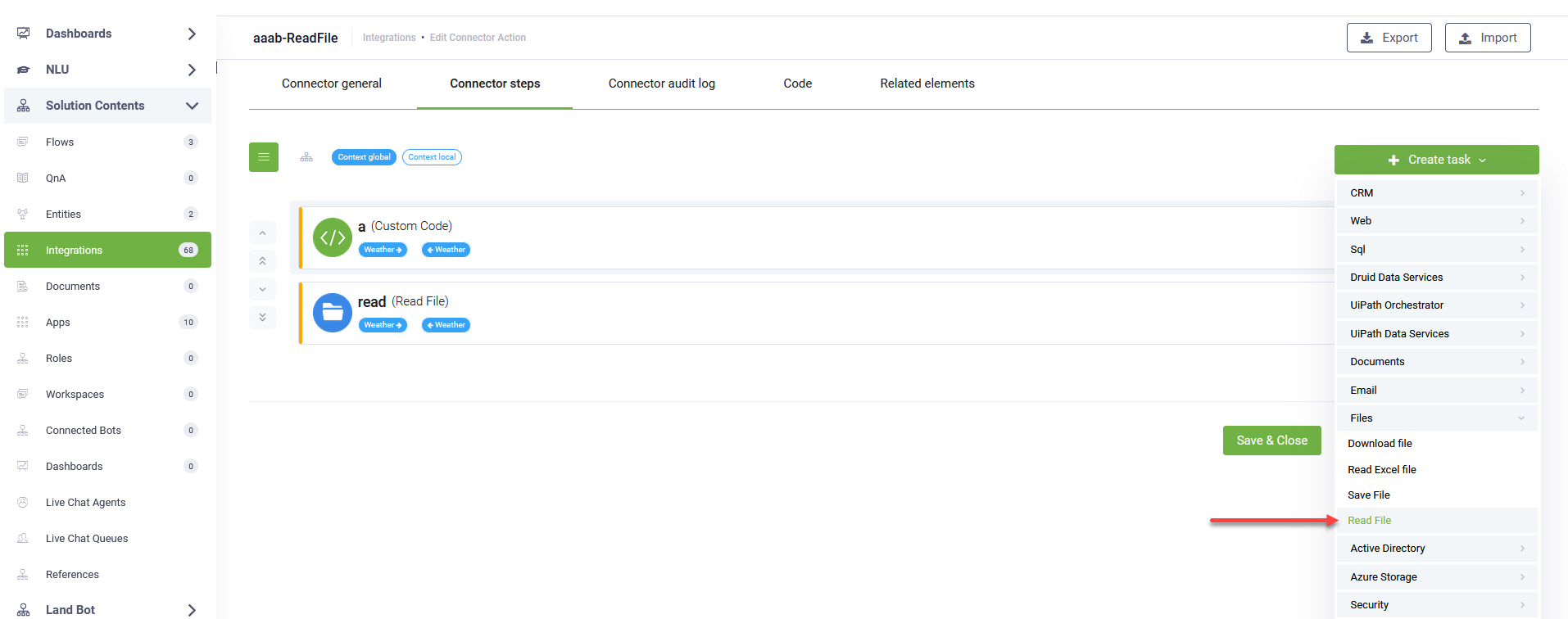
- Go to the desired connector action configuration page.
- Click on the Connector steps tab.
- Add a Custom Code integration to construct and store the full file path in the request entity. This step is crucial for dynamically specifying the file to be read.
- Save and close the Custom Code integration.
- In the top-right corner, click Create task > Files > Read File.
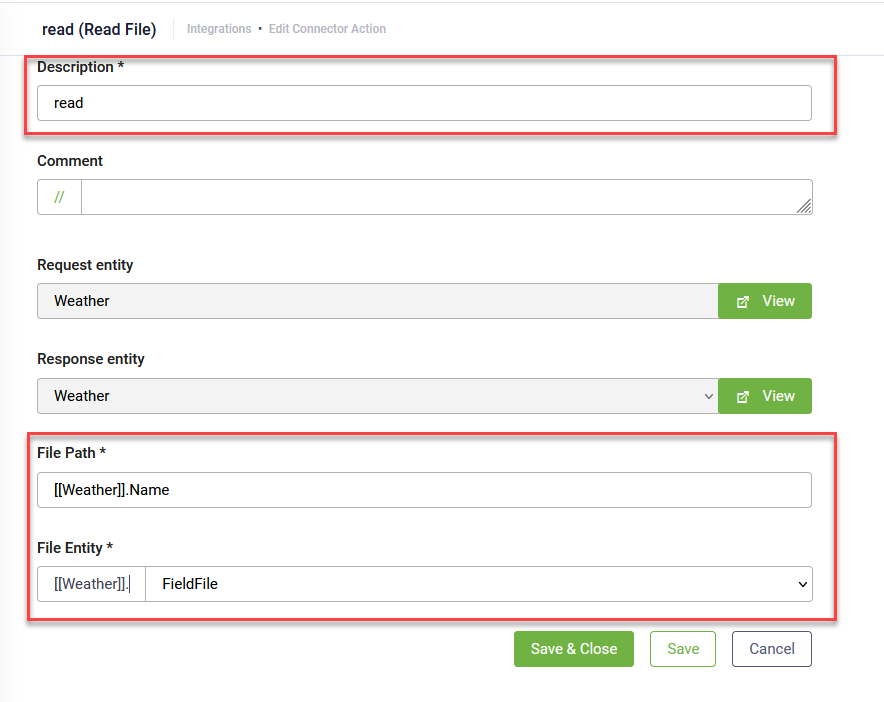
- Provide a short description for the task.
- In the File Path field, enter [[request entity]].Name using the explorer selector. This will dynamically retrieve the full file path constructed in the previous Custom Code step.
- In the File Entity field, select the file-type field where the read file should be stored.
- Save and close the integration.
- Publish the integration.
let root = "C:\\fd"; // Replace with your desired root path, e.g., "C:\\YourFiles"

let requestEntity = Context.GetRequestEntity();

let fileName = requestEntity.Name; // Assuming the file name is passed in the 'Name' field of the request entity
let fullPath = root + "\\" + fileName;
requestEntity.Name = fullPath;

Context.SetRequestEntity(requestEntity);
This code snippet retrieves the file name (e.g., from a user input) and combines it with a predefined root path to form the complete file path. This fullPath is then stored back into the request entity Name field, making it accessible for the Read File task.