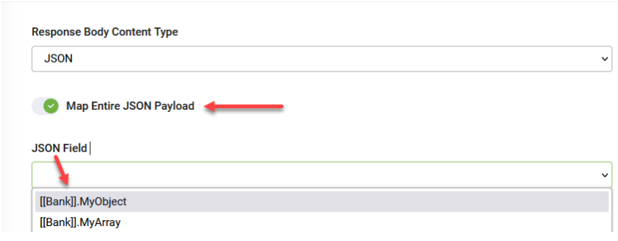
Map the JSON payload as JObject or JArray
In some integrations, you may not need to map individual fields from a JSON response. Instead, you might want to capture the entire JSON object or array as-is and store it in a single field for further processing, logging, or passing to external services.
This is especially useful when:
- You want to forward the raw JSON to another system.
- You plan to process the JSON content in a Custom Code integration or external script.
To support this use case, DRUID allows you to map the full JSON payload directly into a jObject (for JSON objects) or jArray (for JSON arrays) field in your entity.
To map the entire JSON payload:
- Toggle on Map Entire JSON Payload.
- From the JSON Field drop-down, select the appropriate jObject or jArray field in your Druid entity.
- Save and publish the integration.