Filter Data using Druid Custom Query
The Druid Custom Query allows you to filter request data for Query entities and Query-related entity integration tasks. With this feature, you can retrieve and analyze data from entities beyond the request entity, without relying on the Query-related entity integration task. The Druid Custom Query supports a range of SQL statements, functions, operators, and clauses, as detailed below.
Basic statements
 SELECT
The SELECT statement is used to select data from a database table.
* to select all fields from an entity is not supported. Instead, specify the names of the entity fields you want to select, separating them with commas.
Example - select specific fields from the entity [[Account]]
SELECT FirstName, LastName, Age
FROM Account
Aliases
Column Alias
A column alias provides a temporary name for a field in your result set, making it easier to read. For example, when concatenating fields together, you might alias the result.
Where:
column_nameis the original name of the entity field that you wish to alias.ASis optional. Whether you specify theASkeyword or not has no impact on the alias.alias_nameis the temporary name to assign to the entity field.
- If the
alias_namecontains spaces, you must enclose thealias_namein quotes. - It is acceptable to use spaces when you are aliasing a column name.
- The
alias_nameis only valid within the scope of the SQL statement.
In this example, we've aliased the second field (i.e.: FirstName and LastName concatenated) as Name. As a result, Name will display as the heading for the second field / column when the result set is returned.
SELECT ClientId, FirstName + LastName AS "Client Name"
FROM Clients
WHERE FirstName = 'John'
In this example, we've aliased the second column (i.e.: FirstName and LastName concatenated) as "Client Name". Since there are spaces in this alias_name, we enclosed "Client Name" in quotes.
Table Alias
Creates a temporary name for entities / tables. Table aliases are used to shorten your SQL to make it easier to read or when you are performing a self join (i.e.: listing the same entity / table more than once in the FROM clause).
Where:
table_nameis the original name of the entity that you wish to alias.ASis optional. Whether you specify theASkeyword or not has no impact on the alias.alias_nameis the temporary name to assign to the entity.
- If the
alias_namecontains spaces, you must enclose thealias_namein quotes. - It is not generally good practice to use spaces when you are aliasing a table name.
- The
alias_nameis only valid within the scope of the SQL statement.
In the examples below, we omit AS when aliasing a table name.
When creating table aliases, it is not necessary to create aliases for all of the entities listed in the FROM clause. You can choose to create aliases on any or all of the entities.
SELECT p.ProductName, Inventory.Quantity
FROM Products p
INNER JOIN Inventory
ON p.ProductId = Inventory.ProductId
ORDER BY p.ProductName ASC, Inventory.Quantity DESC
The query retrieves the product names and their corresponding quantities from [[Products]] and [[Inventory]] entities. It matches these entities based on the ProductId field. The results are sorted first by ProductName in ascending order and then by Quantity in descending order within each product name.
In this example, we've created an alias for the Products entity called p.Within this SQL statement, we referred to the Products entity as p.
You can use table aliases in conjunction with the GROUP BY clause to aggregate data effectively.
GROUP BY clause to match the aliases in the SELECT statement, ensuring clarity and avoiding errors in complex queries.Example
Select t1.Id Id, t1.Name Name,
count(*) TestCasesCount, t1.CreatedOn
, t3.Id [Bot.Id]
, t3.Name [Bot.Name]
FROM KBTestPlan t1
LEFT JOIN KBTestPlanXTestCase t2
on t1.Id = t2.TestPlanId
LEFT JOIN KBCollection t3
on t1.BotId = t3.Id
GROUP BY t1.Id, t1.Name, t1.CreatedOn, t3.Id, t3.Name
Order By t1.CreatedOn Desc.
In this example, the query selects data from the KBTestPlan, KBTestPlanXTestCase, and KBCollection tables, using aliases (t1, t2, t3) to avoid repeating the full table names.
The GROUP BY clause groups aggregated result by specific columns — t1.Id, t1.Name, t1.CreatedOn, Bot.Id, and Bot.Name — while counting the test cases associated with each test plan.
Filtering and conditions
WHERE
The WHERE clause is used to filter records in a query, ensuring that only those meeting specific conditions are retrieved.
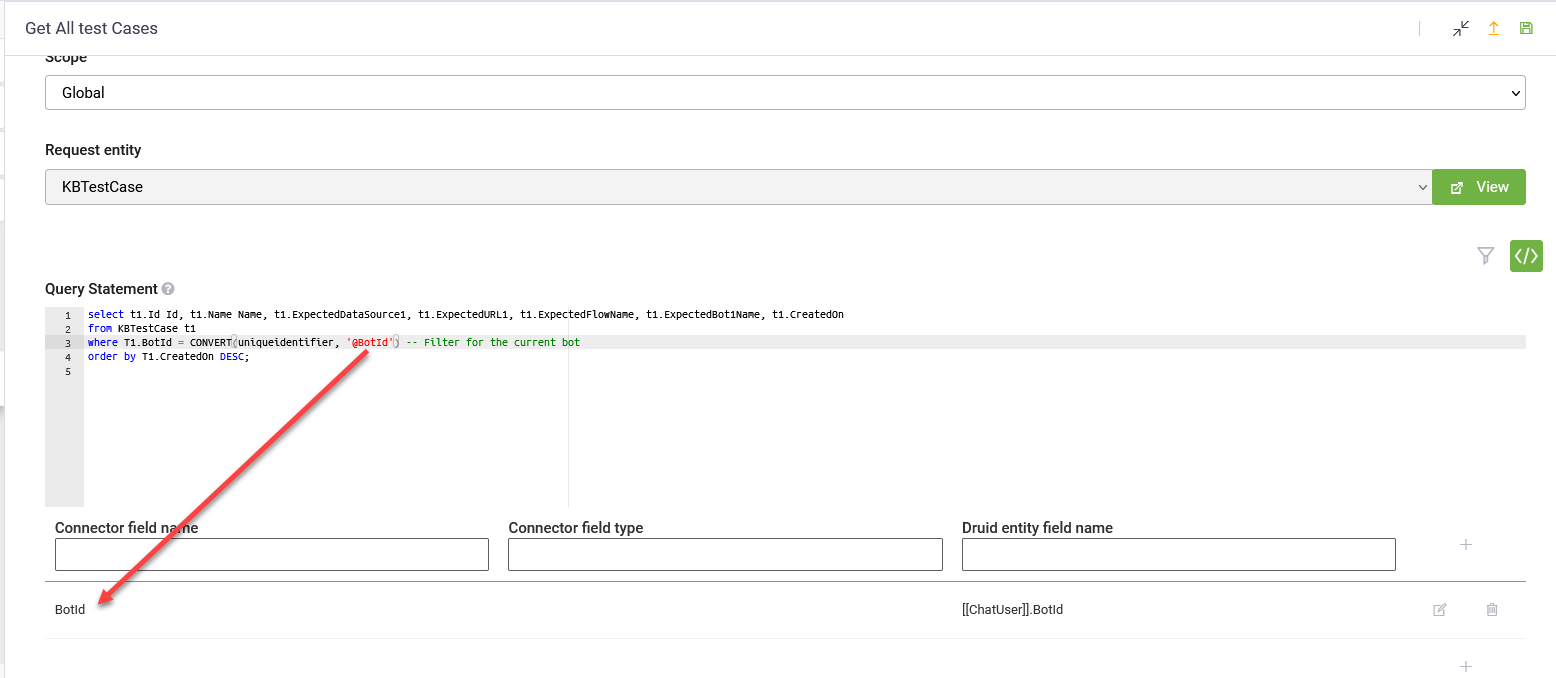
The following query retrieves test case details from the [[KBTestCase]] entity, filtering records based on the AI Agent ID. It converts the @BotId variable into a unique identifier type before applying the filter. The results are sorted in descending order by the CreatedOn field.
select t1.Id Id, t1.Name Name, t1.ExpectedDataSource1, t1.ExpectedURL1, t1.ExpectedFlowName, t1.ExpectedBot1Name, t1.CreatedOn
from KBTestCase t1
where T1.BotId = CONVERT(GUID, '@BotId') -- Filter for the current <span class="mc-variable General.AI_Agent variable">AI Agent</span>
order by T1.CreatedOn DESC;
When using this query, we set the BotId variable to [[ChatUser]].BotId in the mapping table.
The following operators can be used in the WHERE clause:
| Operator | Description |
|---|---|
| = | Equal |
| > | Greater than |
| < | Less than |
| >= | Greater than or equal |
| <= | Less than or equal |
| != | Not equal to |
| LIKE |
Searches for a specified pattern in a field. The LIKE operator supports two types of pattern matching: standard SQL wildcards and regular expression-like syntax. Info: In DRUID versions prior to 9.4, the
LIKE operator only supports % wildcards.
Copy
SQL-style wildcard approach: Finding books where the name starts with "The"
Copy
Regular expression-like approach: Finding books where the name starts with "The"
Copy
SQL-style wildcard approach: Finding books where the name ends with "Guide"
Copy
Regular expression-like approach: Finding books where the name ends with "Guide"
|
| AND / OR |
Combines multiple conditions in a WHERE clause. |
| IN |
Allows you to specify multiple values in a NOTE: This operator is available in DRUID 9.4 and higher.
Copy
Example 1 - select customers from Romania, Germany and Spain
Copy
Example 2 - Return customers that have an order
|
| NOT IN |
Allows you to specify multiple values in a NOTE: This operator is available in DRUID 9.4 and higher.
Copy
Example 1 - select customers except those from Romania, Germany and Spain
Copy
Example 2 - Return all customers that have NOT placed any orders
|
| NOT |
Negates a condition, filtering out rows that match the specified criteria. Use it in combination with other operators to give the opposite result, also called the negative result.
Copy
Example 1 - select customers except those from Romania
If you need to exclude multiple values, use the |
| IS NULL |
Checks for null values. Use it in the
Copy
Example: select customers who have a NULL value in the Address field |
| IS NOT NULL |
Checks for non-empty values (NOT NULL values). Use it in the
Copy
Example: select customers who have a value in the Address field
|
ORDER BY
Sorts the result set of a query by one or more fields / aliases in ascending or descending order.
ORDER BY keyword sorts the records in ascending order by default.Example:
This query will return a list of products, showing the Name, ID, and Price for each product in the Products entity, sorted alphabetically by the ProductName. If there are multiple products with the same name, they will appear in the same order they were stored in the database.
SELECT s.ProductName Name, s.ProductID ID, s.Price Price
FROM Products s
ORDER BY s.ProductName
To sort the records in descending order, use the DESC keyword.
SELECT s.ProductName Name, s.ProductID ID, s.Price Price
FROM Products s
ORDER BY s.ProductName DESC
When multiple fields are specified, the query first sorts the records by the first field. If there are ties (i.e., records with the same value in the first filed), it then sorts those records based on the second field, and so on.
The following query selects all customers from the Customers entity, sorted by the Country and the CustomerName fields. This means that it orders by Country, but if some rows have the same Country, it orders them by CustomerName.
Example - order records by multiple fields
SELECT
    s.CustomerID,
    s.CustomerName,
    s.ContactName,
    s.Country,
    s.City,
    s.Phone
FROM Customers s
ORDER BY s.Country, s.CustomerNameGroups records that have the same values in specified fields. It is often used in conjunction with aggregate functions to perform calculations on each group.
The following query gives the count of customers grouped by both Country and City.
Example - grouping by multiple fields
SELECT Country, City, COUNT(CustomerID) AS NumberOfCustomers
FROM Customers
GROUP BY Country, City
When joining data from two tables (entities), you can group results using either aliased or original column names. Grouping by original column names, introduced in druid 8.10, aligns with standard SQL conventions.
The following query groups the results using the original column names (b.CreatedOn, s.Name, s.Color).
Example - GROUP BY column name
SELECT    COUNT(*) Counter,
   TRUNC(month, b.CreatedOn) CreatedOn,
   s.Name Status.Name, s.Color Status.Color
FROM Book b
LEFT JOIN BookStatus s ON b.StatusId = s.Id
GROUP BY b.CreatedOn, s.Name, s.Color
The following query groups the results using the aliased column names (CreatedOn, Status.Name, Status.Color).
Example - GROUP BY column alias
SELECT    COUNT(*) Counter,
   TRUNC(month, b.CreatedOn) CreatedOn,
   s.Name Status.Name, s.Color Status.Color
FROM Book b
LEFT JOIN BookStatus s ON b.StatusId = s.Id
GROUP BY CreatedOn, Status.Name, Status.ColorGroups records after they have been aggregated, unlike the WHERE clause which filters individual records before aggregation. It's specifically designed to work with aggregate functions (like COUNT, SUM, AVG, MIN, and MAX) and allows you to filter groups based on the results of those aggregations.
The following query will return a list of departments from the Sales entity where the total sales for each department exceed 100,000. It will display the department name and the corresponding total sales for departments that meet this criterion.
Example
SELECT DepartmentName AS Name, SUM(Amount) AS "Total Sales"
FROM Sales
GROUP BY DepartmentName
HAVING SUM(Amount) > 100000
Aggregate Functions
MAX
Returns the highest value of the selected field.
SELECT s.OrderID ID,
       s.OrderName Name,
       MAX(s.Amount) AS MaxAmount,
       s.OrderDate
FROM Orders s
WHERE s.OrderDate >= '2024-01-01'
GROUP BY s.OrderID, s.OrderName, s.OrderDateReturns the average value in a set.
The following query returns only the customers whose average order amount exceeds $5000 for orders placed on or after January 1, 2024.
Example
SELECT s.CustomerID,
       AVG(s.Amount) AS AverageOrderAmount
FROM Orders s
WHERE s.OrderDate >= CONVERT(DateTime, '2024-01-01')
GROUP BY s.CustomerID
HAVING AVG(s.Amount) > 5000Returns the number of records in a dataset.
COUNT(field) is not supported in Druid; therefore, you cannot exclude NULL values when counting records. Only COUNT(*) can be used, which includes all records.The following query retrieves the number of products in each category from the Products entity.
Example
SELECT COUNT(*) AS 'Products Number', CategoryName Name
FROM Products
GROUP BY CategoryNameCounts the number of unique (non-duplicate) values in a specified field. This is useful when you want to determine how many distinct entries exist in a dataset for a particular field.
For example, it can be used to count the number of different prices, product categories, or any other field where duplicates may exist but are not needed in the count.
The following query returns how many distinct customers have purchased distinct products during the year 2024.
Example
SELECT COUNT(DISTINCT CustomerID) AS 'Unique Customers',
       COUNT(DISTINCT ProductID) AS 'Unique Products'
FROM Sales
WHERE SaleDate >= CONVERT(DateTime, '2024-01-01')
AND SaleDate <= CONVERT(DateTime, '2024-12-31')This function combines values from a field across an entity list into a single string, inserting a specified delimiter between each value.
it returns a string value containing all non-null field values from the entity list separated by the delimiter. If all entries in a group are NULL, the function returns NULL.
Parameters:
- field: The target field containing values to concatenate. Non-string values are converted to string types.
- delimiter: The string separator inserted between concatenated values.
The following query groups records by department ID and concatenates values from the name field across the employees entity list into a single comma-separated string:
SELECT dept_id,
       STRING_AGG(name, ', ') AS names
FROM employees
GROUP BY dept_id;
Joins
INNER JOIN
Selects records that have matching values in both the specified parent entity and the child entity.
SELECT entity_field(s)
FROM parent_entity
INNER JOIN child_entity
ON parent_entity.entity_field = child_entity.entity_field;
SELECT Suppliers.SupplierId, Suppliers.SupplierName, Orders.OrderDate
FROM Suppliers
INNER JOIN Orders
ON Suppliers.SupplierId = Orders.SupplierId;
The query returns all records from the Suppliers and Orders entities where there is a matching SupplierId value in both the Suppliers and Orders entities. If one of the records is missing the SupplierId in one of the two entities, the record will be omitted from the result.
LEFT JOIN
Returns all records from the parent, and the matching records from the child entity. The result is 0 records from the parent entity, if there is no match.
Syntax
SELECT field_name
FROM parent_entity
LEFT JOIN child_entity
ON parent_entity1.field_name = child_entity.field_name;
Example
SELECT Customers.CustomerName, Orders.OrderID
FROM Customers
LEFT JOIN Orders ON Customers.CustomerID = Orders.CustomerID
ORDER BY Customers.CustomerName
The query retrieves customer names and their corresponding order IDs. It returns all customers, including those who do not have any orders. Customers without orders will have a NULL value in the OrderID column. The results are sorted alphabetically by customer name.
RIGHT JOIN
Druid does not support RIGHT JOIN. If you wanted to use a RIGHT JOIN (e.g., fetching all records from table B and the matching records from table A), you can rewrite it with a LEFT JOIN by swapping the tables.
Let’s say you want to join the Orders table and the Customers table, where you want to make sure all the Orders appear in your results, even if they don’t have matching customers.
Example
SELECT Orders.OrderID, Customers.CustomerName
FROM Customers
LEFT JOIN Orders ON Customers.CustomerID = Orders.CustomerID
ORDER BY Orders.OrderID
Where:
LEFT JOINensures that all records from the Customers table are returned.- By swapping the order of the tables, Customers becomes the left table and Orders becomes the right table. This ensures that you get all rows from Orders, just like a
RIGHT JOINwould do in other SQL systems.
Even though Druid doesn’t support RIGHT JOIN, this approach using LEFT JOIN with the tables reversed gives you the same result.
Set Operations
UNION
Combines the results of two or more SELECT queries into a single result set. By default, UNION eliminates duplicate rows, ensuring that the result contains only unique records.
UNION ALL instead.Example:
- Let's assume you have two entities: [[Sales]] and [[Revenue], both containing CustomerId and PurchaseAmount fields.
- You want to combine the data from the [[Sales]] and [[Revenue]] entities, but only include distinct records (unique combinations of CustomerId and PurchaseAmount).
Example
SELECT s.CustomerId ID, s.PurchaseAmount Amount
FROM Sales s
UNION
SELECT t.CustomerId ID, t.PurchaseAmount Amount
FROM Revenue tCombines the results of two or more SELECT queries into a single result set, including duplicates. Unlike UNION, which removes duplicates, UNION ALL retains all records from the combined queries, even if they are identical.
Example:
- Let's assume you have two entities: [[Sales]] and [[Revenue]], both containing CustomerId and PurchaseAmount fields.
- You want to combine the data from the [[Sales]] and [[Revenue]] entities, and include all records, even duplicates.
Example
SELECT s.CustomerId ID, s.PurchaseAmount Amount
FROM Sales s
UNION ALL
SELECT t.CustomerId ID, t.PurchaseAmount Amount
FROM Revenue t
The result will include all records, even if there are duplicate records between the [[Sales]] and [[Revenue]] entities.
INTERSECT
Returns only the rows that are common between two SELECT queries. In other words, it returns the intersection of the result sets — only the records that exist in both queries.
INTERSECT removes duplicates by default, so if a record appears multiple times in both queries, it will only appear once in the result.
Example:
- Let’s say you have two Druid entities: [[Customers]] and [[Subscribers]], each with a CustomerId and Email field.
- You want to find the customers who are both customers and have subscribed to your newsletter.
Example
SELECT CustomerId, Email
FROM Customers
INTERSECT
SELECT CustomerId, Email
FROM Subscribers
The result contains only the records that are common in both entities [[Customers]] and [[Subscribers]].
EXCEPT
Returns the records from the first SELECT query that do not exist in the second SELECT query. Essentially, it retrieves the difference between the two result sets, excluding any duplicate rows by default.
Example:
- Let’s say you have two Druid entities: [[Employees]] and [[Contractors]], each with EmployeeId and Name fields.
- You want to find all the employees who are not contractors.
SELECT EmployeeId, Name
FROM Employees
EXCEPT
SELECT EmployeeId, Name
FROM Contractors;
Expressions and Operators
Expressions allow you to perform calculations or operations on fields, literals, and constants. These expressions are often combined with operators to manipulate the data within your queries.
WHERE clause to filter results.Arithmetic Operators
Druid supports basic arithmetic operators for mathematical calculations:
- +: Addition
- -: Subtraction
- *: Multiplication
- /: Division
- The arithmetic operators are used for arithmetic calculations when both fields are numeric data types (e.g., int, float, decimal).
- If any of expression fields contains NULL values, the result of the addition will be NULL unless handled explicitly with functions like
COALESCEorISNULL. - The expression can be used in the
SELECTclause to create a new column in the result set that holds the result.
This example multiplies Price by Quantity to calculate the total cost of an order:
Expression Literals
Literals are fixed values used directly in statements. They can be of various data types, including strings, numbers and date and time.
- String Literals: Use single quotes to enclose string values. Double quotes are not used for strings.
- Numeric Literals: Write numbers directly without quotes.
- Date and Time Literals: Use single quotes to enclose date and time values.
This expression adds 10 to the Price field for each record, creating a new calculated field NewPrice.
Functions
ROUND
Rounds a numeric value or calculation to a specified number of decimal places. ROUND() can be used on numeric expressions, as well as wrapped around aggregate functions (such as AVG, SUM, MIN, MAX, or COUNT).
Where:
- numeric_expression: A numeric field, arithmetic calculation, or aggregate function (e.g., AVG()).
- decimal_places: The number of decimal places to round the result to.
SELECT
    [item].[Name] AS [Name],
    ROUND(AVG([item].[Price] * 1.0), 2) AS [AveragePrice]
FROM [Item] [item]
WHERE [item].[Price] > 1
GROUP BY [item].[Name]
ORDER BY [item].[Name] ASC;
String Functions
String functions are used to manipulate and process text (string) data. These functions help format, extract, replace, and analyze string values.
LEFT
Returns the leftmost part of a character string based on the specified number of characters.
Where:
- character_expression is an entity field.
- integer_expression is a positive integer that specifies how many characters of the character_expression will be returned. If integer_expression is negative, an error is returned.
Example - extract the first 3 characters from the CustomerName
SELECT LEFT(CustomerName, 3) AS ShortName
FROM CustomersReturns the number of characters in a specified string, excluding trailing spaces.
This function is useful for validating input lengths, formatting data, or applying text-based conditions in queries.
Example
SELECT CustomerName, LEN(CustomerName) AS NameLength
FROM Customers
WHERE LEN(CustomerName) > 5
ORDER BY NameLength DESCRemoves leading spaces (or specified characters) from the beginning of a string. This function is useful for cleaning up user input, standardizing text, and improving data quality in queries.
REPLACE
Replaces all occurrences of a specified substring within a string with another substring. This function is useful for standardizing text, cleaning data, and making bulk text modifications in queries.
Where:
field– The original field of type string where replacements occur.string_pattern– The substring to be found and replaced.string_replacement– The new substring that replacesstring_pattern.
Example - replace occurrences of "Inc." with "LLC" in company names
SELECT CompanyName, REPLACE(CompanyName, 'Inc.', 'LLC') AS UpdatedCompanyName
FROM CompaniesReturns a specified number of characters from the end (right side) of a string. This function is useful for extracting suffixes, checking data patterns, and formatting outputs.
Example - extract the last 4 characters of customer phone numbers
SELECT CustomerName, CustomerPhone, RIGHT(CustomerPhone, 4) AS LastDigits
FROM CustomersRemoves trailing spaces (or specified characters) from the end of a string. This function is useful for cleaning up user input, normalizing text, and ensuring consistent data formatting.
Where:
field– A field of type string value to be trimmed.characters(Optional) – A set of characters to remove from the end of the string. If not specified, only space characters (CHAR(32)) are removed.
Example - remove trailing spaces from customer names
SELECT CustomerName, RTRIM(CustomerName) AS TrimmedName
FROM CustomersExtracts a portion of a string based on the given starting point and length of the desired substring.
Where:
field– A field from which the substring will be extracted.start– An integer that specifies the starting position for the substring. The position starts at 1, meaning the first character is at position 1. If start is less than 1, the substring will begin at the first character.length– A positive integer that specifies how many characters to extract from the starting position. If the sum of start and length exceeds the available characters, the entire string from start will be returned. A negative length will generate an error.
Example - extract the first 5 characters from the CustomerName field
SELECT CustomerName, SUBSTRING(CustomerName, 1, 5) AS First5Chars
FROM CustomersConverts all lowercase letters in a string to uppercase. This function is useful for standardizing text, ensuring consistent capitalization, and comparing strings in a case-insensitive manner.
Example - convert customer names to uppercase
SELECT CustomerName, UPPER(CustomerName) AS Name
FROM Customers
DATETIME Functions
You can use the following DATETIME functions in a DRUID Custom Query to manipulate and filter data based on date and time values. These functions support use cases such as rounding to specific time intervals, shifting dates, and extracting specific parts of a timestamp.
DATEADD
Adds or subtracts a specific interval from a DATETIME value.
Where:
unit– The part of the date to change (e.g., 'DAY', 'HOUR', 'MONTH').number– A positive or negative integer indicating the amount to add or subtract.datetime_value– The base date or timestamp.
Example: Orders from the Last 7 Days
SELECT ClientName, OrderDate
FROM Clients
WHERE OrderDate >= DATEADD(DAY, -7, CURRENT_TIMESTAMP)
The query returns clients with orders placed in the last 7 days.
Example: Orders in the Previous Quarter
SELECT ClientName, OrderDate
FROM Clients
WHERE TRUNC(QUARTER, OrderDate) = TRUNC(QUARTER, DATEADD(QUARTER, -1, CURRENT_TIMESTAMP))
The query returns orders from the previous quarter.
DATEPART
Extracts a specific part of a DATETIME value.
Supported units:
- YEAR
- QUARTER
- MONTH
- DAY
- HOUR
- MINUTE
- SECOND
- WEEK
- WEEKDAY (day of week)
Example: Orders in the Current Month
SELECT ClientName, OrderDate
FROM Clients
WHERE DATEPART(MONTH, OrderDate) = DATEPART(MONTH, CURRENT_TIMESTAMP)
  AND DATEPART(YEAR, OrderDate) = DATEPART(YEAR, CURRENT_TIMESTAMP)
The query returns orders from the current month and year.
DATEDIFF
Calculates the number of specified time units that have elapsed between a starting date/time expression and an ending date/time expression. This function is useful for determining durations, calculating age, measuring time differences, or filtering records based on time intervals.
- YEAR
- QUARTER
- MONTH
- DAY
- HOUR
- MINUTE
- SECOND
- WEEK
The functions returns a numeric value representing the difference in the specified unit:
- A positive integer if end_datetime is later than start_datetime.
- A negative integer if end_datetime is earlier than start_datetime.
- 0 if both dates are the same for the specified unit.
SELECT DATEDIFF(OrderDate, CURRENT_TIMESTAMP, MONTH) AS MonthsAgo,
       COUNT(*) AS OrderCount
FROM Orders
GROUP BY DATEDIFF(OrderDate, CURRENT_TIMESTAMP, MONTH)
ORDER BY MonthsAgo ASC
In the example above:
- The function calculates the number of months between when the order was placed and today. This creates categories like: 0 (this month), 1 (last month), 2 (2 months ago), etc.
- All orders from the same "months ago" period are grouped together.
- Counts how many orders are in each group.
- Sorts the results in ascending order - showing the most recent months first.
SELECT
    ModifiedOn,
    CreatedOn,
    DATEDIFF(CreatedOn, ModifiedOn, MINUTE) AS DurationInMinutes
FROM
    Event
WHERE
    DateDiff(CreatedOn, ModifiedOn, MINUTE) > 0
In the example above:
- The function calculates the difference in minutes between when the Event entity was created and when it was last modified.
- The result is returned in a new column named DurationInMinutes.
- The
WHEREclause filters the results to only include records where the modification date is after the creation date (i.e., the duration is positive).
GETDATE
Returns the current date and time in UTC. Unlike traditional SQL's GETDATE() which returns server local time, this function always returns UTC time with the 'Z' timezone indicator.
Example: Orders placed today (UTC)
SELECT ClientName, OrderDate
FROM Orders
WHERE TRUNC(DAY, OrderDate) = TRUNC(DAY, GETDATE())
Example: Orders from the last 24 hours
SELECT ClientName, OrderDate, OrderAmount
FROM Orders
WHERE OrderDate >= DATEADD(HOUR, -24, GETDATE())
ORDER BY OrderDate DESCReturns the current date in UTC with the time component set to midnight (00:00:00). This function is useful for date-only comparisons without considering the time of day.
Example: Orders placed today
SELECT ClientName, OrderDate, OrderAmount
FROM Orders
WHERE OrderDate >= TODAY()
Example: Orders from the last 7 days
SELECT ClientName, OrderDate
FROM Orders
WHERE OrderDate >= DATEADD(DAY, -7, TODAY())
ORDER BY OrderDate DESCRounds down a DATETIME value to the nearest specified unit.
Supported units:
- SECOND
- MINUTE
- HOUR
- DAY
- WEEK
- MONTH
- QUARTER
- QUARTER_END
- YEAR
Example: Orders Rounded to the Same Day
SELECT ClientName, OrderDate
FROM Clients
WHERE TRUNC(DAY, OrderDate) = TRUNC(DAY, CURRENT_TIMESTAMP)
The query returns clients who placed orders today.
Example: Orders This Quarter
SELECT ClientName, OrderDate
FROM Clients
WHERE TRUNC(QUARTER, OrderDate) = TRUNC(QUARTER, CURRENT_TIMESTAMP)
The query returns orders placed in the current quarter.
Advanced Functions
COALESCE
Handles missing data (NULL values) in a dataset by providing an alternative (default) value. This can be useful when displaying data in reports or queries where missing information should be replaced with a more meaningful or user-friendly substitute.
The following query ensures that for each client, the client name is displayed, and if a phone number or address is missing, default values are substituted.
SELECT s.ClientName AS Name,
       COALESCE(s.ClientPhone, 'No phone number') AS Phone,
       COALESCE(s.ClientAddress, 'No address provided') AS Address
FROM Account s
SELECT s.ClientName AS Name,
       COALESCE(s.ClientPhone, s.ClientAddress 'No data') AS ContactInfo
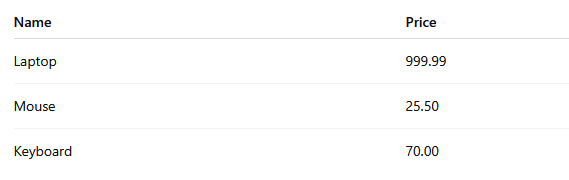
FROM Account sConverts the value of a field in a dataset to a specified data type. You can use this function to transform data into the following types: varchar, int, float, or decimal. Use this function when you need to ensure that data is in the correct format for querying, calculations, or comparisons.
Convert to VARCHART example
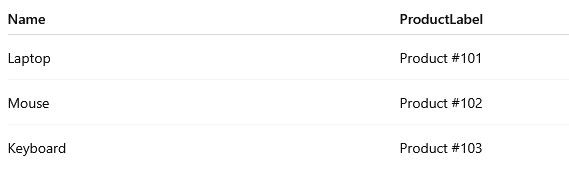
The following query converts the ProductID field to a string and combines it with the product name. Converting ProductID to varchar allows you to combine numeric and text values in one column, which is useful for labels, reports, or display purposes.
SELECT
    s.ProductName AS Name,
    'Product #' + CONVERT(varchar, s.ProductID) AS ProductLabel
FROM Products s
Example output:
Convert to INTEGER example
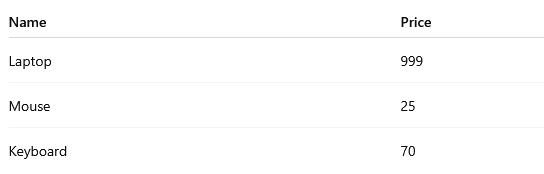
The following query converts the ProductPrice field to an integer data type.
SELECT s.ProductName AS Name, CONVERT(int, s.ProductPrice) AS Price
FROM Products s
Example output:
Convert to FLOAT example
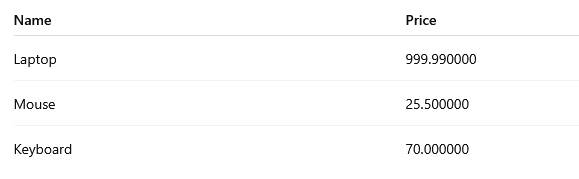
The following query converts the ProductPrice field to a float data type.
SELECT s.ProductName AS Name, CONVERT(float, s.ProductPrice) AS Price
FROM Products s
Example output:
Convert to DECIMAL example
The following query converts the ProductPrice field to a decimal data type.
SELECT s.ProductName Name, CONVERT(decimal, s.ProductPrice) AS Price
FROM Products s
Example output:
CONVERT to the specified date format
Converts int, decimal, double, datetime and varchar to the specified date format.
Use the following syntax for CONVERT with three parameters:
| Format Id | DRUID Data Service Pattern | T-SQL Pattern |
|---|---|---|
| 1 | "%m/%d/%Y" | "MM/DD/YY" |
| 2 | "%Y.%m.%d | "YY.MM.DD" |
| 3 | "%d/%m/%Y" | "DD/MM/YY" |
| 4 | "%d.%m.%Y" | "DD.MM.YY" |
| 6 | "%d %b %Y" | "DD MMM YY" |
| 8 | "%H:%M:%S" | "hh:mm:ss" |
| 110 | "%m-%d-%Y" | "MM-DD-YYYY" |
| 111 | "%Y/%m/%d" | "YYYY/MM/DD" |
| 112 | "%Y%m%d" | "YYYYMMDD" |
| 114 | "%d %b %Y %H:%M:%S:%L" | "DD MMM YYYY HH:MM:SS:MMM" |
| 120 | "%Y-%m-%d %H:%M:%S" | "YYYY-MM-DD HH:MM:SS" |
| 121 | "%Y-%m-%d %H:%M:%S.%L" | "YYYY-MM-DD HH:MM:SS.mmm" |
| 130 | "%d %b %Y %H:%M:%S:%L" | "dd mon yyyy hh:mi:ss:mmm(AM/PM)" |
- DRUID Data Services pattern is currently missing 2-digit years.
- %b or Month as 3 letter in DRUID Data Services pattern is after FormatId 7 (130, 114, 6).
Records limiting clauses
OFFSET
Skips a specified number of records before returning results. Used in combination with FETCH NEXT, limits the number of records returned after the offset.
Example
SELECT e.Id, e.Name, e.Description, ef.EntityMetadataId, ef.LastModificationTime
FROM EntityMetadata e
JOIN EntityFieldMetadata ef ON ef.EntityMetadataId = e.Id
ORDER BY ef.LastModificationTime DESC
OFFSET 90 ROWS FETCH NEXT 15 ROWS ONLY
In this example:
- The query retrieves a specific subset of rows from a joined result of two tables, EntityMetadata (e) and EntityFieldMetadata (ef).
- The results are ordered by the LastModificationTime column from the EntityFieldMetadata table (ef) in descending order. This means that the most recently modified records will appear first in the result set.
- The
OFFSETstatement skips the first 90 rows of the ordered result set. It means that the retrieval starts from the 91st row onward. - After skipping the first 90 rows, the
FETCHstatement limits the number of rows returned to the next 15 rows only, effectively giving rows 91 through 105 in the ordered list.
TOP
Limits the result set to a specified number of rows. However, without proper ordering, the results can appear in an arbitrary order. To ensure a predictable and meaningful result, it is always recommended to use the TOP clause in combination with ORDER BY.
Joining with Entity Fields for Large Data Volumes
When working with large data volumes, using the GROUP BY clause correctly is essential for both accurate results and good query performance. Aggregating data by specific groupings, especially when joining related entity fields, allows you to combine data from multiple entities while ensuring correct aggregation across joined entities. Incorrect grouping can lead to inaccurate results or inefficient queries.
Important considerations
When joining entity fields and aggregating data, keep the following in mind:
- Bracket notation is used to expose related entity fields in the result set.
- All non-aggregated fields in the
SELECTclause must also appear in theGROUP BYclause. - Aliases help avoid ambiguity when referencing fields from joined entities.
- All date and time values are stored in Druid as UTC. Time offsets may be required to account for user time zones. Truncating the adjusted timestamp removes the time component so all records for the same day are grouped together.
Syntax
Syntax
SELECT
  aggregate_function(field_1) AS Alias,
  field_2,
  RelatedEntity.Field
FROM
  Entity AS alias
GROUP BY
  field_2,
  RelatedEntity.Field
ORDER BY
  field_2 ASC
Example 1: Aggregating data using related entity fields
The following example counts books and groups the results by author. The Book entity is joined with the related Author entity, and author fields are included in the aggregation.
Example 1 query
SELECT
COUNT(*) AS Counter,
author.Id   [BookAuthor.Id] // BookAuthor is field Book for Authors
author.FirstName   [BookAuthor.FirstName]   //
FROM Book AS book
JOIN Author AS author on author.Id = book.BookAuthorId
GROUP BY field_2, RelatedEntity.Field
ORDER BY field_2 ASC
Example 2: Aggregating data using date normalization
The following example aggregates books by name and by day. The ReceivedOn timestamp is adjusted by 120 minutes and then truncated to the start of the day to ensure correct daily grouping.
SELECT
    b.BookName,
    TRUNC(day, DATEADD(minute, 120, b.ReceivedOn)) AS ReceivedOn,
    COUNT(*) Counter
FROM Book b
GROUP BY b.BookName, b.ReceivedOn
ORDER BY b.BookName, b.ReceivedOn