AI Authoring Agents
AI Authoring Agents enable authors to quickly build agentic skills within their AI Agents. They automatically create the complete skill package: the conversational flows, entity data models, and orchestrated Druid Data Service integrations. The result is a fully configured, functional agentic skill that enables the AI Agent to both interact naturally with users and operate autonomously to achieve outcomes based on user intent — eliminating the need for additional manual configuration.
Why Use AI Authoring Agents?
- Reduced Authoring Time. Automate the entire pipeline, generating complete and functional agentic skills out of the box, removing the need to manually click through the UI to build separate components.
- Higher Accuracy. Use built-in solution templates that incorporate platform best practices.
- Faster Solution Building. Combining automations with solution adjustments allows configuration to be completed two times faster.
AI Authoring Agents Team
AI Authoring Agents operate as a virtual team of specialized AI Agents, each with distinct expertise. The virtual team converts business specifications into operational AI Agents through a guided workflow.
They detect when a task requires capabilities outside their domain. When a task transitions to another domain, the system hands off the operation automatically. The target AI Authoring Agent receives the context summary, eliminating the need to re-enter parameters or details.
Each AI Authoring Agent handles a specific part of the setup, testing, or management process. You do not need to choose the right specialist manually. If you submit a request to one AI Authoring Agent, it automatically hands off the request to the correct specialist while preserving your conversation history and context.
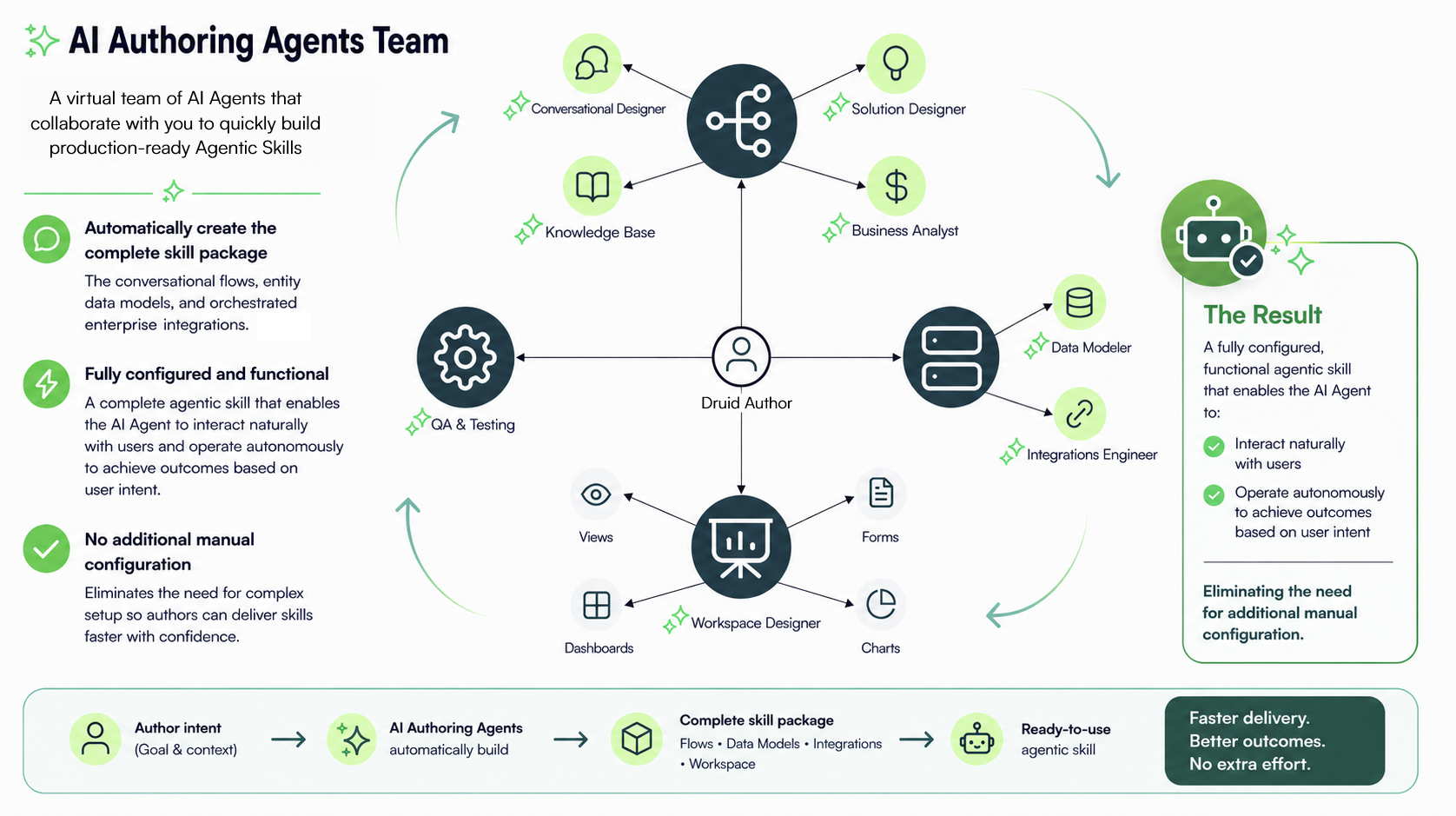
| AI Authoring Agent | Primary Function |
|---|---|
| Conversational Designer |
Designs and builds new AI agents from business descriptions. |
| Data Modeler | Reads existing data models (records, fields, and relationships) and adjusts them to your specific requirements. Rather than building from scratch, it builds on what exists and aligns with your current configuration, verifying what exists and what's new. |
| Integrations Engineer |
Checks existing integrations and identifies new required ones NOTE: Currently available for Druid Data Service integrations, with third-party tools and enterprise systems planned for future releases.
|
| Workspace Designer |
Helps creating create and refining workspace components—including charts, forms, views, and dashboards—using natural language. It transforms your business requirements into workspace configurations, reducing manual design effort and accelerating workspace design. NOTE: The Workspace Designer currently supports chart authoring only. Support for additional workspace components, including forms, views, and dashboards, is planned for future releases.
|
| QA Testing Agent | Runs simulated test scenarios. |
| Review & Update Agent | Modifies existing AI Authoring Agents and upgrades legacy formats. |
| Conversation Diagnostics Agent | Analyzes execution logs and coordinates issue resolution. |
Key Capabilities
- Generates a plain-language architecture plan detailing proposed agent behaviors, triggers, and actions before execution.
- Requires explicit approval before applying configuration changes or creating components.
- Automatically hands off requests for new data structures or external connections to specialized AI Authoring Agents.
- Generates full agent parameters, including system instructions, action sets, and sample invocation triggers.
- Provisions required underlying data schemas automatically when necessary for basic agent function.
Operational Rules
- Reuses existing system connections and data structures unless explicit instructions specify creating new entities.
- Executes configuration actions in sequential, traceable steps.
- Hands off out-of-scope tasks (such as chart generation or testing) to designated AI Authoring Agents.
Access the virtual team
To build a complete agentic skill or granular building blocks , click the Page Help icon at the top of the Druid Portal and follow the guided conversation.
If you prefer to build separate components independently and link them later, click the Page Help icon on the page corresponding to your goal: Entities, Integrations, Flows, Charts, Conservation History, etc.